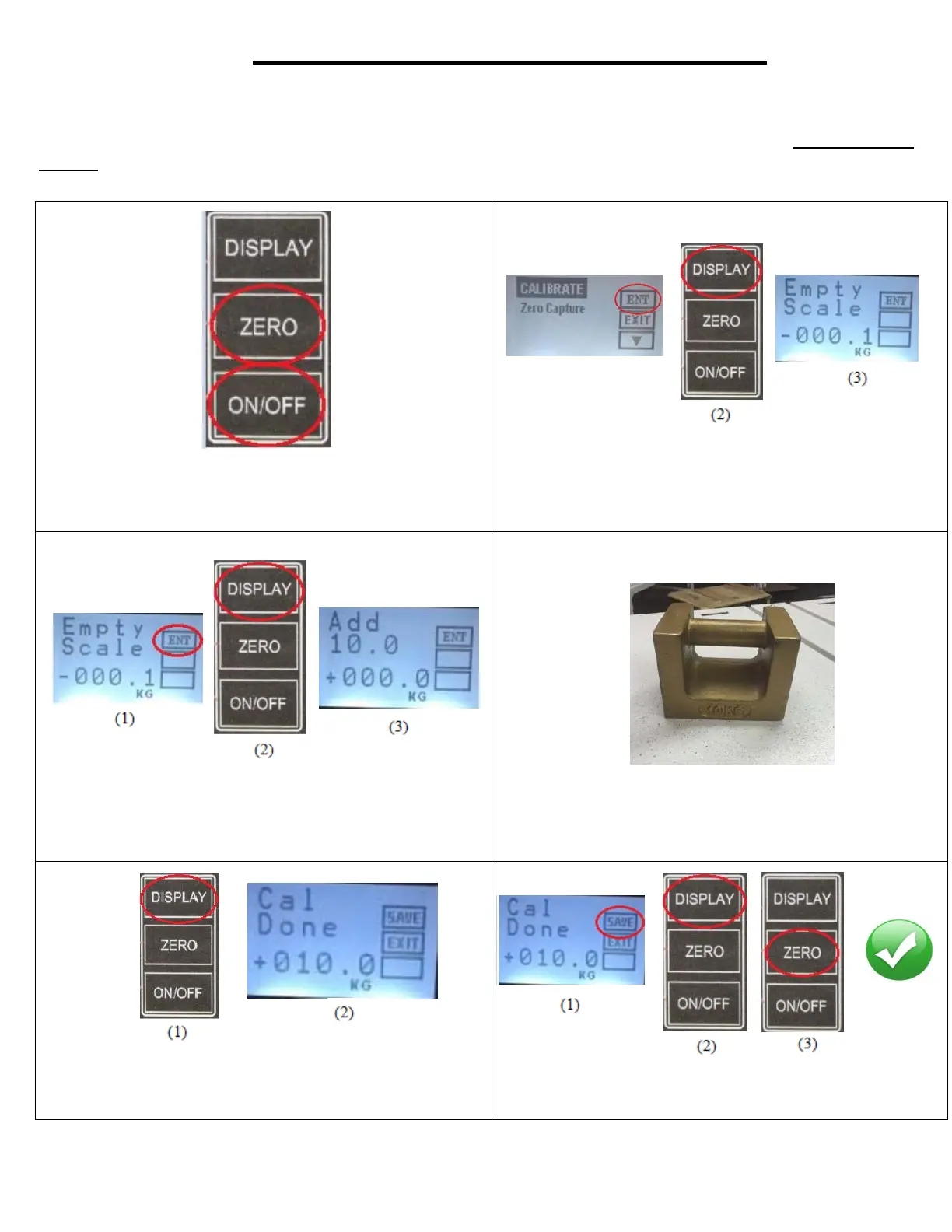
1. Press and hold the “Zero” button and “ON” button
at the same time until display turns on.
(1)
2. Select the enter option on the display screen by
pressing the “Display” button. If done
correctly,
“Empty Scale” should appear on the display screen.
3. Select the enter option on the display screen
once again by pressing the “Display” button. If done
correctly, “Add 10.0 kg.” should appear on display
screen.
4. Place the 10 kg. weight onto the surface of
the
crib.
5. With the 10 kg. weight still on the crib, select the enter option
on the display screen by pressing the “Display” button. If done
correctly,“Cal done” should appear on display screen.
6. Select the save option on the display screen by
pressing the
“Display” button. Calibration is now complete. Press “Zero”
button to exit the calibration setup.
SCALE CALIBRATION INSTRUCTIONS
Your HARD Manufacturing crib will arrive with the scale calibrated and ready for use. You typically should
not need to perform a calibration, however in the event there is a need to do so, use only a certified 10kg
weight to do so and follow the instructions below.



 To Next Page