8 - Menu 4 Toolbox
8.3
Menu 4.7 Emergency
This menu bypasses the system so all sensors are ignored. Then it is possible to align the sprayer or fold the boom manually
and drive home. The sensor status and voltages can be checked, which is useful for HARDI® service to solve the problem.
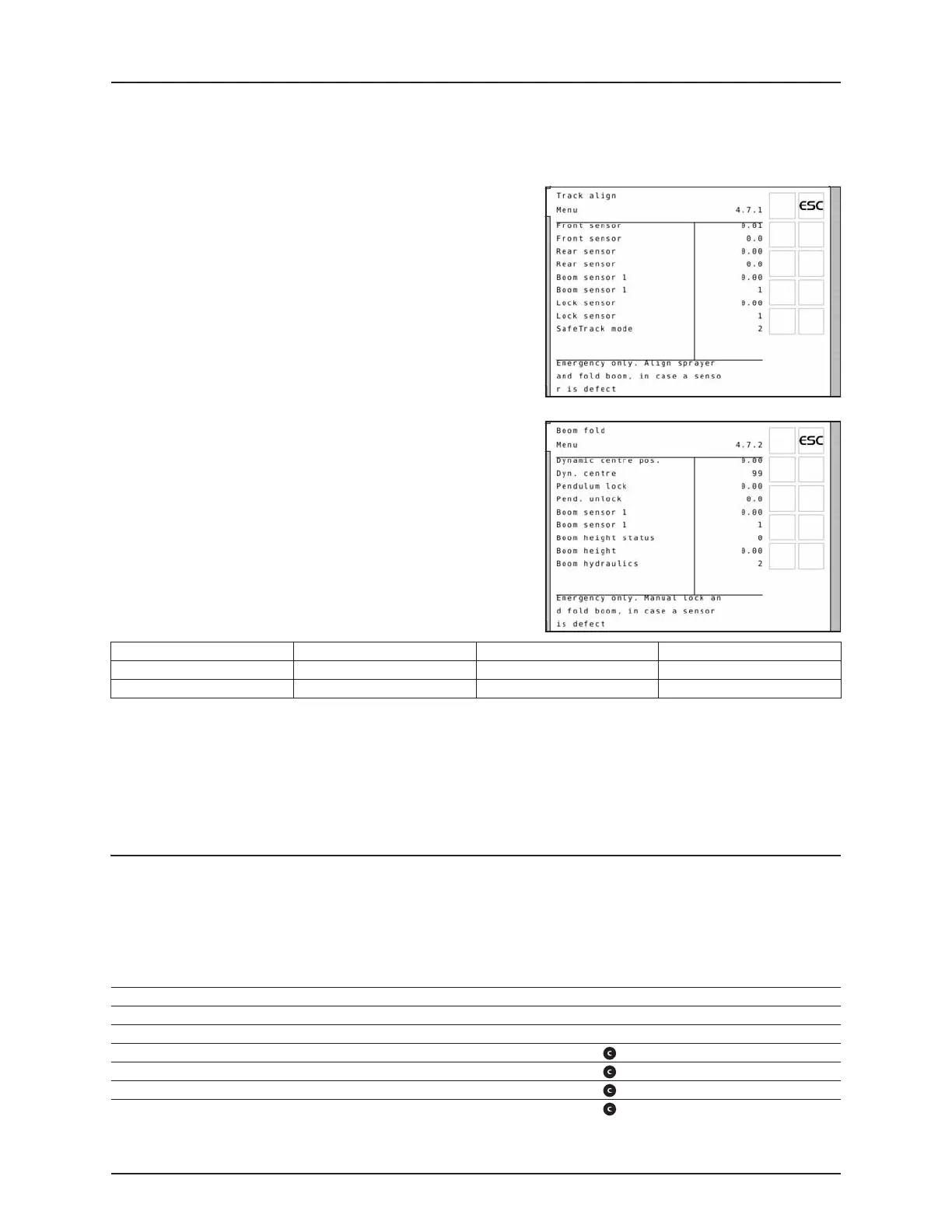
Menu 4.7.1 Track align
The sensor status and voltages can be checked when aligning the
sprayer.
÷
NOTE! Values shown in illustration is an example only.
Menu 4.7.2 Boom fold
The sensor status and voltages can be checked when folding the boom.
÷
NOTE! Values shown in illustration is an example only.
Lock sensor:
If the track selection switch is switched to “align” the trapeze lock is attempted locked disregard any sensor reading. No
automatic align is attempted. Manual or automatic tracking is not possible.
Once the boom is folded into transport position, exit the menu. This will activate the track lock if it is not damaged. As an
extra security, stop oil flow to the sprayer and switch power to OFF on the SetBox in order to turn off the JobCom.
€
DANGER! Emergency only. Don’t track with the boom folded! Safety system is disabled.
Menu 4.8 Computer CAN status
In this menu you can see if there is communication between the units, Controller, Jobcom and Track. See part “Emergency
operation”.
Menu 4.8.X Computer CAN status:
Lock sensor indication Track selection switch Left/right steer Fold inner
Released (high voltage) Auto or Manual Possible Possible
Locked (low voltage) Auto or Manual Not possible Possible
[4.8.1 Operating status all computer] Show operating status details in case of faults.
[4.8.2 Software versions all computer] Show software versions details in case of faults.
[4.8.3 Hardware versions all computer] Show hardware versions details in case of faults.
[4.8.4 Work status Terminal HC 6500] Show faults occurred since power-up. Press Clear key to reset counters.
[4.8.5 Work status JobCom HC 6100] Show faults occurred since power-up. Press key to reset counters. Not for ISOBUS
[4.8.6 Work status Grip HC 6300] Show faults occurred since power-up. Press key to reset counters. Not for ISOBUS
[4.8.7 Work status SetBox HC 6400] Show faults occurred since power-up. Press key to reset counters. Not for ISOBUS
[4.8.8 Work status FluidBox HC 6200] Show faults occurred since power-up. Press key to reset counters. Not for ISOBUS


 To Next Page