| www.harmar.com | 800-833-0478 © 2016 Harmar All Rights Reserved
2
OWNER
RET
RA
CT
OPERATING YOUR LIFT
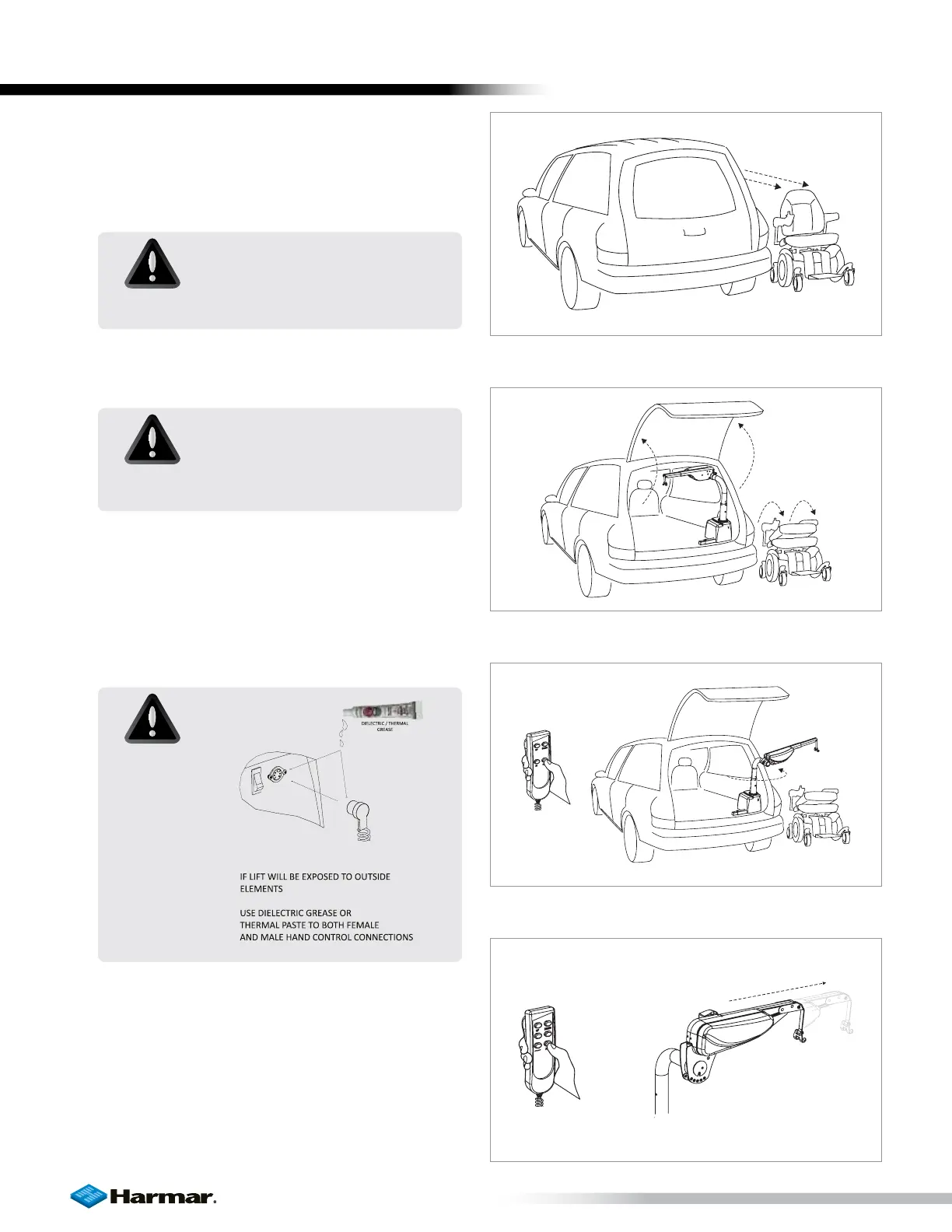
1. Park power chair or scooter ready to be
picked-up along the side and parallel to the
vehicle. [Figure 2-1]
2. Open the vehicle’s hatch. Fold the seat-back of
the chair or scooter. [Figure 2-2]
3. Press the `OUT´ button on the hand controller
to rotate the arm outside the vehicle. [Figure 2-3]
NOTE: For the AL215, manually rotate the lifting
arm outside of the vehicle.
NOTE: AL435 series lifts (AL435 / AL435T) have
an “EXTEND” button which can be pressed
to extend the arm outside, providing more
clearance past the vehicle for wider chairs or
scooters. [Figure 2-4]
Figure 2-1
Figure 2-2
Figure 2-3
Figure 2-4
CAUTION!
Always make sure the vehicle’s
parking brake is firmly set.
CAUTION!
Keep hands and feet away from
the bottom of the chair or scooter
as it is being lifted.
CAUTION!
OPERATING YOUR LIFT









 To Next Page