18
DISPLAY METER MOUNTING
Each Harrison Hydra-Gen generator is shipped with a
meter display. This meter displays output voltage,
frequency, and current. The key components
packaged outside of the generator unit are:
• Display Module
• Extension Cables, 30 ft.
The display module should be mounted where the
generator operator can see the readout. The display
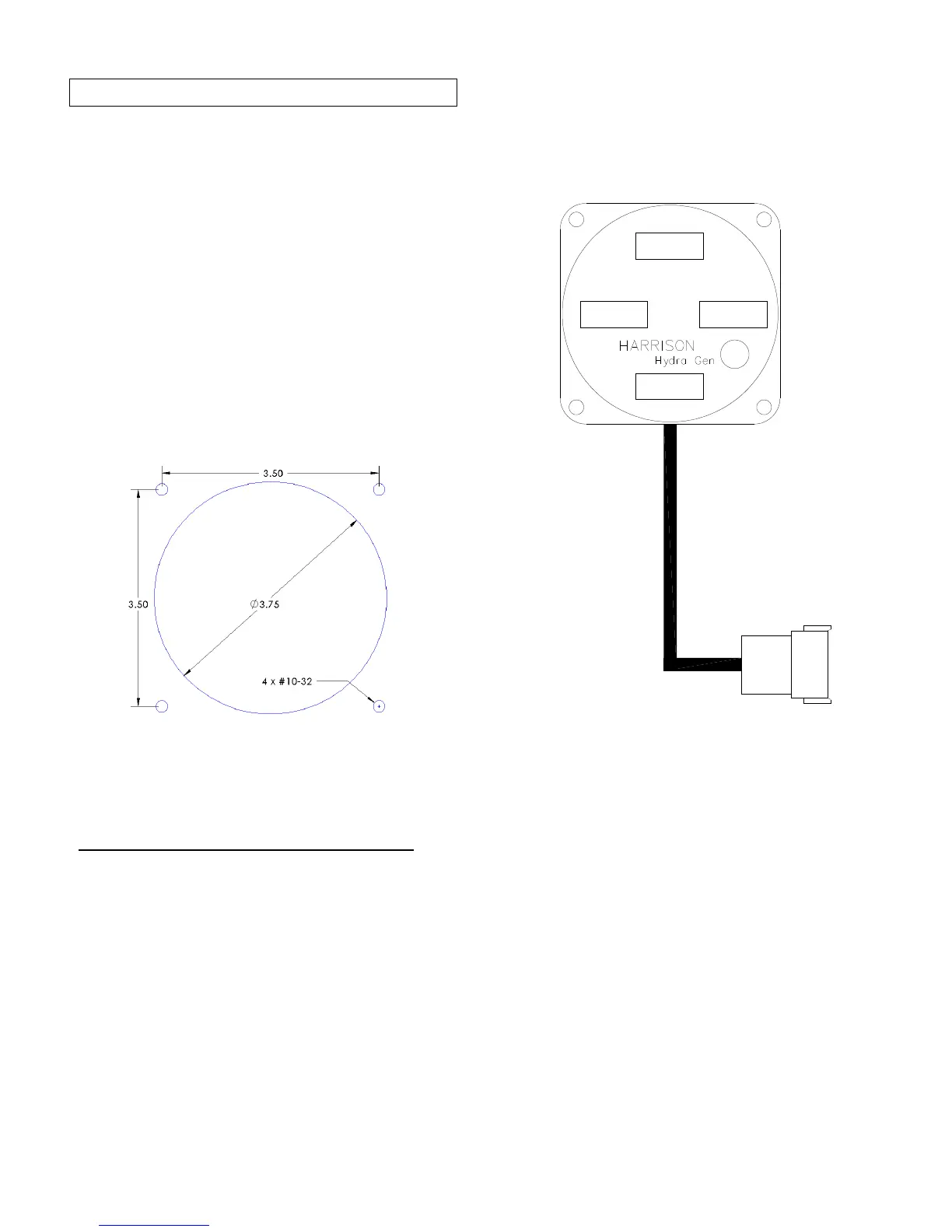
has a square flange with overall dimensions of 4.25”
w x 4.25” h.
A cutout hole shown in the figure below is required
for the meter display.
Figure 12: Meter Display Cutout Dimensions
Follow these steps to install the meter display:
1. Locate a suitable location for the display and cut
the cutout hole and drill the 4 #10-32 mounting
screw holes.
2. Route the 12-conductor extension cable from the
generator to the meter. Plug the cable in to the
generator supplied connector and the meter
connector.
3. A buzzer must be connected for the audible
alarm. Refer to the Electrical Wiring Diagram at
the end of this chapter for details.
FREQUENCY
AMPS LINE1 AMPS LINE2
AC VOLTS
MODE
Figure 13: Meter Display


 To Next Page