24
English
GB
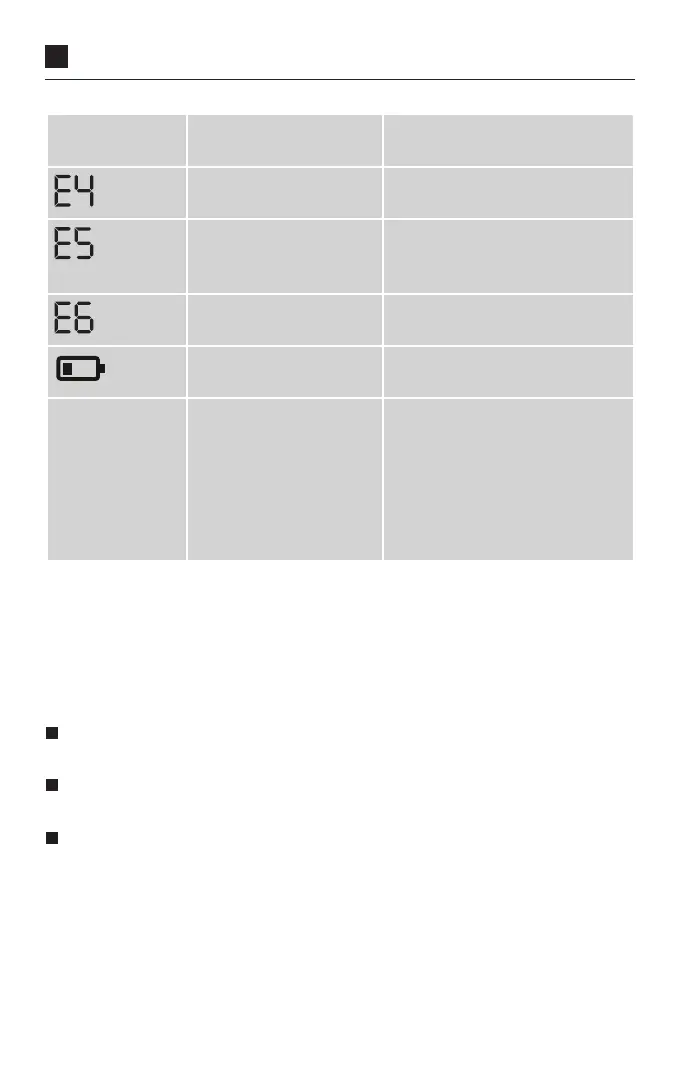
Specific
Error
Possible causes Remedy
There is a system error. Contact customer service if this
error message appears.
Inflation pressure is
higher than 300 mmHg.
Please rest for at least 1 minute
and take the measurement
again.
There is a system error. Contact customer service if this
error message appears.
The batteries are almost
empty.
Replace batteries.
Implausible
measured values
Implausible measured
values often occur due
to inappropriate han-
dling of the monitor
or mistakes during the
measuring procedure.
Please observe the 10 gold-
en rules of blood pressure
measurement (see Chapter 5
‘Measuring your blood pres-
sure’) as well as the safety
instructions. Then repeat the
measurement.
Switch the monitor off if an error symbol appears. Check for all possible causes
and note the 10 golden rules as well as the instructions for self-measurement in
Chapter 2 Important information. Relax for a minute and then take the measure-
ment again.
9. Monitor maintenance
Only ever use a soft, damp cloth to clean the monitor. Please do not use thin-
ners, alcohol, detergents or solvents.
The cuff can be cleaned carefully using a slightly damp cloth and mild soap
solution. Do not completely immerse the cuff in water.
It is recommended to clean and disinfect the cuff regularly or after each use,
especially when used by several users, to prevent infection. The cuff should
be disinfected, particularly on the inside, by wiping with a disinfectant. Use a
disinfectant that is compatible with the cuff materials. To protect from external
influences, keep the monitor, the cuff and these instructions in the storage bag.



 To Next Page