
 Need help?
Do you have a question about the Hayward AquaRite + and is the answer not in the manual?
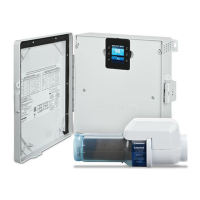
Lists and illustrates the various components that make up the AquaRite+ system.
Details optional kits that can enhance the functionality of the AquaRite+ system.
Explains systems where each component is set up with independent programming.
Highlights how AquaRite+ integrates accessories for comprehensive control.
Summarizes the benefits and functionalities of various upgrade kits like pH, ORP, and Wi-Fi.
Provides step-by-step instructions for safely removing the display module and accessing the front panel.
Details on maintaining water balance, adding salt, and managing salt concentration for optimal performance.
Explains the saturation index and its role in water balance, along with ideal levels.
Describes the home screen layout, status indicators, and button functions for system operation.
Guides users through accessing and configuring various system settings via the menu.
Instructions for measuring and setting the correct salt concentration for the chlorinator.
Procedure for calibrating the T-Cell temperature probe for accurate readings.
Details on how to assign and configure auxiliary relays for various system functions.
Explains the different filtration modes available and how to set them.
Guidance on programming filtration time schedules for automatic operation.
Details on controlling the pool lighting, including manual and automatic modes.
Information regarding the LED light function, setup, and colour selection.
Instructions for configuring and assigning available auxiliary relays for system extensions.
Troubleshooting steps for when the system display is not working.
Guidance on resolving issues with excessively high chlorine levels.
Troubleshooting steps for when the chlorine production rate is below the set point.
Steps to address cell scaling, which can occur in under a month with certain water conditions.
Information on the causes and solutions for white flakes appearing in the pool water.
Troubleshooting to attain a free chlorine level of 1.0 ppm, including filtration and pH checks.
Diagnosing and resolving 'LOW' indicators on the chlorinator display.
Troubleshooting steps for 'FLOW' indicators on the chlorinator display.
Steps to diagnose and fix issues where the pool pump fails to power on.
Guidance on setting the correct period for system operation and maintenance.
Instructions for safely replacing the 4 A fuse in the system.
Procedure for acid washing the T-Cell to remove scale and deposits.
Steps for properly winterising the AquaRite+ and associated pool equipment.
Details on statutory rights and warranty conditions for the product.
Information regarding the limited warranty period and coverage for defects.
Instructions on how to initiate a warranty claim and the process for returns.
Policy statement regarding unauthorised returns and warranty claim procedures.
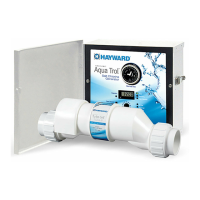
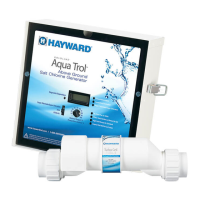
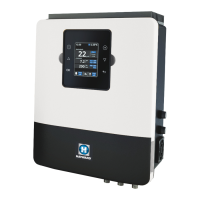
The Hayward AquaRite+ is an advanced salt water chlorinator designed for sanitizing swimming pools and spas, or pool/spa combinations. It operates by converting a low concentration of salt (sodium chloride) in the pool/spa water into free chlorine, which then kills bacteria and algae. After killing these contaminants, the chlorine reverts back to sodium chloride, creating a continuous recycling process that significantly reduces the need for additional sanitizing chemicals. Salt is primarily lost through back-washing, draining, or splashing out, not evaporation, meaning additions are only needed to replenish water. The amount of chlorine required varies based on factors like bather load, rainfall, water temperature, and overall pool cleanliness. The AquaRite+ is suitable for residential pools up to 150,000 liters, depending on the climate and the specific Hayward Turbo Cell connected to the unit.
Beyond its core chlorination function, the AquaRite+ offers extensive control over the filtration pump with various on/off timer features. Its accessory integration capabilities allow it to serve as a comprehensive control point for the entire pool/spa system. This means that with optional upgrade kits, the unit can measure and control pH and ORP levels, manage a heater, and even control an LED light. These functions can be accessed and managed remotely using an optional remote display screen or via a Wi-Fi module with a free app, enhancing user accessibility and convenience.
For installation, the AquaRite+ control unit should be mounted vertically on a flat surface, with cables pointing downwards, at least 3.5 meters horizontally from the pool and within 1 meter of an RCD-protected general purpose outlet. It must also be within 4.5 meters of the T-Cell installation location. Proper ventilation is crucial, so the unit should not be installed behind a panel or in an enclosed space to allow for heat dissipation. Electrical wiring must comply with all local, state, and federal government regulations, including the AS/NZS 3000 Wiring Rules. The device should be plugged into a short-circuit protected power outlet, powered via an isolating transformer or a residual current device (RCD) with a fixed residual operating current not exceeding 30 mA. An extension cord should not be used.
Plumbing installation involves disconnecting the pool filtration pump and releasing system pressure. The flow switch must be installed on the return pipe, directly in line with the T-Cell and, if applicable, the liquid acid injection point (for the optional pH Upgrade Kit). A 30 cm straight pipe section is required before the flow switch if it's in position 1, or the T-Cell can serve as this section if the flow switch is in position 2. The flow switch arrows must point in the direction of water flow to ensure proper activation during filter pump operation. The T-Cell can be mounted vertically as long as water enters from the bottom to keep it flooded. Watertight wire connections are ensured using supplied black cable glands for the Cell Flow Switch and any Light connections.
The AquaRite+ is compatible with all types of pool heaters, including heat pumps and gas heaters, though the Temperature Probe Upgrade Kit is necessary for heater control. If a heating system lacks a remote On/Off control, the AquaRite+ can control it in series with the heater's flow/pressure switch, using its own water temperature probe to manage the heating set point. The T-Cell connects via a plug beneath the device, and the specific T-Cell model must be selected in the configuration menu for correct operation.
Before activating the AquaRite+, proper pool water chemistry balance is essential. Salt should be added several hours or a day before startup, ensuring the recommended concentration of 2.7 to 3.4 g/L (3.2 g/L optimal). Salt levels should be tested 6-8 hours after addition. Only salt intended for chlorinators (99% pure sodium chloride) or common food quality/water softener salt (at least 99.0% pure) should be used. Rock salt, iodized salt, or salt with anti-caking additives are not suitable. For new plaster pools, a 10-14 day curing period is required before adding salt. Salt should be brushed around to dissolve quickly, and the filter pump should run for 24 hours to ensure even dispersion. Stabilizer (cyanuric acid) levels should also be checked and maintained between 30-50 ppm, with 0 ppm for indoor pools. Water balance, including pH (7.2-7.8), total alkalinity (80-120 ppm), calcium hardness (200-400 ppm), and saturation index (-0.2 to 0.2), must be within ideal ranges to prevent corrosion, scaling, or deterioration and ensure optimal chlorinator performance.
The device's operation is managed through a user-friendly interface. The home screen displays current water temperature, auxiliary relay status, chlorine production rate, manual salt level measurement, filtration relay state, and communication status. The main menu, accessed via the OK button, allows configuration of various settings, including language, time, network (with Wi-Fi module), screen intensity and sleep programming, sound for keyboard, pop-ups, alerts, and filtration, and password protection for user access. System information, including software versions and run-time counts, is also available.
Salt chlorination settings involve selecting the T-Cell model, programming electrolysis functions, and setting the desired chlorine production level (0-30 g/hr). The SPA setting activates spa-specific functions (requiring the Spa Flow Switch Upgrade Kit), and the Boost function provides 24-hour continuous super chlorination. Salt concentration measurement is a manual process that needs to be performed periodically, with an option to adjust the displayed salt level. Temperature probe calibration allows for fine-tuning readings to a reference thermometer. Relay configuration enables assigning specific relays to control the filter pump, lighting, and heating system.
Filtration modes include Manual (on/off control), Filter Cleaning (for backwashing), Automatic (timer-based schedules), and Smart. The Smart mode adjusts filtration times based on water temperature, with parameters for minimum and maximum temperatures. Antifreeze mode can activate filtration if water temperature drops below 2°C. Time schedules for filtration can be set with specific on/off times. The unit is preset to power a single-speed pump, but with Hayward Variable Speed Pumps (revision 4.0 or higher software), the AquaRite+ can select between different pump speeds. Lighting control supports LED lights, allowing manual color changes and programming pulse lengths for color cycling.
Troubleshooting guidance covers common issues. If there's no display, checks include power point connection, display-control box cable, external 4A fuse, and supply voltage. Excessive chlorine suggests reducing the chlorine generation level. If the chlorine production rate doesn't reach the set point, checks involve salt concentration, cell condition (for scale or wear), and flow switch. Cell scaling within a month points to hard water, high pH, or total alkalinity, requiring water balance adjustments and checking for automatic polarity changes. White flakes in the pool indicate unbalanced and very hard water. Inability to attain a free chlorine level of 1.0 ppm suggests increasing filtration time, chlorination rate, salt concentration, stabilizer levels, checking test kit expiry, and adjusting pH. A "LOW" indicator on the chlorinator display points to low water conductivity, low water temperature (<15°C), water balance, salinity, or cell scale. A "FLOW" indicator suggests checking the flow switch cable, filter cleanliness, and flow switch conductivity. If the pump doesn't power up, ensure the Run/On command is given, check direct power outlet connection, and reset the internal circuit breaker if needed.
Maintenance includes a settling period of 10-15 days after startup, during which pH and total alkalinity should be closely monitored. Regular pool maintenance, emptying skimmer baskets, and cleaning the filter are also important. Water should preferably be added via skimmers to pass through the chlorinator cell first. The 4A fuse can be replaced by unplugging the unit, unscrewing the fuse holder cartridge, inserting a new fuse, and tightening it.
Servicing and cleaning the AquaRite+ T-Cell involves turning off power, releasing plumbing pressure, and removing the cell. The cell should be inspected for scale or debris. If deposits are visible, they can be removed with a water jet; if unsuccessful, acid washing is required. Acid washing involves preparing a 5:1 solution of water and hydrochloric acid (or a commercial cell cleaning product), fastening the T-Cell to a cleaning stand, filling it with the solution, and letting it soak for 15-20 minutes. Personal protective equipment (gloves, goggles, mask) and a well-ventilated area are crucial when handling acids. After cleaning, the cell should be rinsed and reinstalled. The cleaning solution should be disposed of by tipping it into the swimming pool (if using hydrochloric acid) or according to product instructions. If the T-Cell was cleaned due to a "LOW" fault message, the average salt measurement reading should be reset. Maintaining recommended pH levels (7.2-7.8) typically limits cell cleaning to 3-4 times per year.
For regions with long cold periods, winterizing the AquaRite+ T-Cell, flow switch, probes, and pool piping is necessary to prevent freezing damage. This involves draining all water from the pump, filter, and supply/return pipes before winter. The control unit itself does not need to be removed.
 General
| Type | Salt Chlorine Generator |
|---|---|
| Salt Level | 2700-3400 ppm |
| Warranty | 3 years |
| Voltage | 120/240V |
| Pool Size | Up to 40, 000 gallons |
| Display | Digital |




 To Next Page