USE ONLY HAYWARD GENUINE REPLACEMENT PARTS
7
Operation
Start Up and Operation
With the pool water balanced and the installation complete, HydroRite can be plugged into a GFCI protected outlet to begin operation. After powering up, the UV
lamp inside of the vessel will illuminate and the green POWER ON LED on the controller should be lit. HydroRite’s operation is fully automatic and requires no
interaction from the user. It is designed to stay powered and active at all times and will stop sanitizing when it senses that the pool pump has turned off. When
the pool water flow returns, HydroRite will automatically resume operation.
LED Indicators
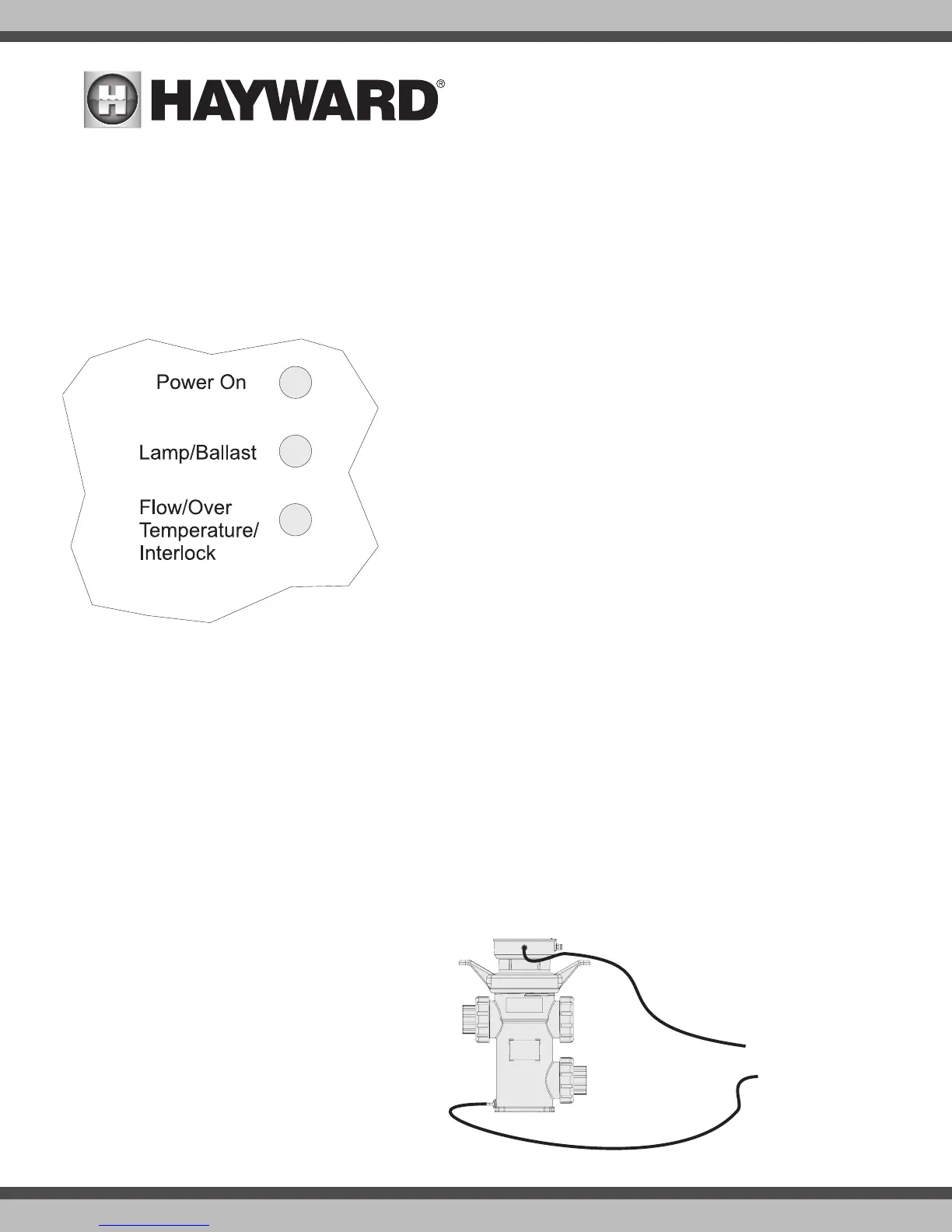
Power On LED
This green LED will be on under normal operation. Even when the pool pump is not running
and HydroRite shuts off its lamp, the Power On LED will be lit.
Lamp/Ballast LED
This red LED indicator will come on when there is an issue with the lamp or ballast. It will
also light if there is a problem with the connection from the ballast cable to the lamp. Note
that the lamp has a defined life and will eventually need to be replaced. Refer to Maintenance
and the UV Lamp Replacement sections of this manual for more information.
Flow/Over Temperature/Interlock LED
The HydroRite will shut down due to the following conditions:
• Flow - the LED will light when the HydroRite sense a no-flow condition. This will happen
normally whenever the pool filter pump is turned off and the pool water stops flowing.
• Over Temperature - The HydroRite has a temperature sensor inside its enclosure and
will shut down operation to protect itself if it senses very high temperatures. Note that
high ambient temperatures and direct sunshine can contribute to an over temperature
condition.
• Interlock - The LED will light indicating that the vessel cap has not been installed prop-
erly or the interlock connection is not properly made.
Maintenance
HydroRite has been designed for robust performance in the harsh environmental conditions of sun, wind, and rain. Like most pool equipment, routine mainte-
nance will help provide years of trouble-free service. While HydroRite requires very little maintenance throughout the year, inorganic and organic chemicals may
deposit on the surface of the quartz sleeve causing it to appear hazy/foggy and reducing its efficacity by lowering the germicidal UV (254nm wavelength light)
transmittance. Cleaning the sleeve should return HydroRite to previous performance.
Hayward recommends that you remove the lamp and clean the sleeve every 1-3 months depending on the condition of your pool’s water. The sleeve may need
more frequent cleaning in areas of the country that have hard water. The quartz sleeve can be manually cleaned or cleaned with an in-line automatic cleaner.
Automatic Cleaning of the Quartz Sleeve
When using an automatic cleaner, the HydroRite’s quartz sleeve can be cleaned with no need to disassemble the vessel. When the user initiates a cleaning, an
acid bath will clean the quartz sleeve. The cleaner is connected
to the inlet and outlet ports located on the top and bottom sides of
the vessel only when cleaning, then disconnected during normal
operation. If automatic cleaning will be employed, three way valves
are required to isolate the HydroRite vessel from the pool’s plumb-
ing. Refer to your automatic cleaner for cleaning instructions.
Muriatic Acid: Use a diluted mixture of 4 parts water to 1 part
Muriatic acid (20º Baume hydrochloric acid 31.45% by weight).
Always add acid to water, and do so slowly.
Disposing of Acid
Follow the manufacturer’s instructions on how to properly dispose
of the Muriatic Acid mixture.
To automatic
cleaning


 To Next Page