23
PME-MP55DP
HBMA0582-3.1 de/en/fr
2 How to connect to a PLC
The steps in successfully connecting to the Profibus:
1. Physically connect the device to the Profibus (see page 26 and page 27)
2. Configure the device parameters, see page 29 (can also be carried out
using HBM‘s “PME−Assitent“ software).
3. Configure the Profibus message and set up its parameters with the aid of a
configuration tool (such as Step7) and GSE files, or manually as shown in
chapter 6.2.
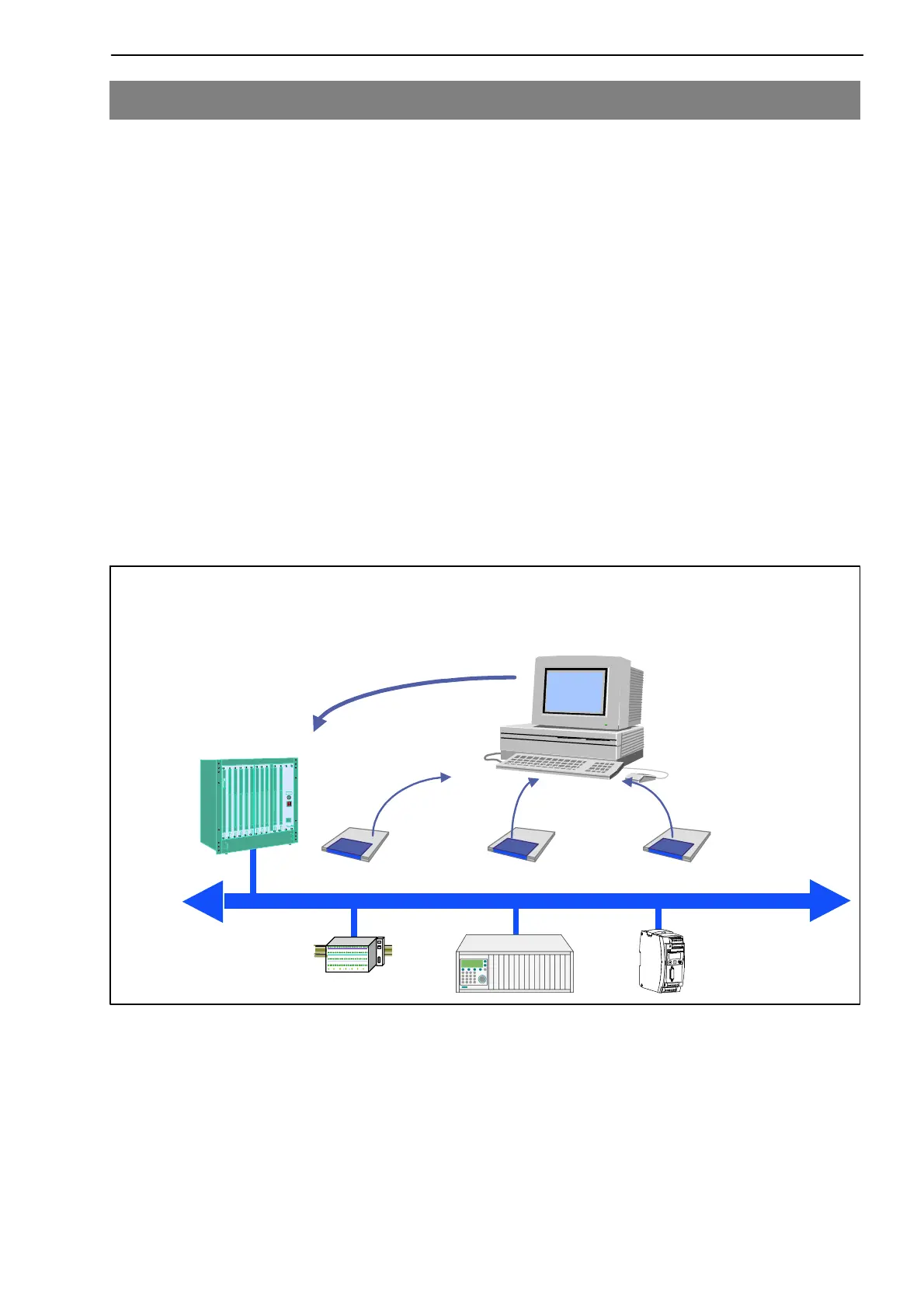
A GSE file describes the properties of a Profibus node in standardized form.
The configuration tool uses it to define which data held on individual bus
nodes will be exchanged on the Profibus.
A default GSE file for PME modules is supplied with the device (on system
CD: hbmxxx.gsd = German version; hbmxxxgse = English version).
PROFIBUS−DP
System configuration
Profibus
configurator
PLC
GSE
Electronic device data sheets (GSE files)
Fig. 2.4: Configuration with the aid of GSE files


 To Next Page