-------------------------------------------------
-------------------------
-
RM22A/RM22D
OPERATIONS MANUAL
HealthCare Information, LLC 11
PRODUCT INTRODUCTION
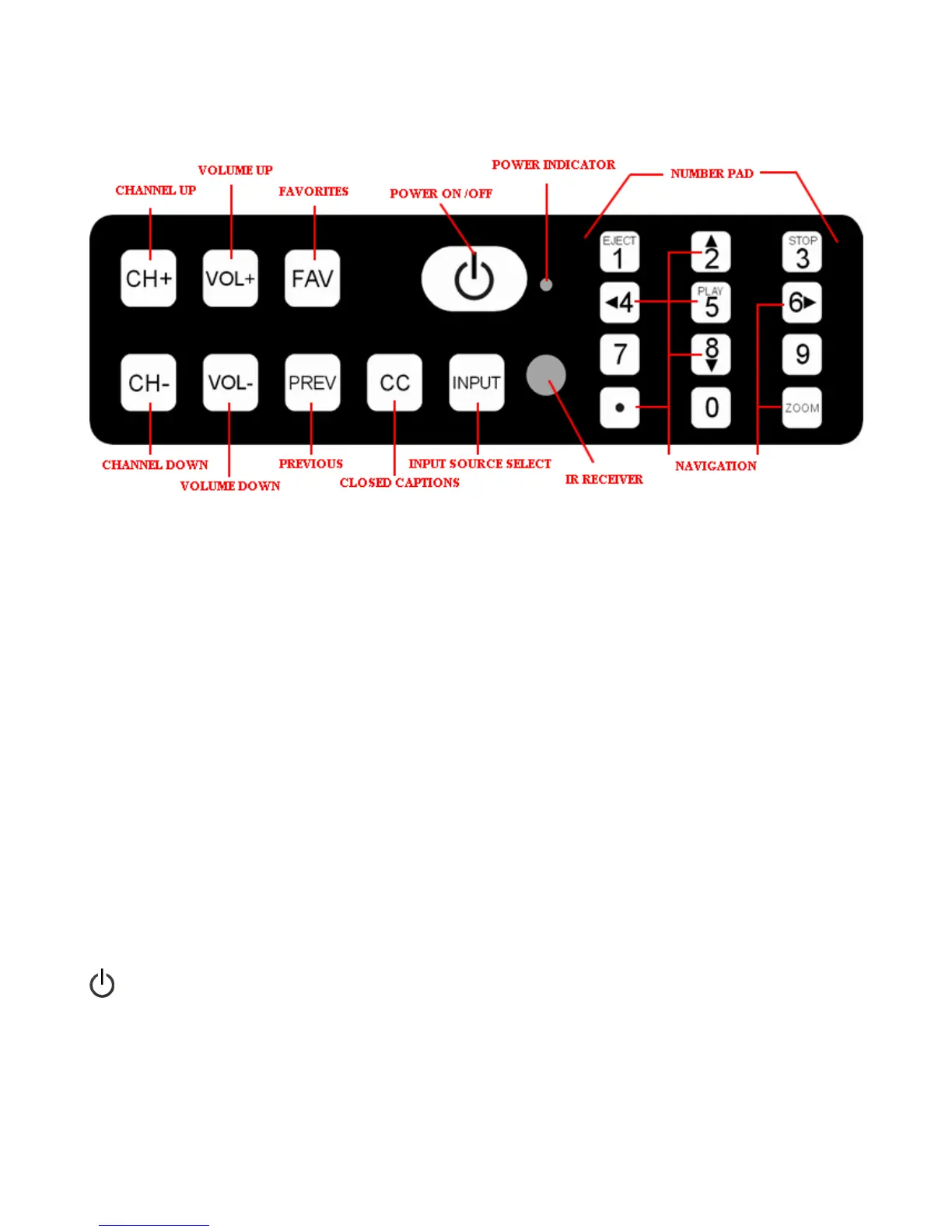
FRONT PANEL
Button Definitions
CH+
CHANNEL UP
-
Goes to the next higher p
rogrammed channel. If TV is on the
highest programmed channel, goes to lowest programmed channel.
CH
-
CHANNEL DOWN
-
Goes to the next lower programmed channel. If TV is on the
lowest programmed channel, goes to highest programmed channel.
VOL+
VOLUM
E UP
–
Increases sound level.
VOL
-
VOLUME DOWN
–
Decreases sound level.
FAV
FAVORITES –
Change channels stored in favorites list and add channels to favorites
list.
PREV
PREVIOUS
–
Changes to the previous channel.
CC
CLOSED CAPTIONS
–
Selects
closed captions mode.
INPUT
INPUT SOURCE SELECT
-
Selects input source.
Turns set on and off and power indicator.
NUMBER PAD
Direct entry of channels.
NAV
I
GATION
Navigate
buttons.



 To Next Page