-------------------------------------------------
-------------------------
-
RM22A/RM22D
OPERATIONS MANUAL
HealthCare Information, LLC 26
7.
Use the arrow buttons to select rating levels. Press the ENTER button to block or unblock each
rating. Some
ratings will effect the rating below them. Press the BACK button when finished.
8.
Select MPA
A. Use the right arrow button to select the highest rating you wish to
allow.
T
he selected rating and all ratings below will be allowed. All rating above will be blocked.
9.
Select Canada English. Use the right arrow button to select the highest rat
ing you wish to
allow.
T
he selected
rating and all ratings below will be allowed. All rating above will be blocked.
10.
Select Canada French. Use the right arrow button to select the highest rating you wish to
allow.
T
he selected
rating and all rating
s below will be allowed. All ratings above will be blocked.
KEY DEFINE
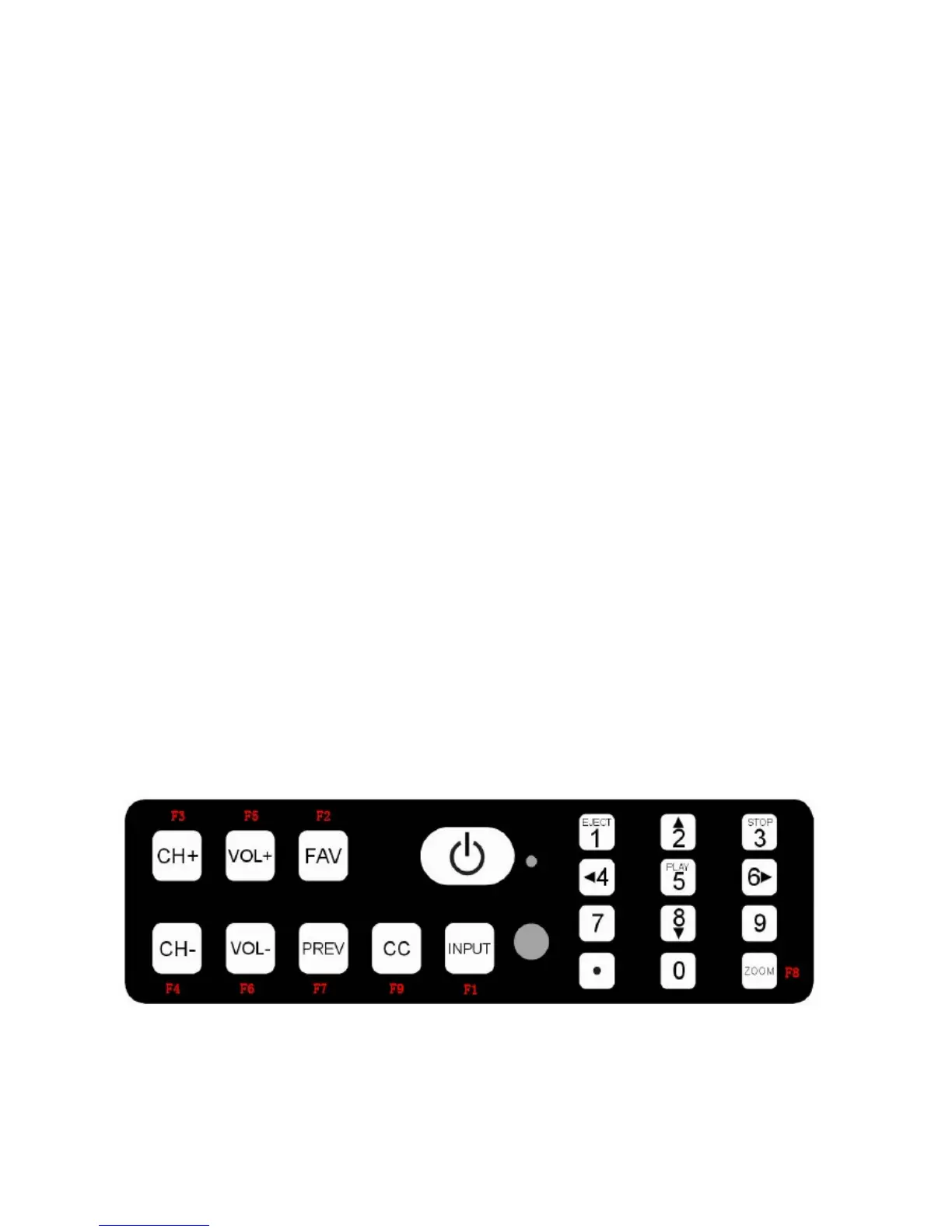
The functions of the front or side panel buttons can be redefined. To change the functions:
1.
Enter the setup menu.
2.
Select KEY DEFINE in the LOCK menu and press the right
arrow button.
3.
Select the button you wish to change.
Not all buttons can be changed.
See diagram for
button locations.
4.
Use the right and left arrow button to change the function.
5.
Repeat steps 2 and 3 for all buttons you wish to change.
6.
Press the "BACK" button when finished.
FRONT PANEL ONLY



 To Next Page