15
Q&A
Q : If I incautiously delete all channels, what should I do?
A : 1. User can go to Installation menu and scan the satellite
once again.
2. If there’s channel in the STB since the first time user get
it, then user can restore the channels by “Factory Setting”.
2. Installation
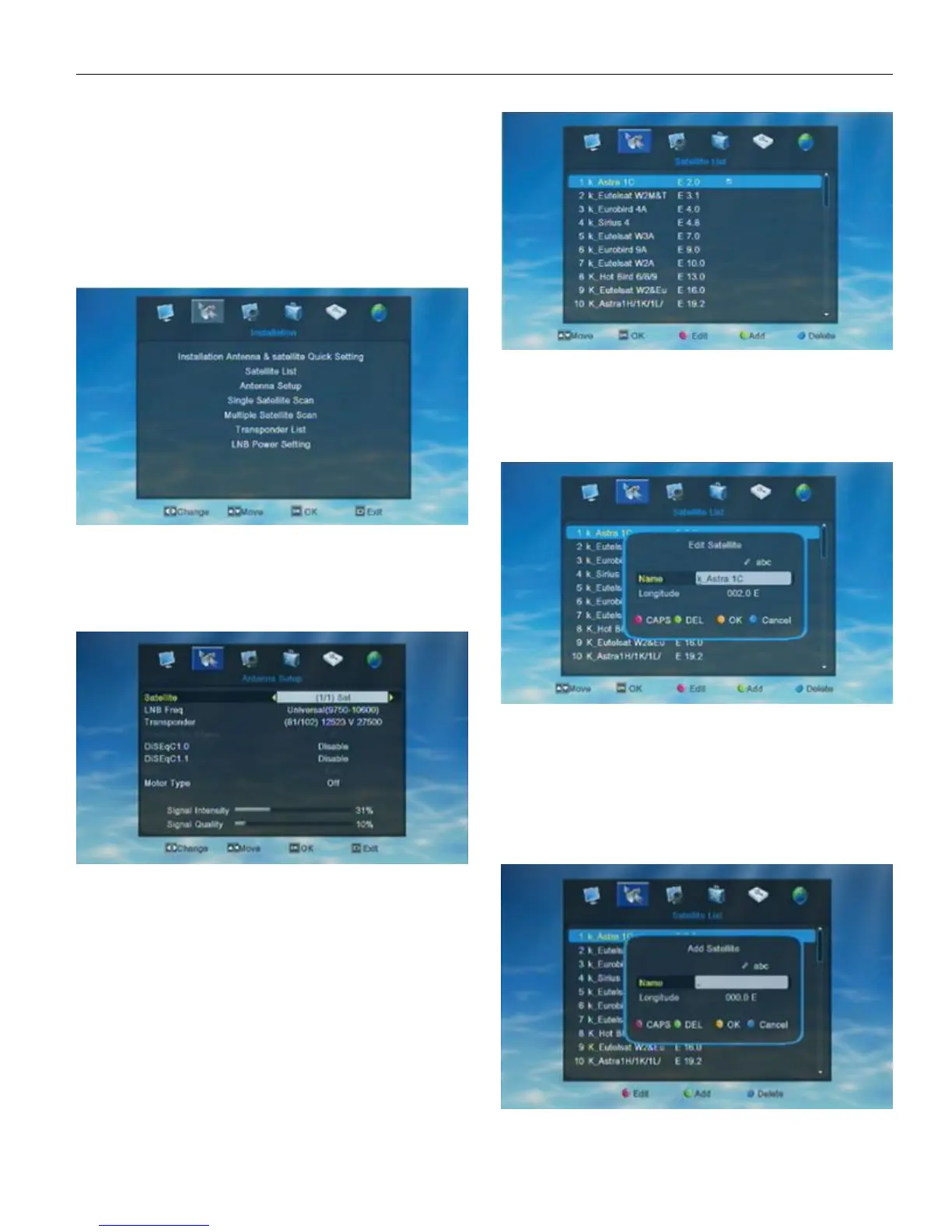
Choose the 2nd symbol “Installation” on the main menu,
then press OK to enter into the Installation menu.
In Installation menu, user can press UP/DOWN to move
highlight and press OK to confirm the choice.
2.1.InstallationAntenna&Satellite Quick Setting
When enter into “Installation Antenna&Satellite Quick
setting” menu, the system will show a menu as below.
In “Installation Antenna&Satellite Quick Setting” menu
user can press Left/ Right to select “Local Longitude” and
“Local Latitude”. User can set USALS, DiSEqC1.2 and Motor
by press UP/DOWN and press OK to confirm the choice.
Set Motor AS USALS ON ALL Satellites
Set Motor AS DisEqC1.2 ON ALL Satellites
Disable Motor Setting on ALL Satellites
2.2. Satellite List
When enter into “Satellite List” menu, the system will
show a menu as below.
User can edit all the satellite of the satellite list, add
new satellite to the satellite list or delete satellite from the
satellite list.
Red key can open the Edit window.
Green key can open the Add window.
Blue key can delete the chose satellite.
User can rename and Edit the satellite.
In Satellite list menu press Red key to open the “Edit”
window and then edit the satellite information according to
user’s needs.
Red key to switch between capital/small letter
Green key to delete input character
Yellow key to save the edition and close the
window
Blue key to cancel adition operation and exit from
the window
If user didn’t find the satellite he/she need, user can
add new satellite into the satellite list. Add new satellite user
only need to input a name and the longitude of the satellite. As
following shows.


 To Next Page