28
6.4. Twin Protocol Setup
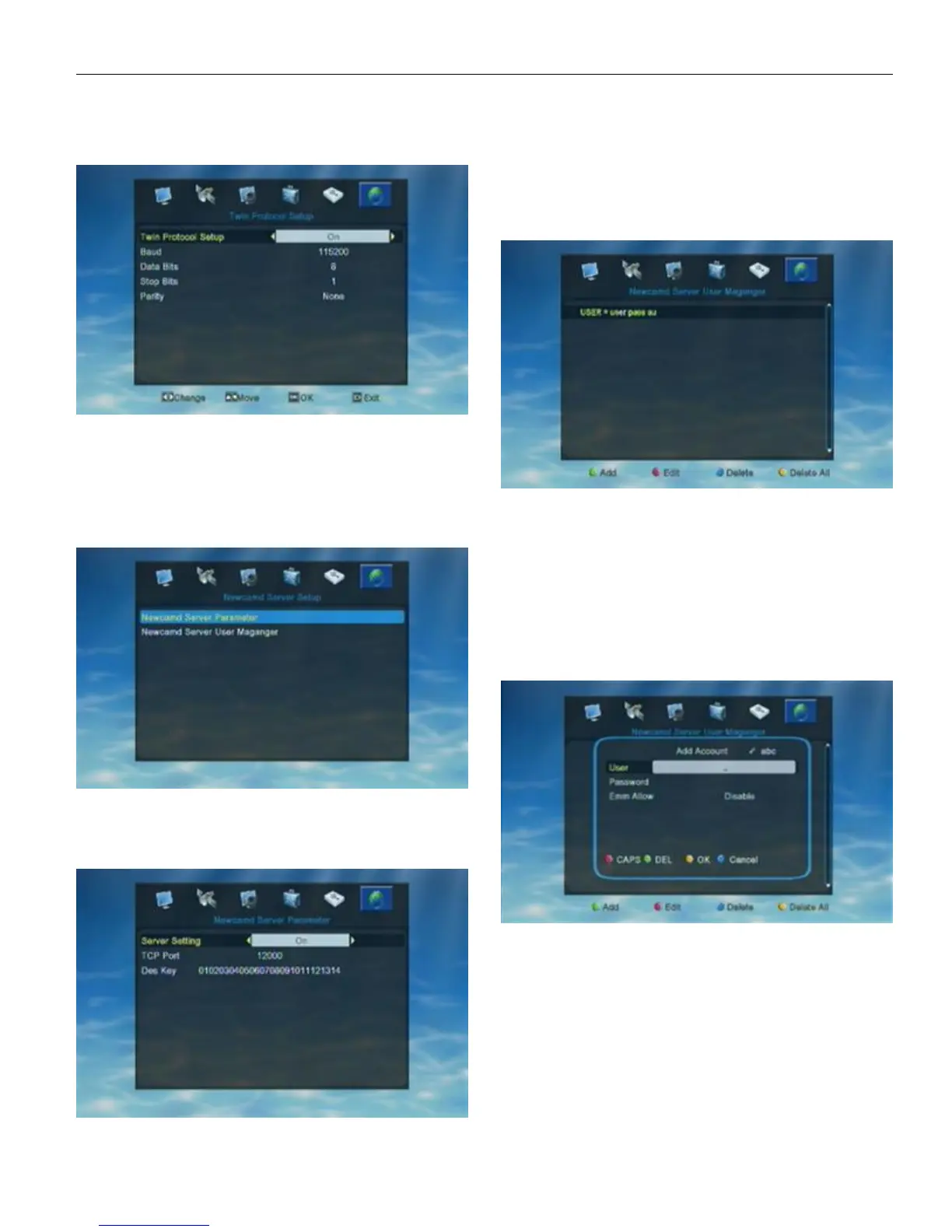
When enter into “Twin Protocol Setup” menu, the
system will show a menu as below.
1. Twin Protocol Setting: ON/OFF
2. Band: 9600/ 14400/ 19200/ 38400/ 57600/ 115200/
128000/ 256000
3. Date Bits: 8
4. Stop Bits: 1/2
5. Parity: None/ Even/ Odd
6.5. NewCamd Sever Setup
In “Newcamd Server Parameter” user can set the
Newcamd informations. In “Newcamd Server User Manager”
user can manage the input Newcad informations.
When enter into “Newcamd server Parameter” menu,
the system will show a menu as below.
User can switch server setting ON/OFF by pressing
Left/Right when hight is on “Server Setting”. When highlight is
on “TCP Port” or “Des Key” user can input informations by
pressing the number key.After finished all settings press EXIT
to save the new settings and exit from current menu.
When enter into “Newcamd server User Manager”
window, the system will show a menu as below.
If user didn’t input any Newcamd information in STB,
there will show nothing in “Newcamd Server User Manager”
window. Just like the above pic. shows.
User can add/edit/delete Newcamd informations by
pressing color key
Green key to add new Newcamd informations
Red key to edit the input Newcamd informations
Blue key to delete the highlighted Newcamd
Yellow key to delete all the input Newcamd
When user opened “Add Account” window by pressing
Green key, the window will show as below.
User need to input the Newcamd informationa
manually, like user name, password and Emm Allow.
Red color key to switch capital/small letter
Green color key to delete the inputted char
Yellow color key to make confirm
Blue color key to cancel the operation and exit from
the window.
Press EXIT to exit from current window without save
all the added informatons.


 To Previous Page