12 • NuWave PIC Complete Cookbook
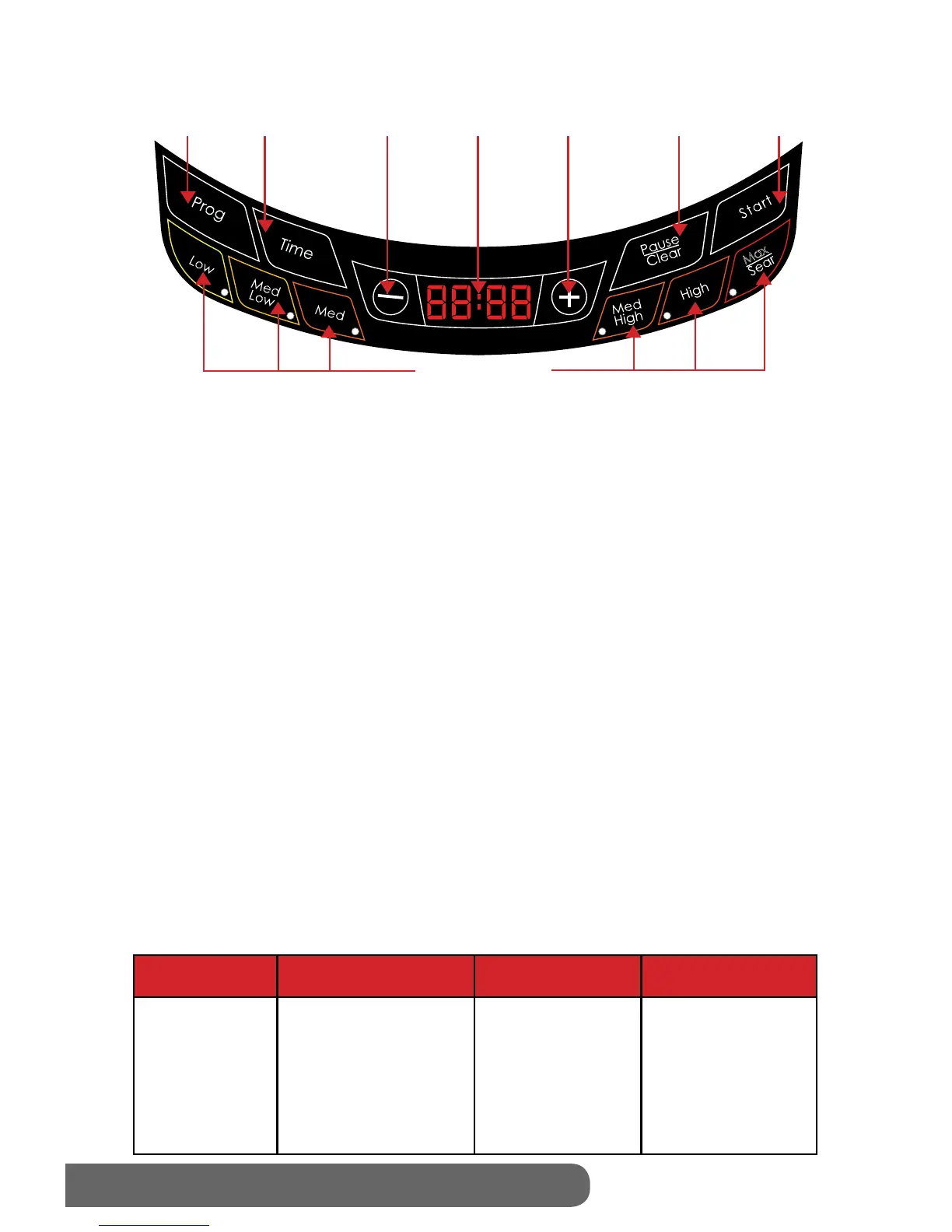
Directions for the Display Panel
Easy Start:
The NuWave PIC is preset to cook on High (425 degrees F) for 1 hours. To begin cooking,
press “Start” button, after placing an induction-ready pot on the surface. If cooking at a
power level other than “High,” press “Low,” “Max/Sear” or press the “-” or “+” buttons to
increase or decrease temperature in 10 F degree increments. See the Panel Display Chart
on the bottom of this page for more details.
Control Panel:
“0” should appear when program is clear or power is on.
To Start Cooking:
Set temperature and time, then press “Start” to begin cooking. The PIC will automatically
stop cooking once time has expired and a “beep” sound will alert users. The display will
always show current temperature during the cooking cycle. To display time lapse, press
“Time” and a countdown will appear, marking the duration before the cycle or stage is
complete.
Setting Temperature:
This appliance is preset to cook on High (425 degrees F). To reset, press temperature
key “Low” - “Max/Sear,” then press “Start.” The temperature range will appear on the
display panel. To raise or lower the temperature in 10-degree increments, press the
“+”or “-” buttons until desired temperature is displayed. Refer to chart below for preset
temperatures. The minimum is 100°F while the maximum temperature reaches 575°F. The
PIC’s LED screen is defaulted to display cooking temperature in Fahrenheit(F). To switch
the display to Celsius(C), press the “Prog” button, followed by “-.” Press “-“ again to convert
to Celsius. To return to Fahrenheit, press “-“ once more. To close out of the F/C conversion
option, press the “Pause/Clear” button until a “0” appears on the unit’s screen.
Press Button Range Temperature Examples
Low
Med Low
Med
Med High
High
Max/Sear
Warm
Simmer
Steam
Stir/Deep Fry
Boil/Saute
Sear
100F/ 38C
175F / 80C
275F / 136C
375F / 191C
425F / 219C
SEAR
Panel Display
Max
Max
P
R
E
C
I
S
I
O
N
I
N
D
U
C
T
I
O
N
C
O
O
K
T
O
P
TM
•
D
I
G
I
T
A
L
A
C
C
U
R
A
C
Y
•
Program
Time
Decrease
LED
Display
Low-Max/Sear
Increase
Pause/Clear
Start
100°F (38°C)
175°F (80°C)
275°F (136°C)
375°F (191°C)
425°F (219°C)
575°F (302°C)


 To Next Page