EasyManua.ls Logo

Heathkit AR-14 - Page 58

Heathkit AR-14
90 pages
Print Icon
To Next Page IconTo Next Page
To Previous Page IconTo Previous Page
Loading...
~
~tff&iff&P
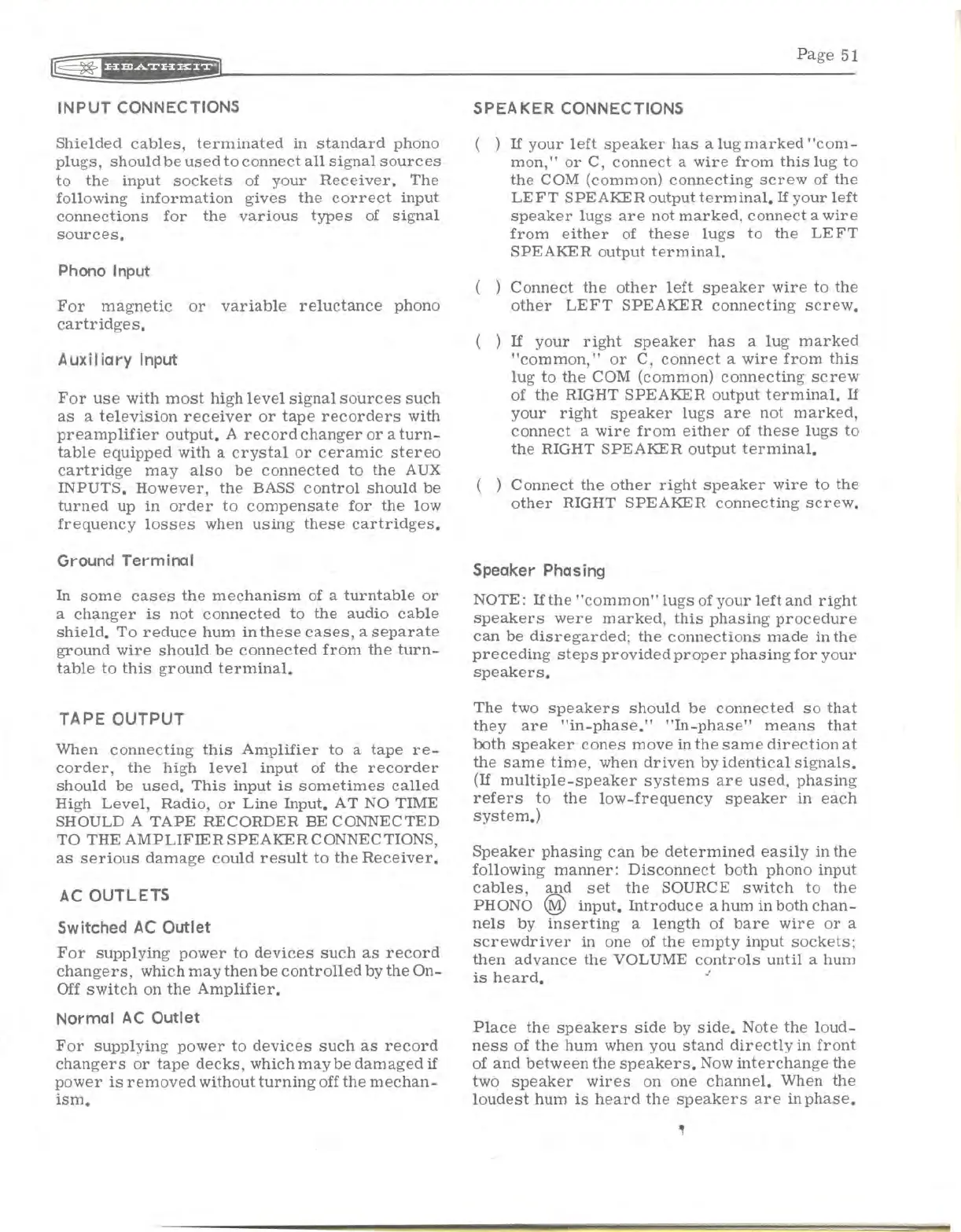
INPUT
CONNECTIONS
Shielded
cables,
terminated
in
standard
phono
plugs,
should
be
used
to
connect
all
signal
sources
to
the
input
sockets
of
your
Receiver.
The
following
information
gives
the
correct
input
connections
for
the
various
types
of
signal
sources.
Phono Input
For
magnetic
or
variable
reluctance
phono
cartridges.
Aux
ii
iary
Input
For
use
with
most
high
level
signal
sources
such
as
a
television
receiver
or
tape
recorders
with
preamplifier
output.
A
record
changer
or
a
turn-
table
equipped
with
a
crystal
or
ceramic
stereo
cartridge
may
also
be
connected
to
the
AUX
INPUTS.
However,
the
BASS
control
should
be
turned
up
in
order
to
compensate
for
the
low
frequency
losses
when
using
these
cartridges.
Ground Terminal
In
some
cases
the
mechanism
of a
turntable
or
a
changer
is
not
connected
to
the
audio
cable
shield.
To
reduce
hum
in
these
cases,
a
separate
ground
wire
should
be
connected
from
the
turn-
table
to
this
ground
terminal.
TAPE
OUTPUT
When
connecting
this
Amplifier
to
a
tape
re-
corder,
the
high
level
input
of
the
recorder
should
be
used.
This
input
is
sometimes
called
High
Level,
Radio,
or
Line
Input.
AT
NO TIME
SHOULD A
TAPE
RECORDER
BE CONNECTED
TO THE
AMPLIFIER
SPEAKER
CONNECTIONS,
as
serious
damage
could
result
to
the
Receiver.
AC
OUTLETS
Switched
AC
Outlet
For
supplying
power
to
devices
such
as
record
changers,
which
may
then
be
controlled
by
the
On-
Off
switch
on
the
Amplifier.
Normal
AC
Outlet
For
supplying
power
to
devices
such
as
record
changers
or
tape
decks,
which
maybe
damaged
if
power
is
removed
without
turning
off
the
mechan-
ism.
Page
51
SPEAKER CONNECTIONS
( )
If
your
left
speaker
has
a
lug
marked
"com-
mon,"
or
C,
connect
a
wire
from
this
lug
to
the
COM (common)
connecting
screw
of
the
LEFT
SPEAKER
output
terminal.
If
your
left
speaker
lugs
are
not
marked,
connect
a
wire
from
either
of
these
lugs
to
the
LE
FT
SPEAKER
output
terminal.
( )
Connect
the
other
left
speaker
wire
to
the
other
LEFT
SPEAKER
connecting
screw.
( )
If
your
right
speaker
has
a
lug
marked
"common,"
or
C,
connect
a
wire
from
this
lug
to
the
COM (common)
connecting
screw
of
the
RIGHT
SPEAKER
output
terminal.
If
your
right
speaker
lugs
are
not
marked,
connect
a
wire
from
either
of
these
lugs
to
the
RIGHT
SPEAKER
output
terminal.
( )
Connect
the
other
right
speaker
wire
to
the
other
RIGHT
SPEAKER
connecting
screw.
Speaker Phasing
NOTE:
If
the
"common"
lugs
of
your
left
and
right
speakers
were
marked,
this
phasing
procedure
can
be
disregarded;
the
connections
made
in
the
preceding
steps
provided
proper
phasing
for
your
speakers.
The
two
speakers
should
be
connected
so
that
they
are
"in-phase."
"In-phase"
means
that
both
speaker
cones
move
in
the
same
direction
at
the
same
time,
when
driven
by
identical
signals.
(If
multiple-speaker
systems
are
used,
phasing
refers
to
the
low-frequency
speaker
in
each
system.)
Speaker
phasing
can
be
determined
easily
in
the
following
manner:
Disconnect
both
phono
input
cables,
and
set
the
SOURCE
switch
to
the
PH
ONO @
input.
Introduce
a hum
in
both
chan-
nels
by
inserting
a
length
of
bare
wire
or
a
screwdriver
in
one of
the
empty
input
sockets;
then
advance
the
VOLUME
controls
until
a hum
is
heard.
Place
the
speakers
side
by
side.
Note
the
loud-
ness
of
the
hum
when you
stand
directly
in
front
of
and
between
the
speakers.
Now
interchange
the
two
speaker
wires
on one
channel.
When
the
loudest
hum
is
heard
the
speakers
are
in
phase.

Related product manuals