22
support@heimvision.com
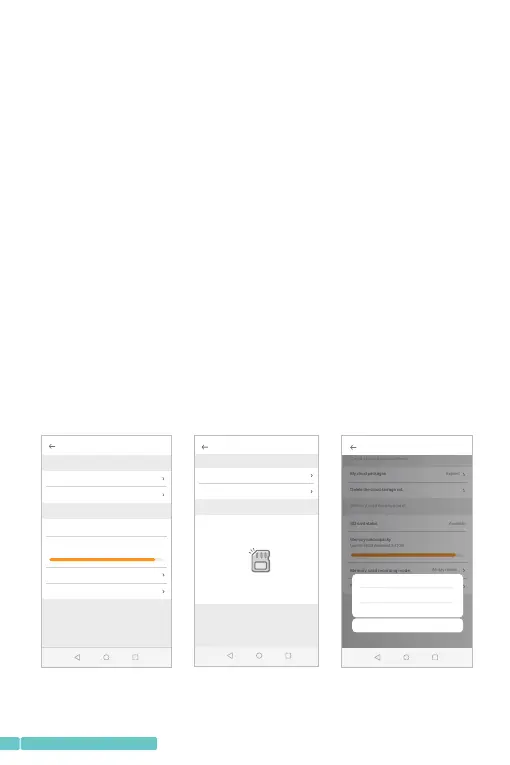
*GotoSetting>Devicestorage>Memorycard
management:
•tocheckthemicroSDcardstatus;
•tochecktheremainingcapacityofthemicroSDcard;
•toformatthemicroSDcard(itisrecommendedtoformat
atthefirstuse);
•tosettherecordingmodesofthemicroSDcard.Selecting
NotRecordingmeansnovideoswillbesavedinmicoSD
card.SelectingEventrecordingmeansvideoswithhuman
ormotionwillberecordedandsavedinmicroSDcard.
SelectingAll-dayrecordingmeansthecamerawillrecord
videosuninterruptedly.
*amicroSDcardisaconsumable.GettingamicroSDcard
withbrands,suchasKingstonandSanDisk,is
recommended.
Clo ud stor age man ageme nt
My cloud packages
Delete the cloud storage vid...
Mem ory car d manag ement
SD card status
Memory card capacity
Used 6.78GB,remained 0.41GB
Mem ory car d recording m ode
Format the SD card
Expired
Available
All-day record...
Devicestorage
Clo ud stor age man ageme nt
My cloud packages
Delete the cloud storage vid...
Mem ory car d manag ement
SD card status
Memory card capacity
Used 6.78GB,remained 0.41GB
Mem ory car d recording m ode
Format the SD card
Expired
Available
All-day record...
Devicestorage
Not reco rdi ng
Event re cor ding
All-da y rec ording
Cancel
Devicestorage
Clo ud stor age man ageme nt
My cloud packages
Delete the cloud storage vid...
3 Day All-da...
Mem ory car d manag ement
SD card status
Failed to detect the SD card
Make sure to insert a SD card or reinsert the SD card
?


 To Next Page