ensure trouble-free operation.
Web server
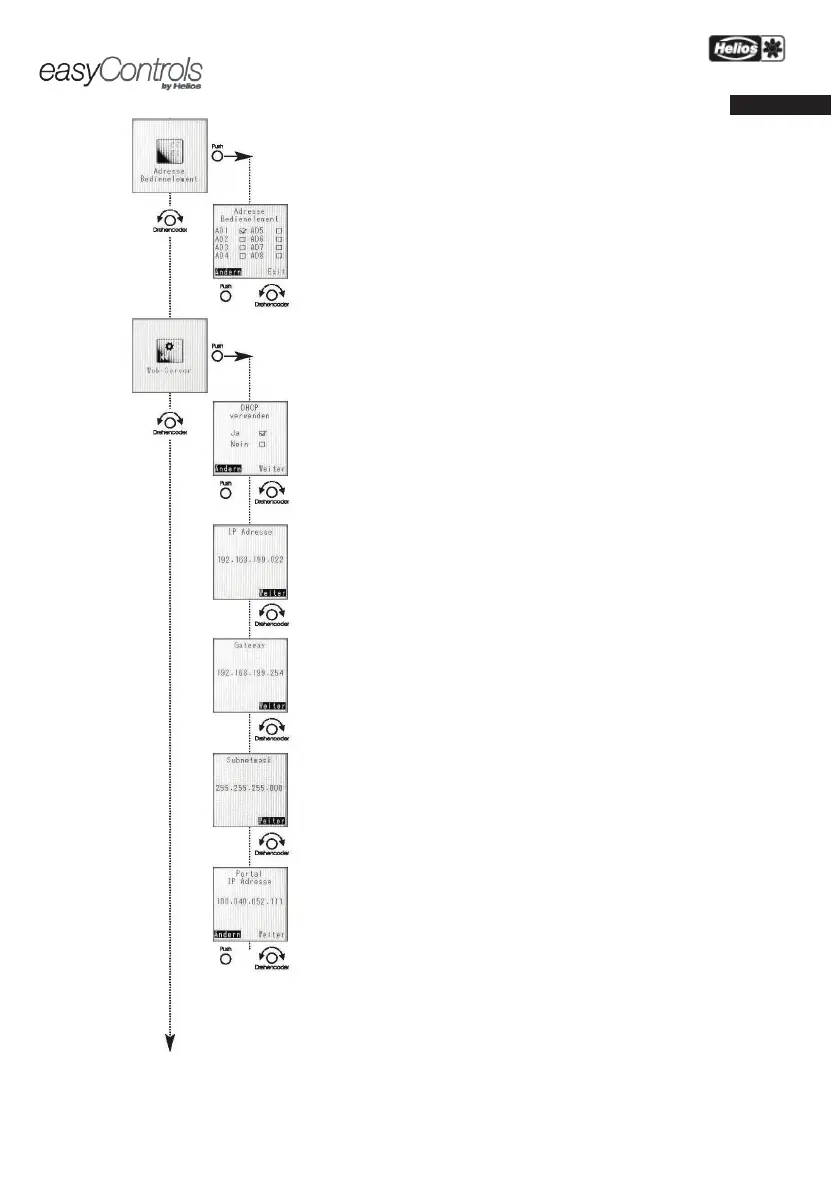
The easyControls control system has a local web server, whereby the KWL
via an internet browser.
ATTENTION: These settings should only be adjusted by a computer specialist!
Use DHCP
When DHCP is activated ("Yes" marked), all of the following network settings
router with DHCP configuration.
When DHCP is deactivated, the following data must be manually configured.
IP address
Display depends on DHCP settings (see above)
„Off” Enter the desired IP address
„On” Displays the assigned IP address (Image left)
Gateway
Display depends on DHCP settings (see above)
„Off” Enter the desired gateway
„On” Displays the assigned gateway (Image left)
Subnet mask
Display depends on DHCP settings (see above)
„Off” Enter the desired subnet mask 255.---.---.---
„On” Displays the assigned subnet mask (Image left)
Portal IP address
Display depends on DHCP settings (see above)
„Off” Enter the desired portal IP address


 To Next Page