COFFEE
SETTING
SETTING
11
EN
READY
STRENGTH
COFFEE
COFFEE
VOLUME 50ML
VOLUME 50ML
ENJOY!
READY
COFFEE
LATTE
COFFEE
LATTE
STRENGTH
HEATING
CREAM
60S
WAITING
60S
COFFEE 100ML
ENJOY!
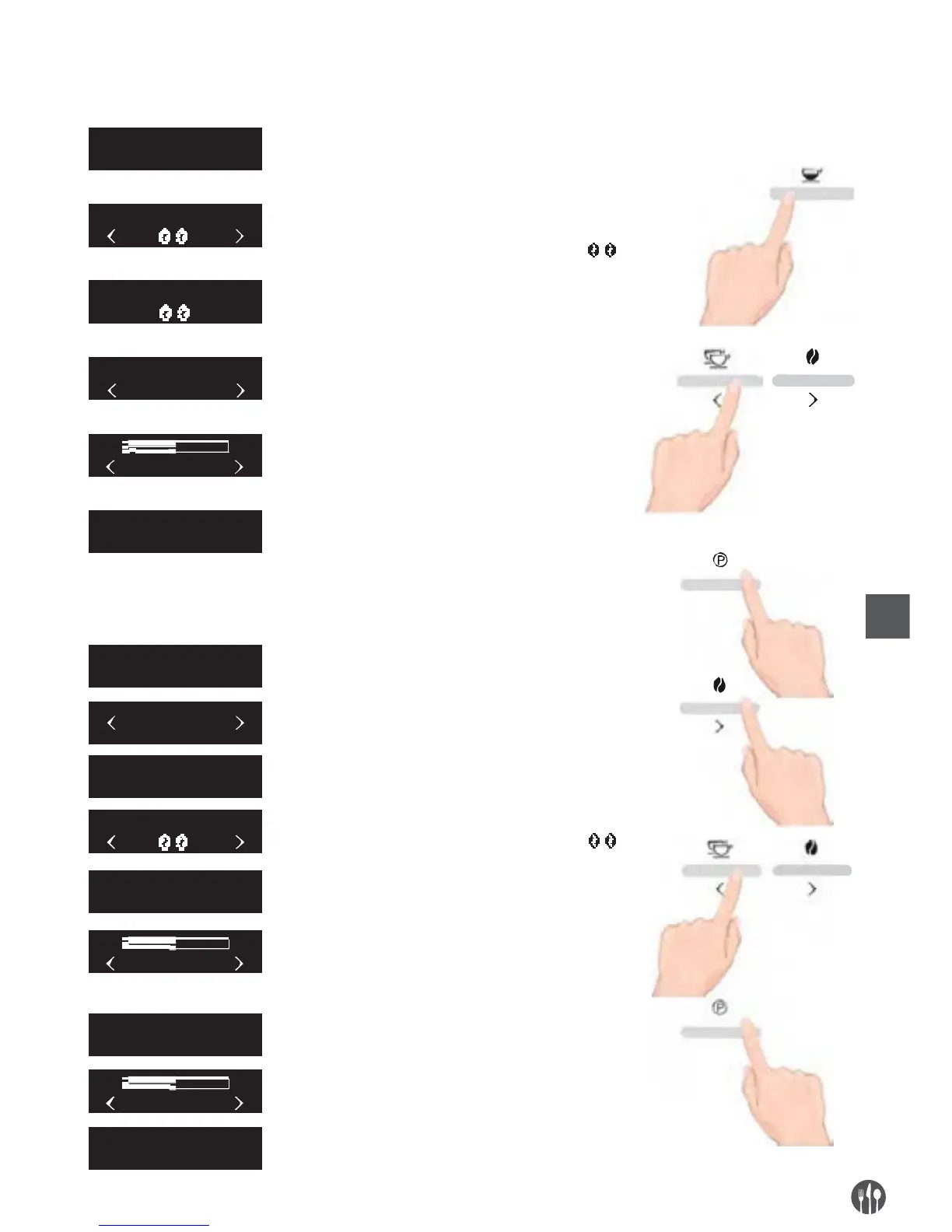
When the screen shows “READY”, press coffee button
for coffee function.
The grinder will begin to grind. At this time, you can
adjust the amount of coffee beans by pressing the left and
right button. Default amount of coffee beans
After grinding , the amount of coffee beans can not
be adjusted by pressing the left and right button.
During making coffee, you can adjust the volume
of coffee by pressing the left and right button.
During making coffee, you can cancel making coffee
by pressing coffee button.
When the screen shows as the left picture, it means
the coffee is ready, please enjoy it.
MAKING COFFEE:
Before making Coffee, please rotate the button to the direction of milk cream silk printing.
When the screen shows “Ready”, press “setting”button
to show the second menu.
Press the right button until screen shows
“Coffee Latte”.
Press Setting button to start making coffee latte.
The grinder will begin to grind. At this time, you can
adjust the amount of coffee beans by pressing the left and
right button. Default amount of coffee beans
After grinding, the amount of coffee beans can not be
adjusted by pressing the left and right button.
After heating, it starts to make milk cream. You can adjust
the time of making milk cream by pressing the left and
right button. Press Cappuccino button to stop making
milk cream.
After milk cream is ready, it needs to wait 20 seconds.
During making coffee, you can adjust the volume of
coffee by pressing the left and right button. Press Setting
button to stop making coffee
When the screen shows as the left picture, it means
Coffee Latte is ready.
MAKING COFFEE LATTE:
Before making Coffee Latte, please rotate the button to the direction of milk cream silk printing.


 To Next Page