7
EN
6. RESIDUAL RISKS (FOR THE USER)
After a cooking operation, open the door cautiously,
to avoid a violent outfl ow of heat which could cause
burns.
While the oven is in operation, pay attention to the
possible hot zones (marked on the appliance) of its
external surfaces.
Place the machine on a bench or similar support,
at a height of at least 85 cm from the fl oor.
The bench or support must be able to support the
weight of the machine and house it correctly.
The appliance contains electrical parts and must
never be washed with a jet of water or steam.
The appliance is electrically connected: before at-
tempting any cleaning operation, cut power to the
appliance.
Do not use the door handle to move the appliance
(the glass panel may break).
When the tilting door is wide open, there is the risk
that things could be placed on the surface with the
risk of irreparably damaging the door hinges.
7. HOW TO USE THE CONTROL PANEL
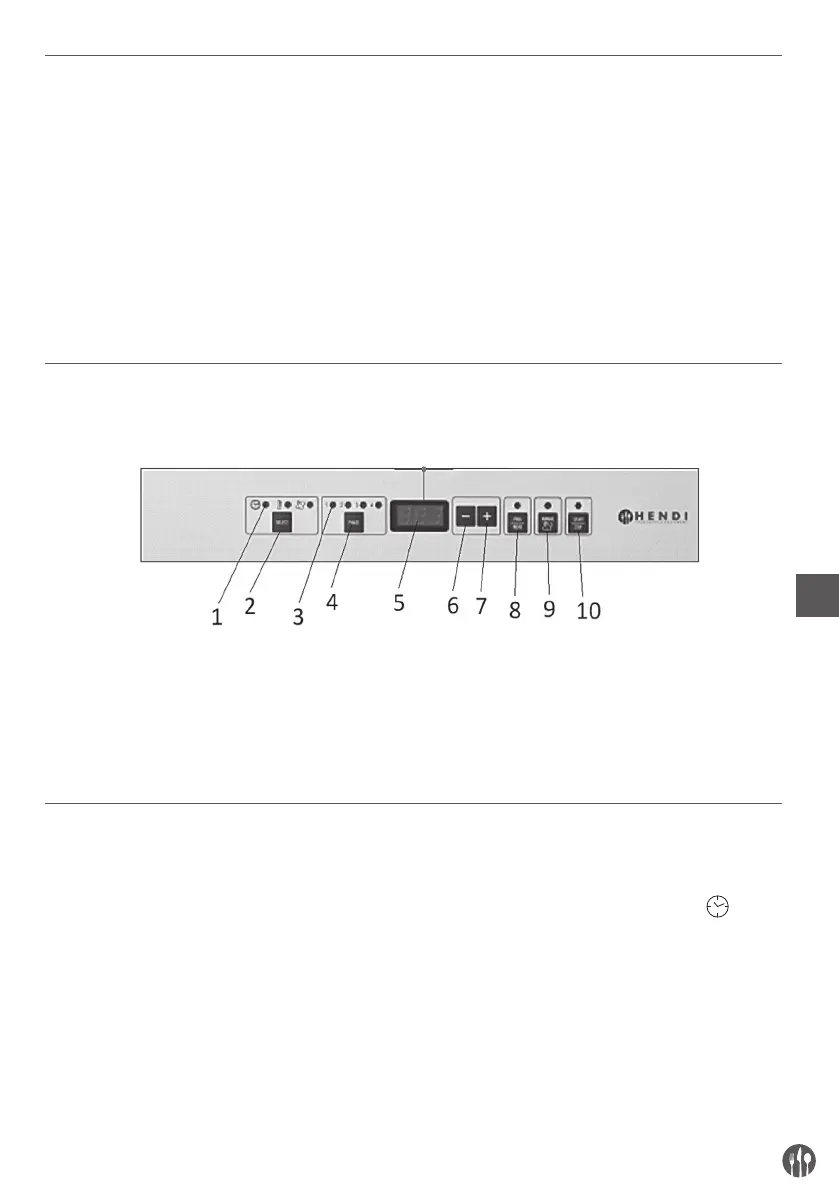
Control Panel symbol legend:
1. Parameter on signal LED 6. Parameter value decrease button
2. Cooking parameter selection button 7. Parameter value increase button
3. Step on signal LED 8. Cooking program select/save button
4. Cooking step selection button 9. Manual humidifying button
5. Parameter display 10. START/STOP button
8. IGNITION
The control panel (digital) automatically turns on
as soon as the oven is electrically powered.
The display shows in succession the following written:
– “r.X.X” where “X.X” indicates the fi rmware revi-
sion number inserted in the electronic board (eg
“r.1.0”).
– “d.XX” where “X.X” is the abbreviation for the card
calibration of the model.
Then “0.00” appears on the display to indicate time
(expressed in hours and minutes) and the time led
turns on in the parameter fi eld (symbol ).
The phase 1 led turns on in the “phase” fi eld (set to
receive cooking parameters).


 To Next Page