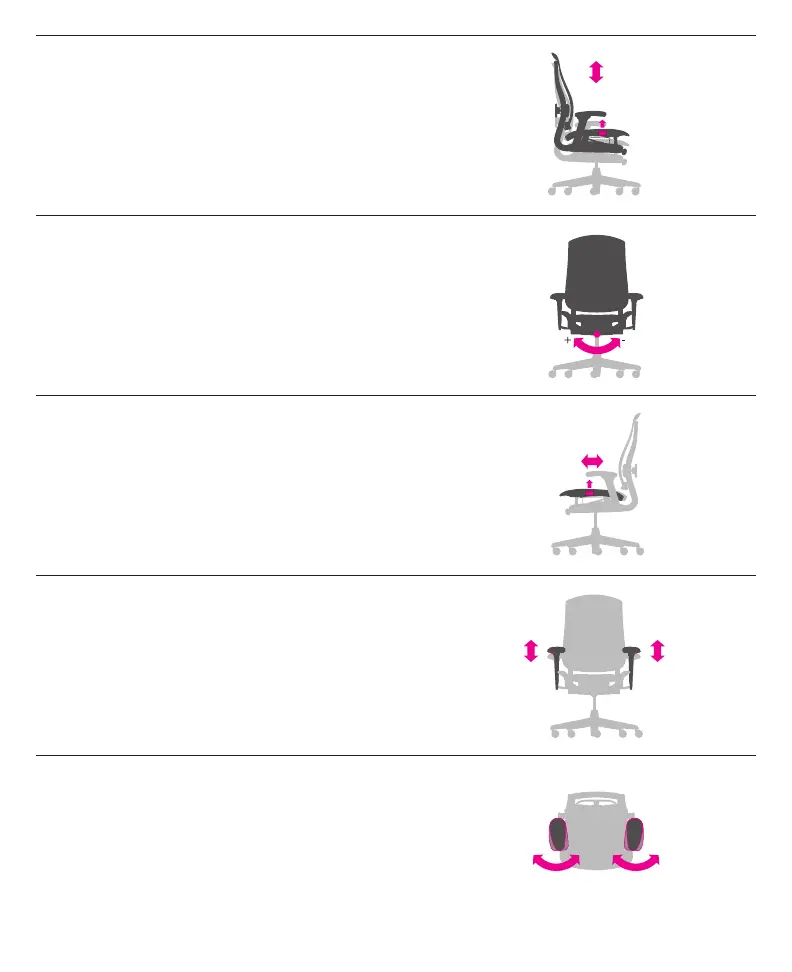
Seat Height
Lever under right side of seat
To raise: While taking your weight off chair, lift lever up.
To lower: While seated, lift lever up.
Adjust the seat height so your feet rest flat on the floor or footrest.
Tilt Tension
Knob below front side of seat
To increase: Turn knob clockwise.
To decrease: Turn knob counterclockwise.
Set the tilt tension to control the resistance you feel when
leaning back.
Seat Depth
Lever under left side of seat
While taking your weight off chair, lift lever and adjust seat pan
forward or back. Release lever to lock in position.
Adjust your chair’s depth so the seat edge doesn’t hit the
back of your legs.
Arm Height
Lever on outside lower base of each arm
To raise or lower arms: Raise lever to unlock arm, adjust arm,
release lever to lock.
Adjust chair’s arm height to support your arms and take
weight off your shoulders.
Arm Angle
Front of each armpad
To pivot arms in or out: Grasp front end of armpad and
pivot it to the left or right.
Adjust chair’s arms inward for support while using a keyboard;
adjust arm out for support when using a mouse.



 To Next Page