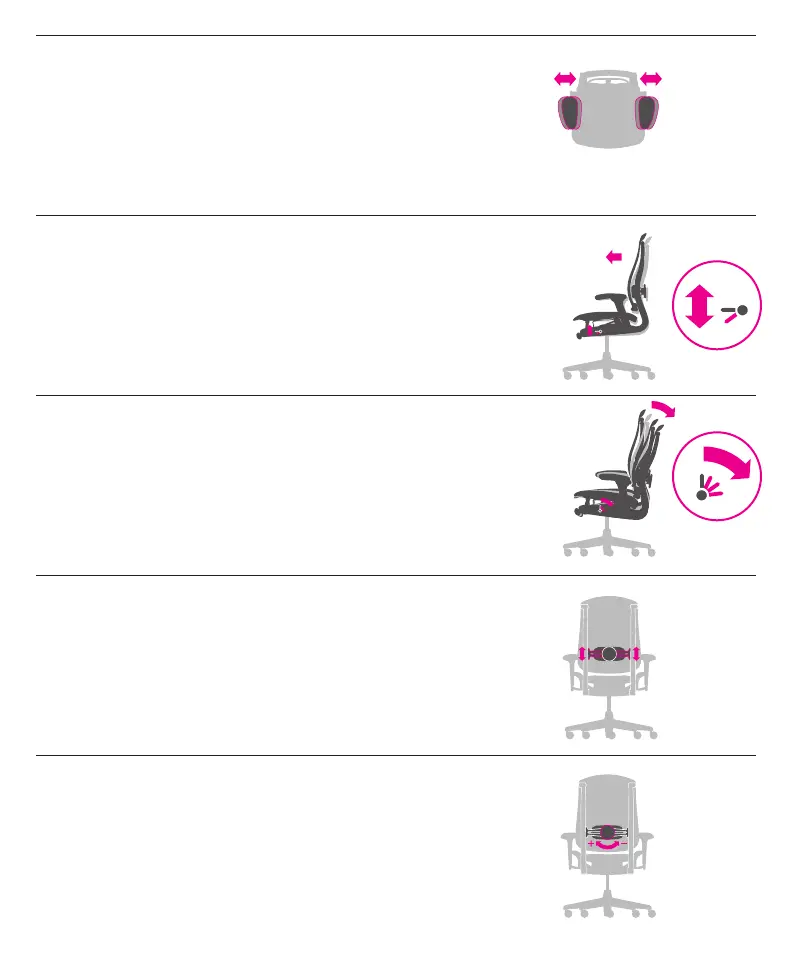
Arm Width
Rear of each armpad
To adjust: Grasp rear portion of armpad and adjust arm in or out.
Adjust width of chair’s arms to support your arms and take
weight off your shoulders.
Forward Tilt
Horizontal tab under left front side of seat
To position chair forward: Recline and flip tab down.
To resume horizontal position: Recline and flip tab up.
Engage the forward tilt for support when performing task-intensive
work such as keyboarding.
Tilt Limiter
Vertical tab under left front side of seat
To engage: Recline and move tab up to define the limit of recline.
To release: Lean forward and press tab back.
Engage the tilt limiter when you want to sit in an upright or
partially reclined position.
Lumbar Height
Side edges of lumbar support
To raise or lower: Grasp side edges of lumbar support,
slide lumbar support up or down to desired height.
Adjust the height of the lumbar so it supports the natural
curve of your spine.
Lumbar Depth
Knob in center of lumbar support
To increase lumbar support: Turn knob clockwise.
To decrease lumbar support: Turn knob counterclockwise.
Adjust the depth of the lumbar so it supports the natural
curve of your spine.



 To Next Page