Adjustment Guide2HermanMiller Verus
®
Chair
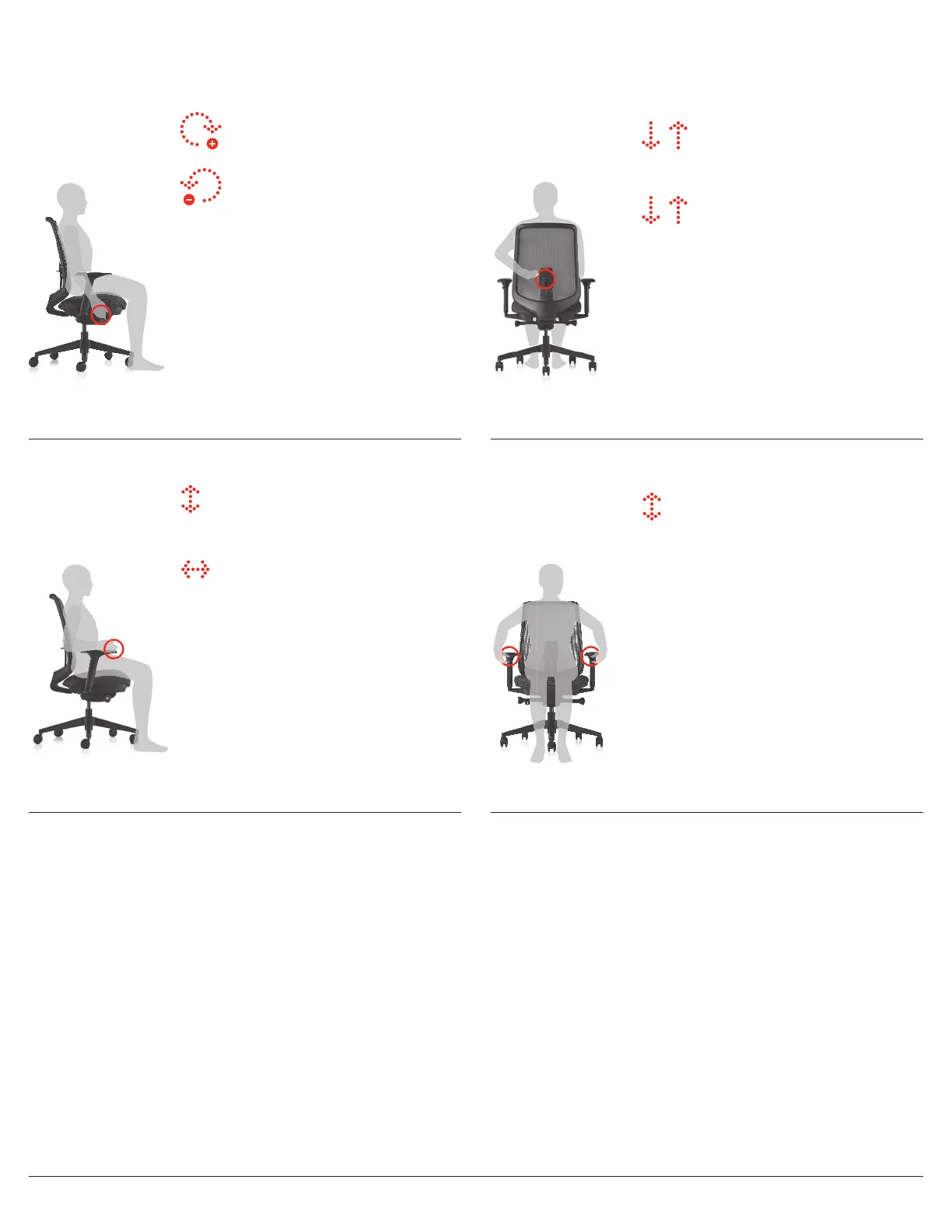
To adjust height on suspension back:
Slide lever up and down to desired
height.
To adjust height on TriFlex back:
Slide adjustable back support up and
down to desired height.
Lumbar Height: Lever on adjustable lumbar support
Only available on some models.
To raise or lower arm:
Push button and pull arms up or down
to desired height.
For maximum comfort, your arms should make contact with the armpad
without any lift at your shoulders.
Arm Depth & Width:
Only available on some models.
To adjust arm depth:
Grasp arm pad, push forward or back to
desired position.
To adjust arm width:
Grasp armpad and pull in or push out.
Arm Height: Button located on arm stalk under each arm pad
To increase tension:
While seated, turn knob forward
(toward + sign).
To decrease tension:
While seated, turn knob backward
(toward – sign).
Set the tilt tension to control the resistance you feel when leaning back.
For the Self-adjusting Tilt with the Tilt lock or Tilt limiter, the tension is
pre-loaded to adjust to the user.
Tilt Tension: Long stem on right side with knob
Available on Tilt (8) Tension control
with tilt lock.



 To Previous Page