MANL-00005-A - D Series Rotary Dispensers.docx 17
OPERATING INSTRUCTIONS
Colorant Selection
1. Ensure all gauges are set to zero before beginning.
2. Identify the colorant to be dispensed.
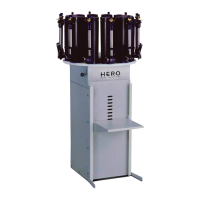
3. Release the table brake and rotate the table until the desired colorant is directly over the
dispensing shelf.
4. Set the table brake to prevent rotation during dispensing.
5. Place an open can of paint under the dispense nozzle.
6. Confirm that there is sufficient colorant in the canister to complete the dispense. If the colorant
level is too low, air will be drawn into the pump during the pump charging process and result in an
inaccurate dispense.
Gauge Setting – Non-micro
TIP: If the dispense formula cannot be completed in a single dispense, multiple dispenses will be required.
In this situation it is recommended to divide the dispense into equal parts to minimize the risk of errors due
to gauge setting.
1. Identify the amount of colorant to be dispensed.
2. Depress the spring loaded button and lift the gauge by its handle to the required marking.
3. Release the spring loaded button and confirm that the gauge is locked in place.
Gauge Setting – Micro (optional)
TIP: If the dispense formula cannot be completed in a single dispense, multiple dispenses will be required.
In this situation it is recommended to divide the dispense into equal parts to minimize the risk of errors due
to gauge setting.
1. Identify the amount of colorant to be dispensed.
2. Depress the spring loaded button and lift the gauge by its handle to the required marking.
3. Release the spring loaded button and confirm that the gauge is locked in place.
4. Turn the micro knob to the desired dispense fraction.


 To Next Page