• The time advances fast when the
button is pressed and held.
• The time advances by 1 minute, each
time the button is pressed.
NOTE :
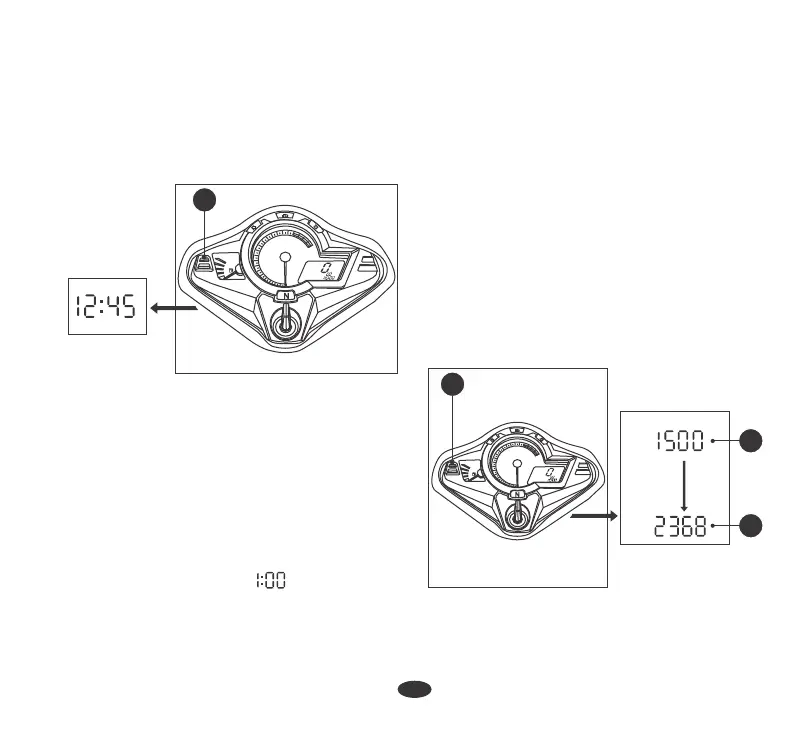
6. To end the adjustment press Select
Button (2). The display will stop
flashing automatically and the
adjustment will be saved or if the
button is not pressed for about 40
seconds.
The clock will reset " " if the battery is
disconnected.
ODOMETER / TRIPMETER
Push Select button (2) to select the
Odometer & Tripmeter. Tripmeter can be
displayed from ''9999.9'' Kms. If the
Tripmeter exceeds "9999.9" Kms. it will
return to "0.0" Kms. automatically.
The Tripmeter (A) shows distance traveled
per trip.
The Odometer (B) shows accumulated
distance traveled.
The Odometer can be displayed from "0 to
999999" Kms.
x1000r/min
2
1
0
3
4
5
6
7
8
9
10
1
1
F
E
TRIP
TOTAL
PM
km
km/h
12
2
x1000r/min
2
1
0
3
4
5
6
7
8
9
10
1
1
F
E
TRIP
TOTAL
PM
km
km/h
2
km.
TOTAL
A
B
km..
TRIP
AM :


 To Next Page