ALTIWARE SERIES
TABLE OF CONTENTS
9
english
axis
TABLE OF CONTENTS
10
english
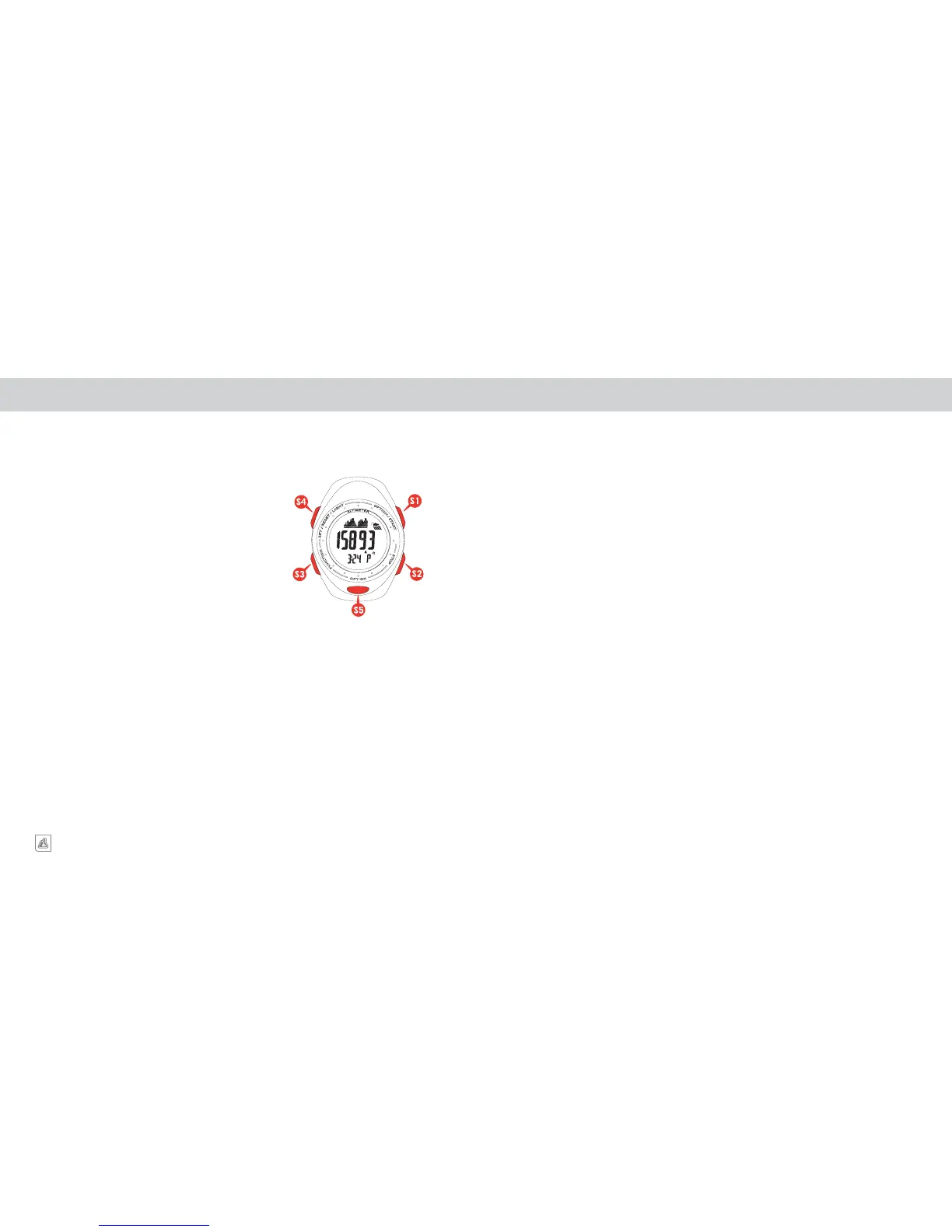
KEYS AND THEIR FUNCTIONS KEYS AND THEIR FUNCTIONS
S1 KEY
- Changes View in Time, Barometer, Altimeter, Altimeter
Log and Chronograph Log modes
- Start/Stop information storage in Altimeter mode
- Advances variable in Setting mode
- Start/Lap/Split action in Chronograph mode
- Turns Daily Alarm On/Off
S2 KEY
- View/Select Time 1 / Time 2 in Time of Day mode
- View/Select C/F in Barometer mode
- View/Select Ft/M in Altimeter mode
- Scroll through Altitude Log files
- Stop Chronograph/Save Chronograph Files
- Scroll through Chronograph Log files
- Select Alarm 1 or 2
S3 KEY
- Advances display through the various operational
modes
- Selects variable in setting mode
S4 KEY
- Enter/Exit Setting mode for each function
- Clear Chronograph and Altimeter memories
-
S5 KEY
- Changes view in Time, Barometer, Altimeter Altimeter
Log and Chronograph Log modes
The Axis is equipped with 4 individual keys. Each key has several functions listed below.
KEY ACTIONS – QUICK PRESS VS. PRESS AND HOLD
There are two key actions used to program the watch:
QUICK PRESS
The key is pressed quickly and immediately released. This is the most common key action and is
used for most aspects of the watches operation.
PRESS & HOLD
The key is pressed and held for 2-3 seconds. This key action is generally used to initiate a
programming sequence or to change an on screen variable.
NOTE: Generally, when a PRESS & HOLD action is required, the word HOLD will appear on
the center line of the display.
NOTE: In this manual we will indicate when a PRESS & HOLD is required. In most other
instances, if not specifically stated, a QUICK PRESS should be assumed.
PROGRAMMING THE WATCH – COMMON KEY ACTIONS
The following are key presses required to perform the most common operations.
ENTER A PROGRAMMING SEQUENCE
PRESS & HOLD the S4 key.
The words ADJUST – HOLD will appear in the top and center lines of the display. Continue to hold
the key until the display automatically advances to the first variable in the programming sequence.
ADJUST VARIABLE IN A PROGRAMMING SEQUENCE
QUICK PRESS the S1 & S2 keys.
Variables in a programming sequence are adjusted up using QUICK PRESSES of the S1 key and
down using QUICK PRESSES of the S2 key.
In most programming options, a PRESS & HOLD of either the S1 or S2 key will cause the variable
to fast advance, allowing you to quickly advance to a different number.
Continued next page.


 To Next Page