
 Need help?
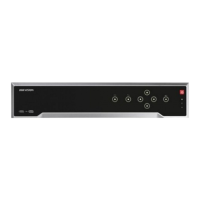
Do you have a question about the HIKVISION DS-7732NI-K4 and is the answer not in the manual?
Procedures for starting up, shutting down, and activating the NVR.
Step-by-step guide to configuring the NVR using the setup wizard.
Instructions for activating, adding, and connecting IP cameras to the NVR.
Defining parameters affecting image quality, stream type, and resolution.
Setting schedules for automatic recording and capture based on time or events.
Setting up motion detection to trigger recording or other actions.
Configuring recording or capture triggered by external alarm inputs.
Configuring recording based on Video Content Analysis (VCA) events.
Methods to protect record files from being overwritten or deleted.
Instructions for playing back recorded video files through various search methods.
Methods for exporting and backing up record files to various devices.
Configuring motion detection parameters, areas, and response actions.
Handling actions for external sensor alarms and configuring linkage.
Setting up detection and response actions for video loss events.
Configuring detection and response for video tampering events.
Defining how the system responds to alarms and exceptions.
Configuring face detection rules, sensitivity, and response actions.
Setting up vehicle detection for traffic monitoring and license plate capture.
Configuring rules for detecting objects crossing a virtual line.
Setting up intrusion detection rules for objects within a defined virtual region.
Configuring rules for detecting objects entering a pre-defined virtual region.
Configuring basic network parameters like IP address and DNS.
Steps to enable RAID and configure disk arrays.
Process for initializing newly installed hard disk drives.
Procedures for upgrading NVR firmware using backup devices or FTP.
Adding, deleting, and editing user accounts and their permissions.
Detailed technical specifications for various NVR models.
Common issues and solutions for NVR operation.
 General
| Audio system | 2-way |
|---|---|
| Input bandwidth | 256 Mbit/s |
| Output bandwidth | 160 Mbit/s |
| Maximum frame rate | 30 fps |
| Maximum resolution | 4096 x 2160 pixels |
| Alarm input channels | 16 |
| Video input channels | 32 channels |
| Alarm output channels | 4 |
| Supported resolutions | 4096 x 2160, 3840 x 2160, 2560 x 1440, 1920 x 1080, 1600 x 1200, 1280 x 1024, 1280 x 720 |
| Audio formats supported | G.711 A-law, G.711 μ-law, G.726 |
| Video formats supported | H.264, H.264+, H.265, H.265+, MPEG4 |
| Number of simultaneously playbacked channels | 16 channels |
| USB 2.0 ports quantity | USB 2.0 ports have a data transmission speed of 480 Mbps, and are backwards compatible with USB 1.1 ports. You can connect all kinds of peripheral devices to them. |
| Ethernet LAN data rates | 10, 100, 1000 Mbit/s |
| Ethernet LAN (RJ-45) ports | 2 |
| Supported network protocols | TCP/IP, DHCP, IPv4, IPv6, DNS, DDNS, NTP, RTSP, SADP, SMTP, SNMP, NFS, iSCSI, ISUP, UPnP, HTTP, HTTPS |
| AC input voltage | 100 - 240 V |
| AC input frequency | 50 - 60 Hz |
| Power consumption (typical) | 20 W |
| Operating temperature (T-T) | -10 - 55 °C |
| Operating relative humidity (H-H) | 10 - 90 % |
| HDD capacity | - GB |
| HDD interface | SATA |
| Maximum storage capacity | 8 TB |
| Number of HDDs installed | 0 |
| Certification | FCC Part 15 Subpart B, ANSI C63.4-2014 CE EN 55032: 2015, EN 61000-3-2, EN 61000-3-3, EN 50130-4, EN 55035: 2017 |
| Product color | Black |
| Wi-Fi | No |
 Weight and Dimensions
| Depth | 400 mm |
|---|---|
| Width | 445 mm |
| Height | 71 mm |
| Weight | 5000 g |


 To Next Page
