
 Need help?
Do you have a question about the HIKVISION HiLook Series and is the answer not in the manual?
Safeguards to prevent serious injury or death.
Precautions to prevent potential injury or material damage.
General preparation steps before starting camera installation.
Detailed steps for installing Type I camera models.
Detailed steps for installing Type II camera models.
Instructions on connecting the camera to TVI DVR and monitor.
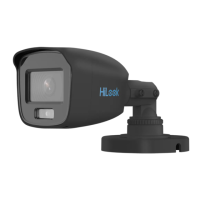
This document describes the HiLook Series 3K ColorVu Audio Turret Camera, a versatile surveillance device designed for various environments. The camera is available in two types, Type I (THC-T159-MS) and Type II (THC-T259-MS), both offering similar core functionalities with slight differences in physical design and installation methods.
The HiLook Series 3K ColorVu Audio Turret Camera is primarily a surveillance camera equipped with a high-performance CMOS sensor, enabling it to capture clear images. A key feature is its "3K ColorVu" capability, which suggests the camera is designed to provide vivid, full-color imaging even in low-light conditions, enhancing detail and clarity compared to traditional monochrome night vision. The "Audio Turret" designation indicates that the camera includes audio capabilities, allowing for the capture of sound in addition to video, and its turret form factor provides flexibility in aiming and positioning.
The camera offers a "4 in 1 video output," meaning it supports multiple video formats: TVI, AHD, CVI, and CVBS. This multi-format support ensures compatibility with a wide range of existing DVRs and surveillance systems, making it a flexible option for upgrades or new installations. The ability to switch between these video outputs is a significant usage feature, allowing users to adapt the camera to their specific system requirements. Audio transmission "over coaxial cable" is another notable feature, simplifying cabling by allowing both video and audio signals to be carried over a single coaxial cable, which is common in analog surveillance setups.
The camera's menu system provides extensive control over its imaging and audio parameters. Users can adjust settings related to exposure, video quality, and audio. The "EXPOSURE MODE" allows selection between GLOBAL, BLC (Backlight Compensation), HLC (Highlight Compensation), and DWDR (Digital Wide Dynamic Range). GLOBAL mode offers standard exposure adjustments, while BLC compensates for bright backgrounds to clarify foreground objects. HLC reduces the brightness of strong light spots to improve overall image quality, and DWDR enhances visibility in scenes with both very dark and very bright areas. AGC (Auto Gain Control) is available to optimize image clarity in poor lighting, with adjustable levels (HIGH, MEDIUM, LOW). "ANTI-BANDING" is a setting to prevent horizontal lines in images captured under low-frequency light or high brightness.
Under "VIDEO SETTINGS," users can fine-tune image characteristics such as "IMAGE MODE" (STD, HIGH-SAT, HIGHLIGHT), "WHITE BALANCE" (AUTO, MANUAL with R-GAIN and B-GAIN adjustment), "BRIGHTNESS," "CONTRAST," "SHARPNESS," "SATURATION," and "DNR" (Digital Noise Reduction). These settings allow for precise customization of the video output to suit different environmental conditions and user preferences. "AUDIO SETTINGS" enable users to turn audio on or off and adjust the "VOLUME," though audio settings are specifically supported only in TVI mode.
The "SMART LIGHT" feature is designed to manage the integrated white light, preventing overexposure when the light is active. It can be set to "AUTO" or "OFF." In AUTO mode, the white light automatically activates when the environment becomes dark, with an adjustable "THRESHOLD" to determine the ambient light level for activation and a "LEVEL" setting to control the brightness of the white light. If set to OFF, the white light remains off unless an alarm is triggered.
The camera's design emphasizes ease of installation and adjustment. Both Type I and Type II cameras feature a "Switch Button" that, when pressed and held for 5 seconds, allows users to switch between the four video output formats (TVI, AHD, CVI, CVBS). This on-device switching capability eliminates the need for external tools or complex software for format changes, enhancing user convenience during setup.
Installation options include ceiling mounting (with or without a junction box) and wall mounting. The manual provides detailed steps for each, including the use of drill templates for accurate screw placement. The camera's 3-axis adjustment mechanism (Pan Position [0° to 360°], Tilt Position [0° to 75°], Rotation Position [0° to 360°]) allows for flexible positioning to achieve the optimal viewing angle. This adjustability is crucial for ensuring comprehensive coverage and effective surveillance.
The camera's menu is accessed via a connected TVI DVR and monitor. Users can navigate the menu using PTZ (Pan-Tilt-Zoom) control buttons on the DVR interface, specifically using up/down buttons to select options, "Iris +" to confirm selections, and left/right buttons to adjust values. This method of menu access is standard for many analog surveillance cameras, providing a familiar interface for experienced users.
The "ColorVu" technology, combined with the 3K resolution, ensures that the camera delivers high-quality, full-color images even in challenging low-light conditions, which is a significant advantage for identification and evidence collection. The audio capability further enhances surveillance by providing contextual sound information.
The manual provides guidelines for proper handling and maintenance to ensure the longevity and optimal performance of the camera. It advises against disassembling the camera by unprofessional personnel, emphasizing the importance of contacting a dealer or service center for repairs. This suggests that internal components are sensitive and require specialized knowledge for servicing.
For cleaning, the manual recommends using a clean cloth with a bit of ethanol and wiping gently, indicating that harsh chemicals or abrasive materials should be avoided to prevent damage to the camera's surfaces or lens.
Environmental considerations are also highlighted as part of maintenance. Users are cautioned against exposing the device to high electromagnetic radiation, extremely hot, cold, dusty, or damp locations. Good ventilation is recommended to avoid heat accumulation, which can impact performance and lifespan. The camera should also be kept away from liquids if it is not a waterproof model.
The "FACTORY DEFAULT" option in the menu allows users to reset all settings to their original factory configuration, which can be useful for troubleshooting or reconfiguring the camera after extensive adjustments. The "SAVE & EXIT" function ensures that any changes made to the settings are preserved, while "EXIT" allows users to leave the menu without saving changes. These menu options contribute to straightforward maintenance and configuration management.
Overall, the HiLook Series 3K ColorVu Audio Turret Camera is designed as a robust and adaptable surveillance solution, offering advanced imaging and audio capabilities with user-friendly installation and comprehensive configuration options.
 General
| Power Supply | 12 VDC |
|---|---|
| Video Compression | H.264/H.265 |
| Analog Video Input | Depends on model |
| CVBS Input | Depends on model |
| Video Output | HDMI/VGA |
| Audio Compression | G.711 |
| Audio Input | Depends on model |
| Audio Output | Depends on model |
| Two-Way Audio | Depends on model |
| Hard Disk | SATA |
| Capacity | Up to 10TB (depends on model) |
| Network Interface | RJ45 10M/100M |
| USB Interface | USB 2.0 |
| Consumption | Depends on model |
| Working Temperature | -10 °C to 55 °C (14 °F to 131 °F) |
| Dimensions | Depends on model |
| Weight | Depends on model |
| HDTVI Input | Depends on model |
| AHD Input | Depends on model |
| HDCVI Input | Depends on model |
| IP Video Input | Depends on model |



 To Next Page
