Page 2 of 16
For detailed Warning and Caution statements, and operating
instructions, refer to the VersaCare® Bed User Manual (USR119
for A through J models; 161956 for K model and newer).
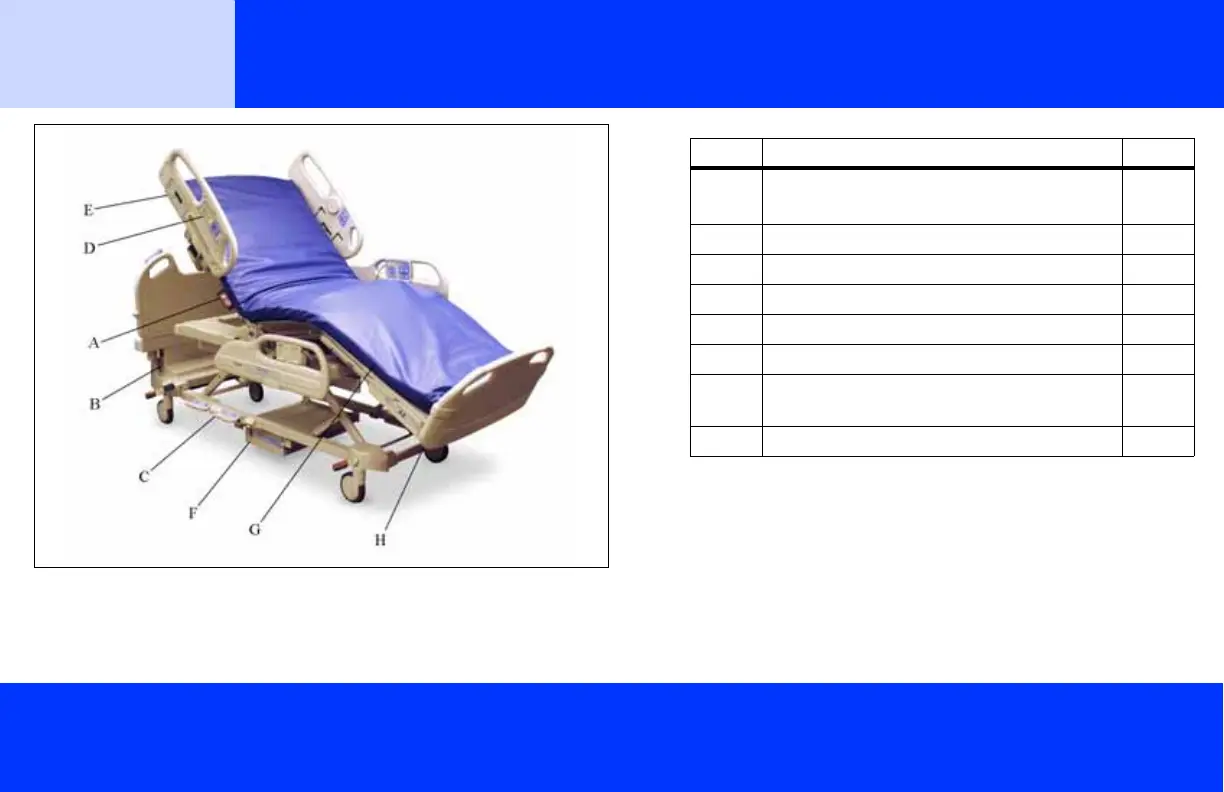
Item Description Page
A Emergency CPR and Emergency
Trendelenburg
a
Control
a. There must be power to the bed, either AC or battery, for
the Emergency Trendelenburg function to operate.
3
B Battery Back-Up 4
C Foot Controls 4
D Point-of-Care® Caregiver Control Panel 5, 6
E Control Pod 7, 8, 9
F IntelliDrive® Transport System (optional) 10
G Active Integrated Response® Treatment
Surface or P500 Surface (optional)
12
H SafeView™ Alerts (optional) 9
Bed
Features
NOTE: In this document, there are references to different bed models. To identify your bed model, look at the serial number label. The
label is on the right side of the weigh frame, under the patient’s shoulder. For example, P3200AXXXX identifies an A model bed.
Also in this document where two versions of a symbol are shown, one or the other will be used on your bed.













 To Next Page