Page 4 of 16
For detailed Warning and Caution statements, and operating
instructions, refer to the VersaCare® Bed User Manual (USR119
for A through J models; 161956 for K model and newer).
Bed
Obstacle Detection
and Battery and Foot
Controls
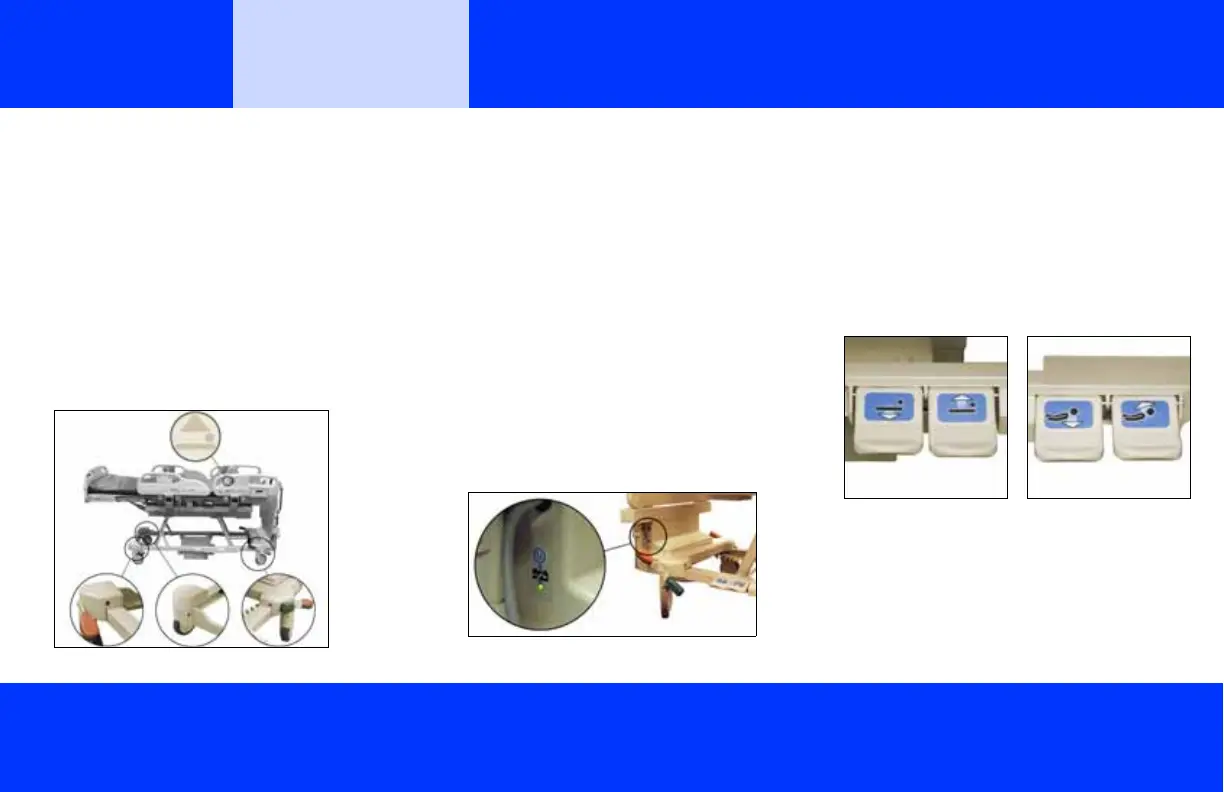
Obstacle Detection
The bed is equipped with an obstacle detection
system that runs along the three open sides of
the base frame. This system detects objects
that are between the upper frame and the base
frame.
If an object is detected, the Bed Not Down indi-
cator on both siderails will flash and you will not
be able to lower the bed.
If an object is detected while the bed sleep deck
is lowering, the bed will stop lowering, and then
raise automatically for 2 seconds. The Bed Not
Down indicator on both siderails will flash.
Battery Back-up
When the bed does not receive AC power, bat-
tery back-up can be activated. When the bed
operates on battery back-up—
• The functions on the caregiver control panel
are available.
• The functions on the control pod are not
available, and the surface indicators are off.
• The battery stays active for 10 minutes (A
through J models) or 1 minute (K model and
newer) after the last control is used.
The battery indicator on the caregiver control
panel shows its status (see “Battery” on page 3).
Activate
• A through J models—press the Battery con-
trol that is at the right-side head end, just
below the power cord.
• K model and newer—press any caregiver
siderail control except the Lockout control.
Foot Controls
1. To enable the controls, step down on one of
the Head Down/Up or Bed Down/Up ped-
als for 1 to 3 seconds.
2. Release the pedal.
3. Step down on the pedal of the applicable
function until the bed is in the correct posi-
tion.













 To Next Page