64
7.1.5 Configure NAT (Network Address Translation) Settings
Purpose:
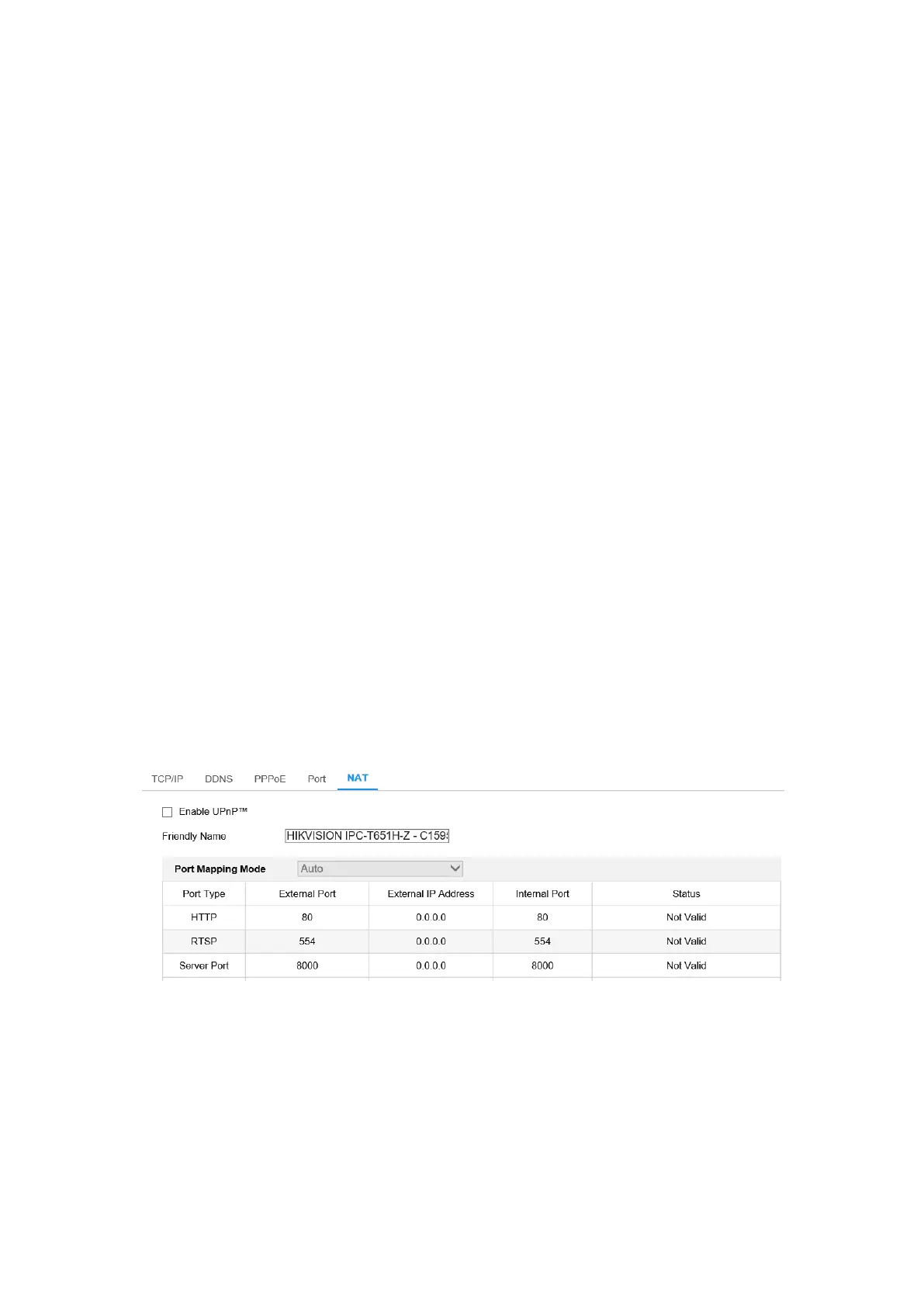
NAT interface allows you to configure the UPnP™ parameters.
Universal Plug and Play (UPnP™) is a networking architecture that provides
compatibility among networking equipment, software and other hardware devices.
The UPnP protocol allows devices to connect seamlessly and to simplify the
implementation of networks in the home and corporate environments.
With the function enabled, you don't need to configure the port mapping for each port,
and the camera is connected to the Wide Area Network via the router.
Steps:
1. Enter the NAT settings interface. Configuration > Network > Basic Settings >
NAT.
2. Check the checkbox to enable the UPnP™ function.
3. Choose a nickname for the camera, or you can use the default name.
4. Select the port mapping mode. Manual and Auto are selectable. And for manual
port mapping, you can customize the value of the external port.
5. Click Save to save the settings.
Figure 7-6 UPnP Settings
7.2 Configure Advanced Settings
Purpose:
You can configure the parameters, including SNMP, FTP, Email, HTTPS, QoS,



 To Next Page