EasyManua.ls Logo

Hilti SR 4-A22 - User Manual

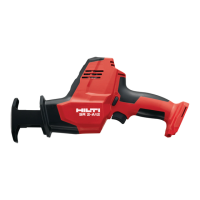
Hilti SR 4-A22
52 pages
Print Icon
To Next Page IconTo Next Page
Loading...
SR 4-A22
English 1
Français 10
Español 21
Português 31

Other manuals for Hilti SR 4-A22

Questions and Answers

  • V
    Vicki KingAug 18, 2025
    How to remove saw blade from Hilti Cordless Saw chuck?
    • S
      Shawn GreerAug 18, 2025
      If you're having trouble removing the saw blade from the Hilti Cordless Saw chuck, it might be because the locking lever wasn't pushed all the way. Turn the locking lever as far as it will go and remove the saw blade. Another reason could be that the chuck is clogged with residues from sawing operations. Clean the chuck regularly from the outside to remove these residues.
  • A
    Allison CampbellAug 20, 2025
    Why saw blade cannot be removed from Hilti Cordless Saw chuck?
    • L
      Laurie RubioAug 20, 2025
      If the saw blade cannot be removed from the Hilti Cordless Saw chuck, it could be that the locking sleeve is not turned as far as it will go. Turn the locking sleeve as far as it will go and remove the saw blade.
  • S
    Steven RamirezAug 22, 2025
    Why does my Hilti SR 4-A22 not develop full power?
    • A
      Andrew WellsAug 23, 2025
      Your Hilti Saw might not be developing full power because the control switch isn't fully pressed. Ensure you press the control switch completely. Alternatively, the battery could be discharged, so try changing the battery and charging the empty one.
  • C
    carolynhigginsAug 26, 2025
    What to do if the LEDs do not light up on my Hilti SR 4-A22?
    • J
      Jason BeanAug 26, 2025
      If the LEDs on your Hilti Saw aren't lighting up, there could be a few reasons. First, check if the battery is fully inserted; push it in until you hear a double click. The battery might also be empty, so try charging it. Lastly, the transport lock may be engaged; disengage it to see if that resolves the issue.
  • J
    Jason KingAug 28, 2025
    Why is 1 LED flashing on my Hilti Saw?
    • R
      robertoliverAug 28, 2025
      If one LED is flashing on your Hilti Saw, it could mean that the battery is discharged. Try changing the battery and charging the empty one. Another possibility is that the battery is either too hot or too cold. In this case, bring the battery to the recommended working temperature.
  • K
    Katrina BarnesAug 30, 2025
    How to remove the saw blade from the chuck of my Hilti SR 4-A22 Saw?
    • D
      danielle10Aug 30, 2025
      If you're having trouble removing the saw blade from the chuck of your Hilti Saw, make sure the locking sleeve is turned as far as it can go. Turn the locking sleeve completely, and then try removing the saw blade.
  • K
    Kelsey EvansSep 2, 2025
    Why does my Hilti Cordless Saw not have full power?
    • M
      Mrs. Lisa SmithSep 2, 2025
      If your Hilti Cordless Saw isn't developing full power, make sure the control switch is fully pressed. If that doesn't solve it, the battery might be discharged. Try changing the battery and charging the empty one.
  • K
    Kevin RodriguezSep 4, 2025
    What to do if 1 LED flashes on my Hilti Cordless Saw?
    • C
      Christopher MitchellSep 4, 2025
      If 1 LED is flashing on your Hilti Cordless Saw, the battery may be discharged. Try changing the battery and charging the empty one. Alternatively, the battery could be too hot or too cold. In this case, bring the battery to the recommended working temperature.
  • P
    pierceangelaSep 7, 2025
    How to fix Hilti Cordless Saw if LEDs do not light up?
    • B
      Brittany MunozSep 7, 2025
      If the LEDs on your Hilti Cordless Saw don't light up, first ensure the battery is fully inserted by pushing it in until it engages with a double click. If they still don't light up, the battery might be empty and needs charging. Another possibility is that the transport lock is engaged, so disengage it.
  • T
    teresa90Sep 9, 2025
    Why Hilti Cordless Saw power tool does not develop full power?
    • C
      Christine CarterSep 9, 2025
      The Hilti Cordless Saw might not be operating at full power because the control switch isn't fully pressed; ensure you press it completely. Alternatively, the battery could be discharged, so try changing the battery and charging the empty one.

Summary

Documentation Information

About this Documentation

Read this documentation before initial operation or use.

Explanation of Symbols

Explains signal words, document symbols, and illustration symbols.

Product and Safety Guidelines

Product Symbols and Information

Describes symbols on the product and provides product information.

General Power Tool Safety

Read all safety warnings, instructions, illustrations, and specifications.

Saw Specific Safety and Operation

Safety Instructions for Reciprocating Saws

Hold by insulated gripping surfaces, secure workpiece.

Additional Safety Instructions

Use only perfect working order product, do not tamper, use sharp blades.

Product Description and Battery Status

Product Overview

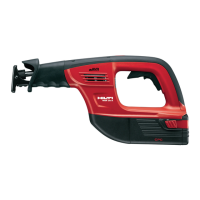
Details the parts of the reciprocating saw with numbered references.

Intended Use and Possible Misuse

Describes the product's intended use and possible misuse.

Li-ion Battery Status Indicator

Explains LED indicators for battery charge and tool status.

Technical Data and Safe Operation

Technical Data

Provides specifications for the saw and battery.

Safe Operation Precautions

Warnings and precautions for safe operation.

Battery and Blade Handling Procedures

Battery Insertion and Removal

Procedures for inserting and removing the battery.

Saw Blade Installation and Removal

Procedures for inserting and removing the saw blade.

Power Tool Switching

Steps for turning the power tool on and off.

Advanced Operations and Maintenance

Plunge Cutting Technique

Instructions and safety for plunge cutting.

AVR Contact Shoe Replacement

Steps to change the AVR contact shoe.

Tool and Battery Care

Guidelines for tool and battery care and maintenance.

Transport, Storage, and Troubleshooting

Transport and Storage Guidelines

Guidelines for transporting and storing cordless tools and batteries.

Troubleshooting Saw Not Working

Addresses malfunctions like LEDs not lighting up or blade removal issues.

Troubleshooting, Disposal, and Warranty

Troubleshooting Saw Working

Addresses issues when the saw is in working order but has faults.

Disposal and Warranty Information

Information on recycling tools, batteries, and manufacturer's warranty.

Hilti SR 4-A22 Specifications

General IconGeneral
BrandHilti
ModelSR 4-A22
CategorySaw
LanguageEnglish

Related product manuals