Press and hold the “ ” for 2S to power the display. Press and hold the “ ” for 2S to
power off. The display does not consume the battery power and the leak current is less
than 1uA in the power-off status. When the E-bike is not in any operation for over 5
minutes, the display will automatically shut down.
15
◆ Power On/Off
Press and hold “ ” for 2S and the E-bike will enter the walking mode with a constant
speed of 3.7 mph. Meanwhile, the screen will show a “Walking Mode”sign. Release “ ”
and the E-bike will stop power output immediately and return to the previous state.
The walking mode function can only be used when the user is pushing the bike. Please
do not trigger this function in the riding status.
◆ Walking Mode
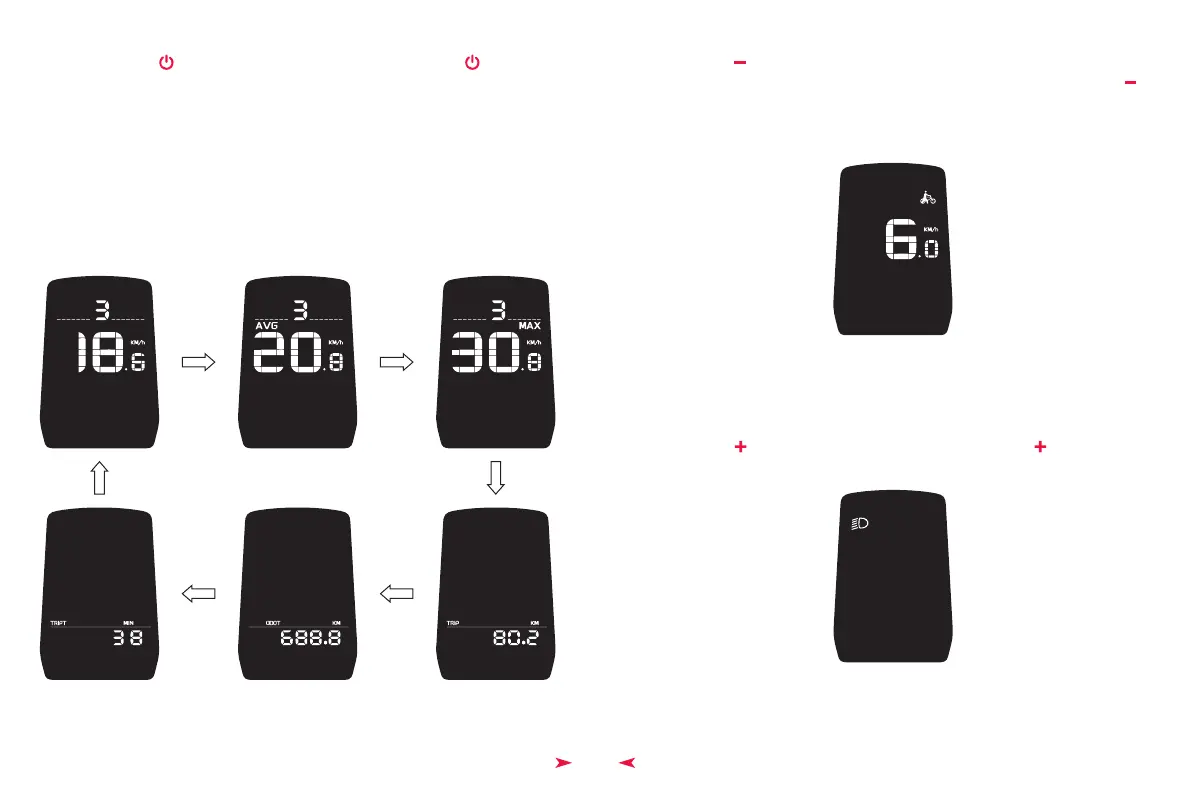
After the display is powered on, it will show by default the real-time speed and total
mileage. Click on “
M ” to switch the information of real-time speed (mph), AVG (average
speed) (mph), MAX (maximum speed) (mph), TRIP (single trip mileage) (Miles), and ODO
(total trip mileage). (As figures below)
◆ Display UIs (User Interfaces)
The Switched Display UIs
Display UI in
Walking Mode
Display UI With
the Headlight On
Press and hold “ ” for 2S to turn on the headlight. Press and hold“ ” for 2S again to
turn off the headlight.
◆ Headlight On/Off


 To Next Page