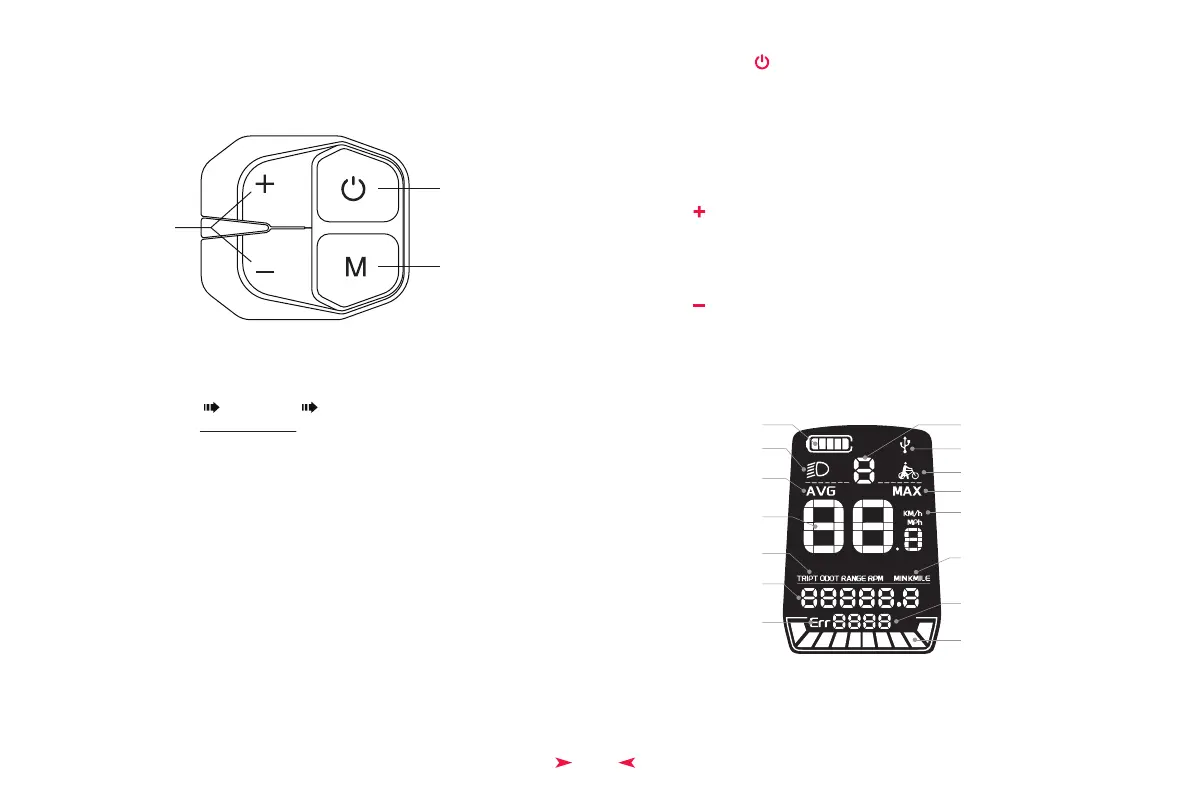
◆ Power On/Off
Press and hold the “ ” button for 2S to power on/off the instrument.
14
Basic Display Settings
+/- Pedal Assist level
Settings Menu
Power
◆ Button Definition
*Go look on our website:
https://himiwaybike.com Help Center Tools and Instructions
*For video tutorial, search Display Settings on Himiway YouTube Channel.
◆ Function Display on the main UI
Battery Level Pedal Assist Level
Power Scale
Error Code & power Indicator
Range Unit
Speed Unit
Error Indication
Range
Biking Data
Speed
Average Speed
Lighting Indicator
Maximum Speed
Walking Mode Indicator
Charging Indicator
◆ Menu Settings
Press and hold the “ M ” to enter the setup UI. M
◆ Gear Up
Click on “ ” to turn the gear from low to high. Press and hold the button to turn on the
headlight.
Click on “ ” to lower the gear from high to low. Press and hold the button into walking
mode
◆ Gear Down


 To Next Page