18
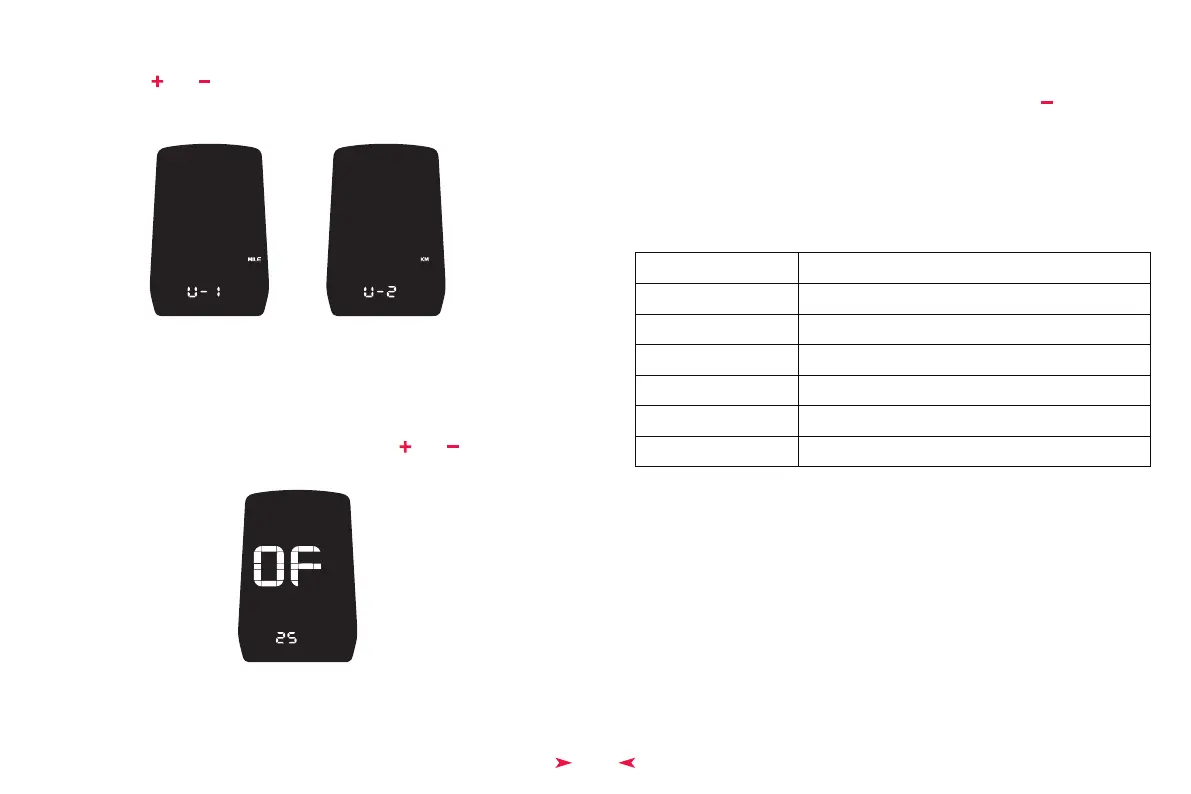
U is for unit, 1 for imperial units and 2 for metric units. Convert the speed and mileage
units by pressing “ ” or “ ”buttons. Click on “
M ” button to confirm the option and
enter the system voltage selection. Press and hold “
M ” to confirm the setting and exit
the general settings. The default unit of the display is imperial.
◆ Imperial and Metric Unit Conversion
Setting UI for Imperial and Metric Unit Conversion
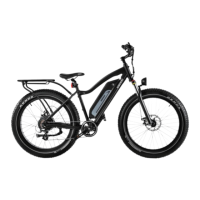
The default auto power off time of the display is 5min. This value can be changed to set
the auto off time.
The time can be choose from 0 to 40, which set by pressing “ ” or “ ” buttons. Long
press “
M ” to exit the setting. 0 means no auto power off.
◆ Auto Power off Time
Auto Power Off Time Setting UI
Clicking on the “ M ” button ( within 2S ) in the setting status is to confirm the input and
to save the current setting. Press and hold “
M ” (for more than 2S ) is to confirm the
current setting and to exit the current setting status. Press and hold “ ” ( for more than
2S ) is to cancel the current operation and exit the setting without saving the current
setting.
If no operation is occurred within one minute, the Hi-Play will exit the setting page
automatically.
◆ Exit Setup
◆ Error Code Definition Table
Error Code
21
22
23
24
25
30
Definition
Abnormal current
Abnormal handlebar steering
Missing motor phase
Abnormal hall signal of the motor
Abnormal braking
Abnormal communication



 To Next Page