6.1 Test Modes
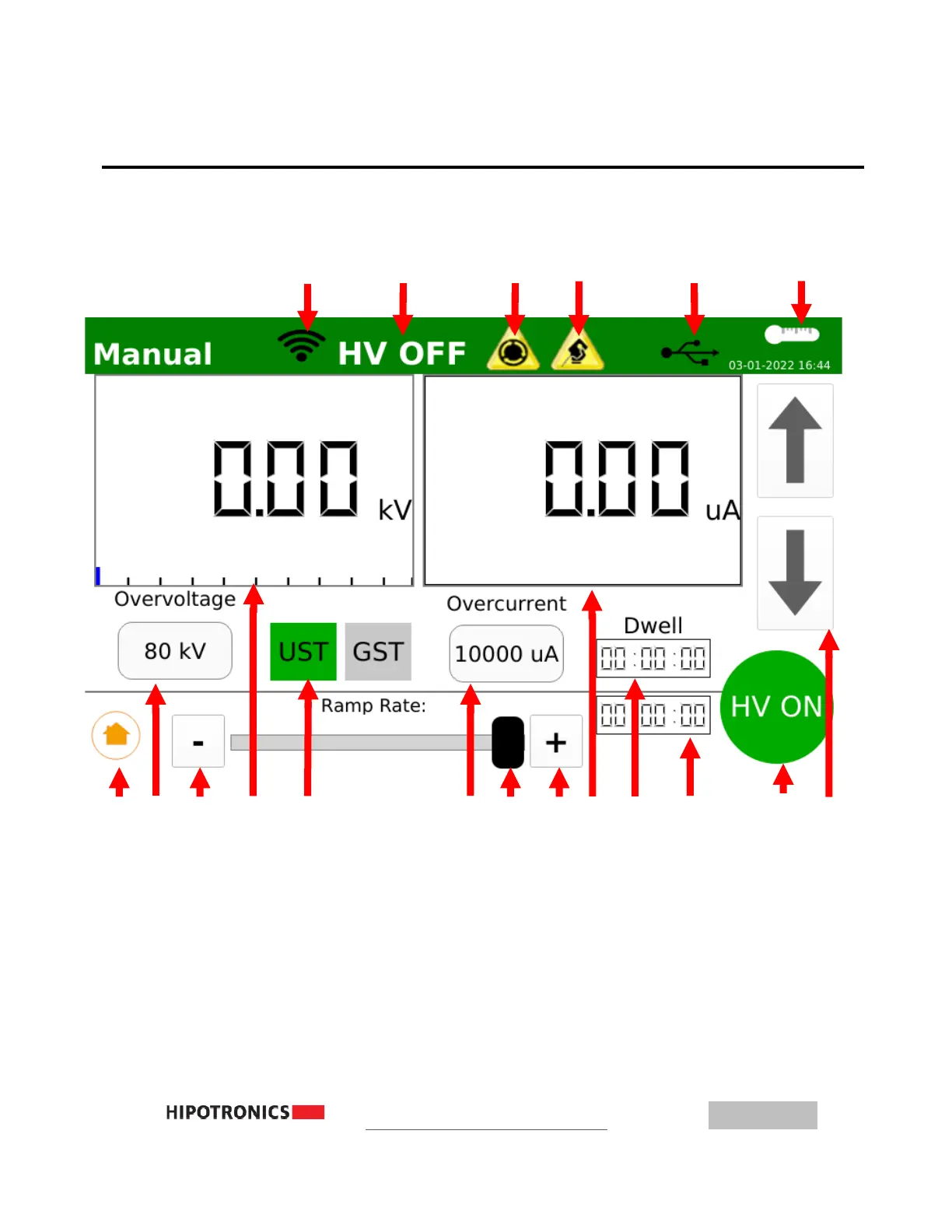
Operation Interface with HV OFF
1
– WiFi Connected Indicator 10 – Volt Meter Display, Touch to Toggle Analog/Digital
2
– High Voltage Indicator 11 – Ungrounded-Specimen or Grounded-Specimen Selection
3
– Emergency Stop Engaged 12 – Overcurrent, Touch to Set
4
– External Interlock Open 13 – Ramp Speed Slider
5 – USB Drive Detected 14 – Increase Ramp Speed of Raise/Lower Buttons
6 – Internal Temperature Monitor 15 – Current Meter, Touch to Toggle Analog/Digital
7 – Return to Main Menu 16 – Dwell Time: Touch to Set, Enabled in Settings
8 –Overvoltage, Touch to Set 17 – Elapsed Test Time Display
9 - Decrease Ramp Speed of Up/Down Buttons 18 – HV Button, press to Start/Stop test
19 - Up/Down Buttons, touch to adjust HV in test



 To Next Page