7
Step 4. Power on the TV
Plug the power cord into a power outlet.
Your TV will display a launch screen showing the Hisense logo.
Step 5. Complete the first-time setup
The first time you turn on your TV, there is a guided setup to make it easy to connect
your TV to the Internet and complete the setup of your TV.
Step 6. Establish a network connection
1. Press
the [ ] button
on the remote,
and select Settings to enter the Settings menu
.
2. Select Network & Internet.
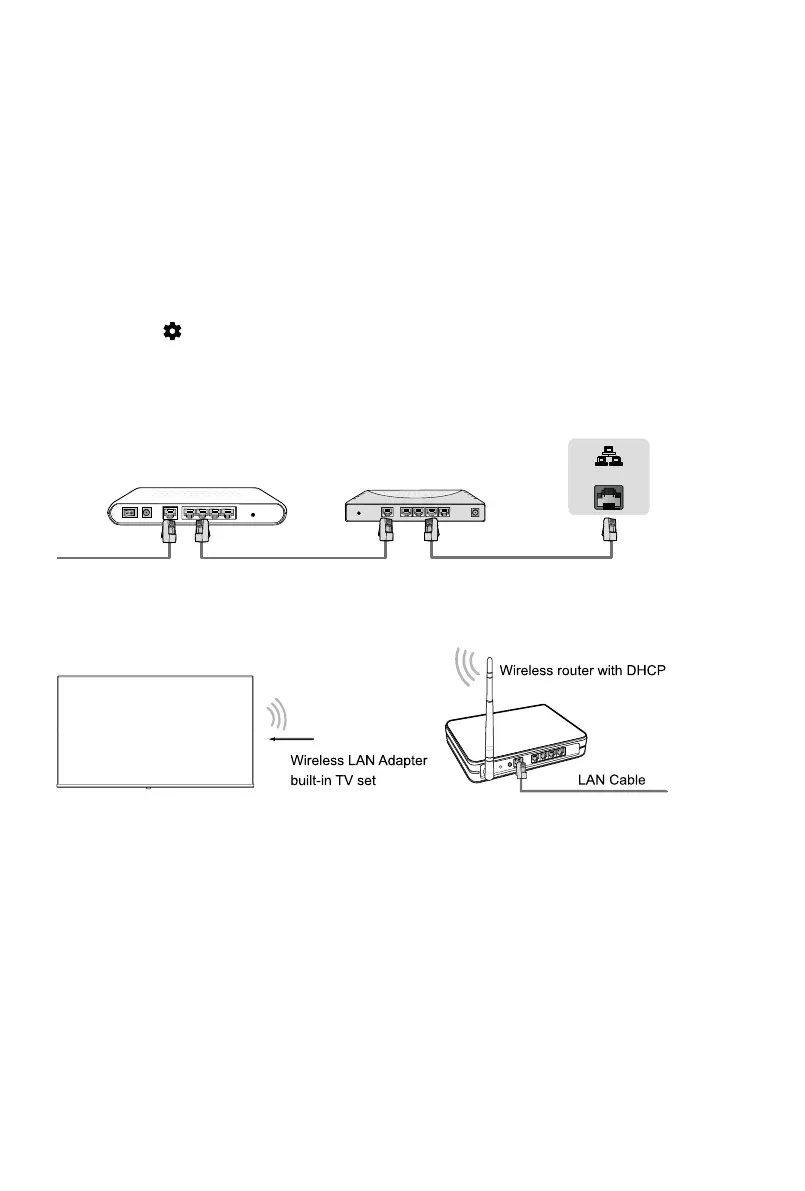
Modem Cable LAN CableLAN Cable
External Modem
(ADSL / VDSL / Cable TV)
IP Sharer (Router)
(with DHCP server)
LAN
Establish a wireless network connection
Establish a wired network connection
And setup is done, congratulations!
Now that you’ve completed the first-time setup, enjoy your TV!



 To Next Page