2
Identifying the Parts
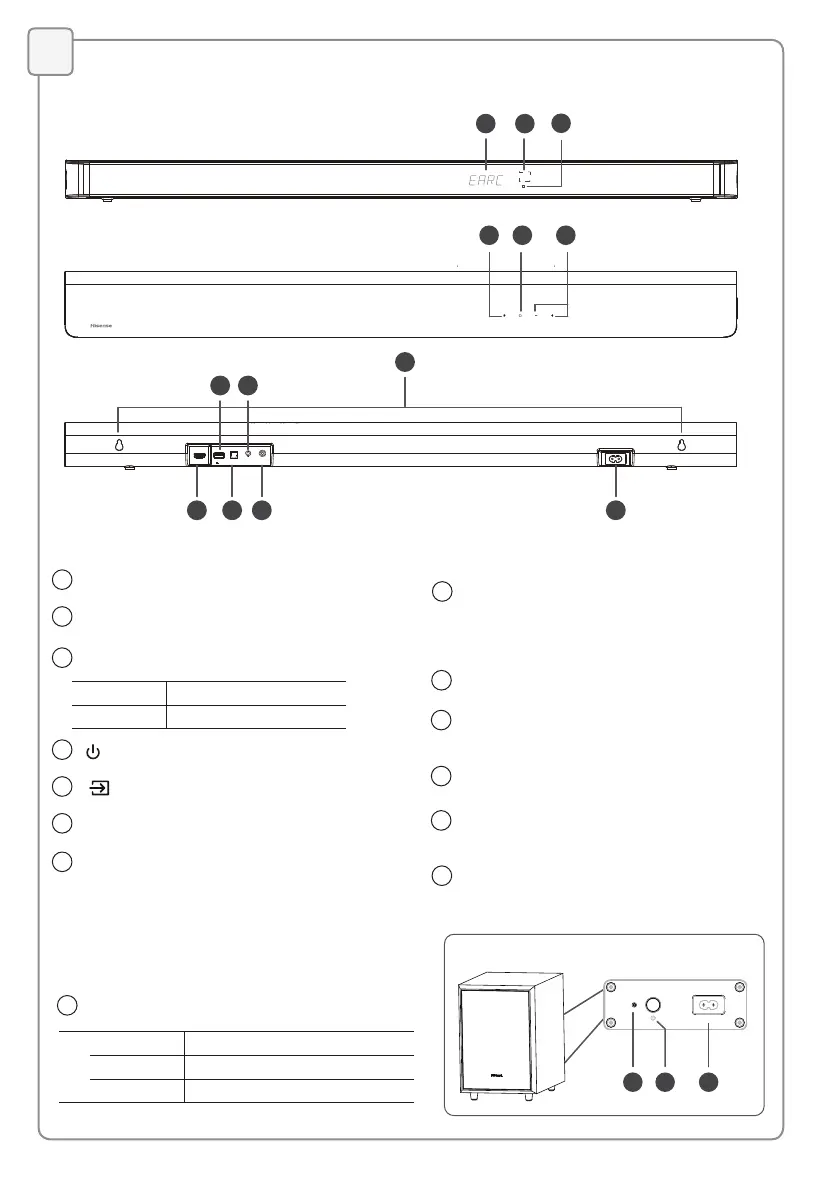
Main Unit
1 2
4
3
5 6
7
8 10 12 13
9 11
HDMI eARC
OPTICAL
AUX
COAXIAL
AC IN
USB
5V 500mA
4
3
(ON/OFF) Button
Switch the unit between ON and STANDBY mode.
5
(SOURCE) Button
Select the play mode.
6
+/-(VOL+/VOL-) Button
Increase/decrease the volume level.
1
Display Window
Show the current status.
2
Remote Control Sensor
Receive signal from the remote control.
7
Wall Mount
Install the wall mounting screws into the
wall mount of the unit.
9
USB Socket
Insert the USB device to play music.
10
OPTICAL Socket
Connect to the OPTICAL OUT socket
on an external device.
11
12
AUX
Socket
Connect to an external audio device.
COAXIAL Socket
Connect to the COAXIAL OUT socket
on an external device.
13
AC IN Socket
Connect to the power supply.
8
HDMI eARC Socket
The port for connecting a TV. The port
supports the eARC/ARC HDMI feature, which
allows the soundbar to play audio that
originates on the connected TV.
Wireless Subwoofer
1 2 3
AC IN
1
Indicator
• Fast blink The subwoofer in pairing mode
• Constant on Connected / Paired successfully
• Slow blink Connection / Pairing failed
Red Standby Indicator
• Constant on In Standby mode
• Slow blink In Auto-Wake On mode



 To Next Page
 Loading...