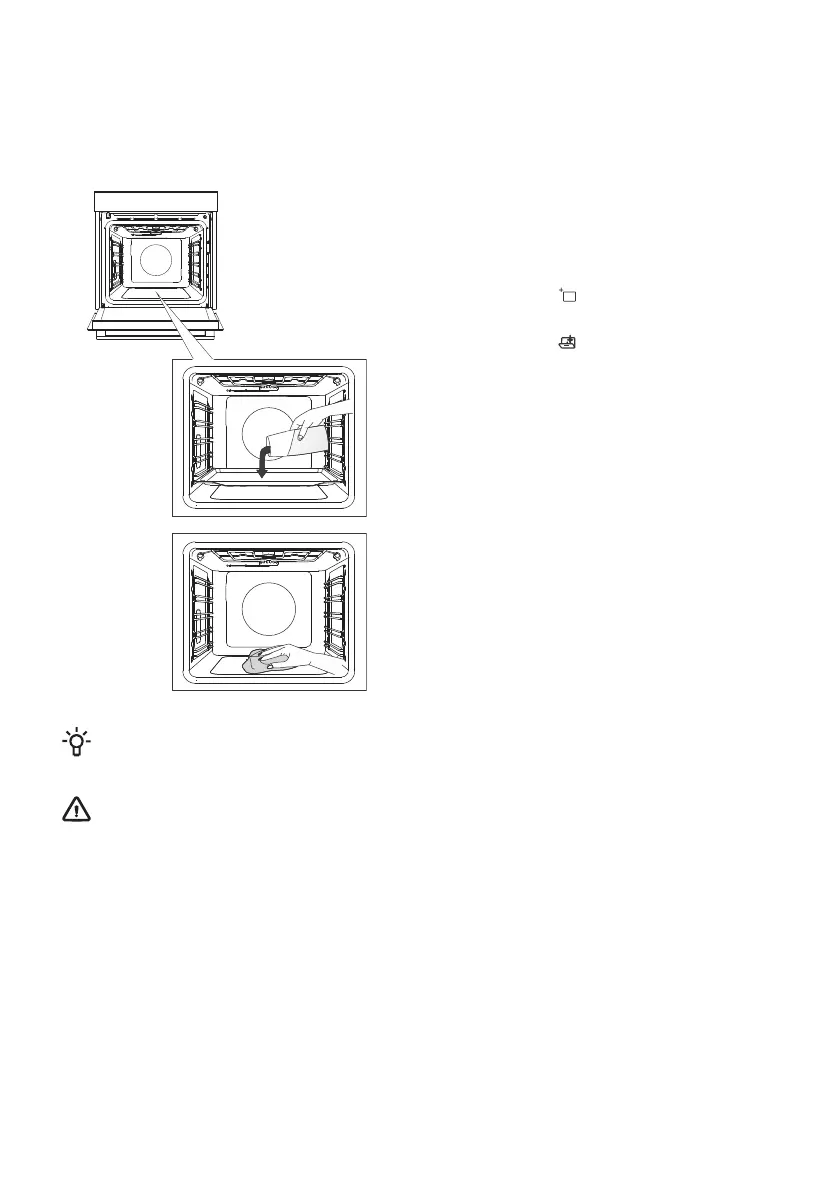
Using the Steam Clean program to clean the oven
This program makes it easier to remove any stains from inside the oven.
The function is the most effective if used regularly, after each use.
Before running the cleaning program, remove all large visible chunks of dirt and food residues from
the oven cavity.
1 Insert the shallow baking tray into the first
guide level and pour 0.4 litres of hot water into
it.
2 Touch the key to display extra
functions on the display unit. Rotate the KNOB
to the symbol . Preset values will appear
on the display unit.
3 The program will operate for 30 minutes.
When the program is complete, End will appear
on the display unit.
4 When the program is completed, carefully
remove the baking tray, using oven mitts (there
can still be some water on the baking tray).
Wipe down the stains with damp cloth and
soapsuds. Thoroughly wipe the appliance with
a wet cloth to remove all cleaner residue.
INFORMATION!
If the cleaning process is not successful (in case of particularly stubborn dirt), repeat it.
WARNING!
Use the Steam Clean system when the oven has fully cooled down.
41



 To Next Page