10
Basic Operation
1
Turning the device on or off
1. Plug the power cord into a wall outlet.
2. Press the button on the remote to turn on the device. When you turn
it on for the rst time, follow the instructions displayed on the screen and
congure the device's basic settings.
NOTE:
• When the device is started up, you can press the button on the remote
to turn it into standby mode; When the device is in standby mode, you can
press the button on the remote to turn on the device.
• Pull the power cord out of a wall outlet when you do not use the device for
a long time.
• Please wait at least 10 seconds to turn on the device again when it is shut
down.
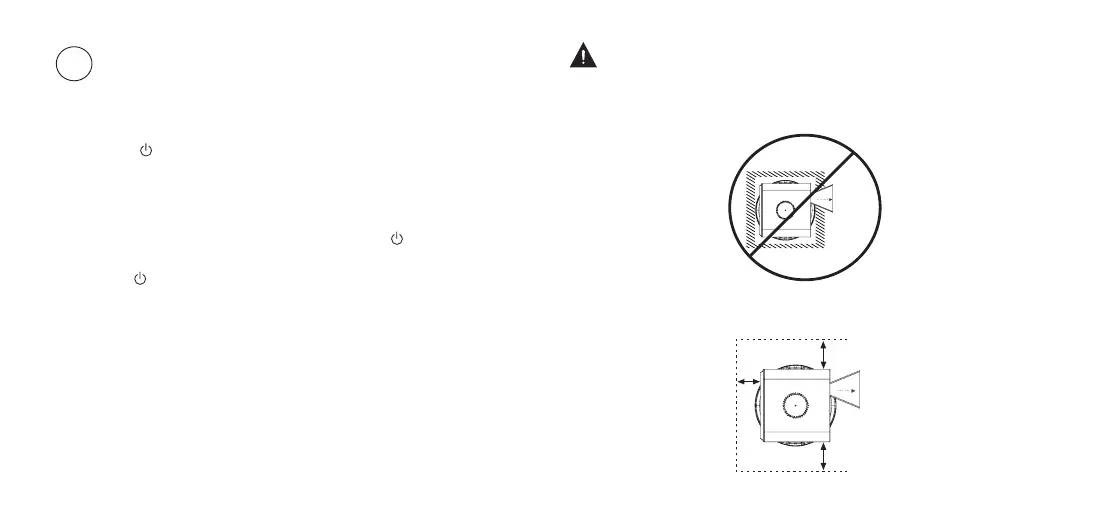
WARNING: Poor ventilation will cause the device to overheat or become
damaged.
• Do not block the ventilation openings or place any object on the device.
• Do not place the device in any narrow, enclosed or poorly ventilated space.
• To ensure proper ventilation of the device, the minimum space must be
maintained as shown in the diagram below.
20cm
20cm
20cm
Laser beam
Laser beam



 To Next Page