11
Auto Focus
2
When the auto focus function is enabled, the device can automatically adjust
the focus to make your projector picture clear.
• Enable auto focus function by pressing button on the remote.
• You can enable manual focus function by pressing and holding button,
and manually adjust the focus by pressing the D-pad on the remote.
More Settings
4
Press button on your remote, select
Settings
to enter the Settings Menu to
set up your device.
NOTE:
• For detailed instructions, please refer to the E-Manual (
Settings
>
Support
>
E-Manual
).
• Parts of the software function changes with the system upgrade.
Auto Keystone Correction
3
Press button on your remote, select
Settings
>
Projector
>
Auto
Keystone Correction
.
The device can perform auto keystone correction on the projected screen and
automatically changes the screen shape into a rectangle.
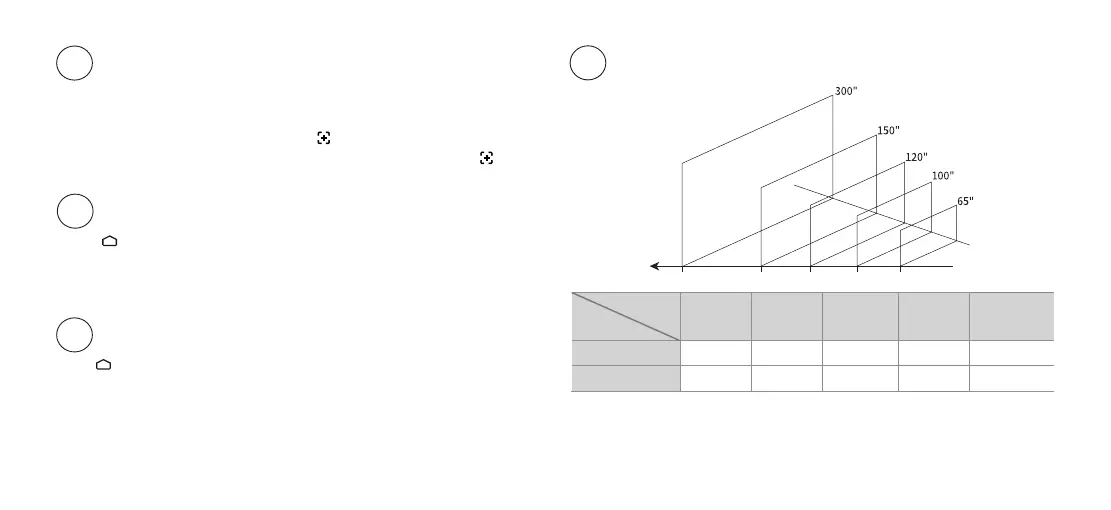
300'' 150" 120" 100" 65"
mm
7970 3985 3188 2657 1727
inch
314 157 126 105 68
Image
Size
Projection
Distance
Image Size and Projection Distance
5
7970 3985 3188 2657
Projection
Distance (mm)
1727
NOTE:
• When the image size is greater than 150 inches, Auto Keystone Upon Motion may be
unavailable, Manual Focus and Manual Keystone Correction are required.



 To Next Page