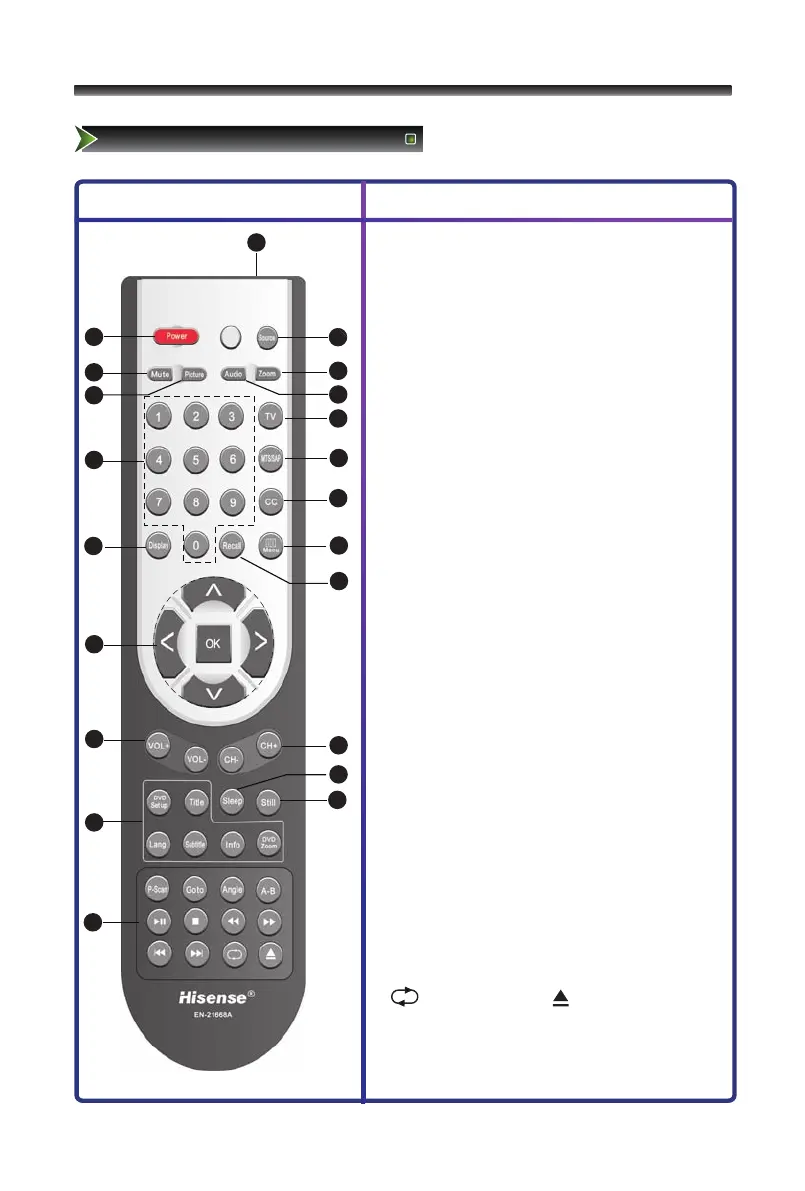
(1) Remote sensing Window.
(2) Power Standby: Power button.
(3) Source: Available source selection.
(4) Mute: Mute the sound.
(5) Zoom:Zoom image.
(6) Picture: Picture Mode selecting.
(7) Audio: Sound Mode selecting.
(8) 1,2,... numbers: For direct channel access.
(9) TV: Analog source input.
(10) MTS/SAP: Audio select button.
(11) CC: Adjust CC mode.
(12) Display: Display current program informations.
(13) Menu:Display the main menu/Back menu
display.
(14) Recall:To return to the last view program.
(15) OK: Enter or confirm the operation
Λ /V /</>: Up/Down/Left/Right operation
(16) VOL+/VOL-: Volume increase/Volume decrease.
(17) CH+/CH-: Next channel/Previous channel.
(18) Sleep:Set the sleep time.
(19) Still: Freeze picture.
(20) DVD function buttons
● DVD Set up: Display the main DVD menu
● Title: Get DVD title menu
● Lang.: Select Audio language.
● Subtitle: Display the subtitle content of the signal.
● Info: Display DVD basic information
● DVD Zoom: Zoom DVD image
(21) DVD function buttons
● P-Scan:Available DVD source selection.
● Goto: Get DVD Goto menu
● Angle: To select various angle to view the same
image (works only for the disc with multi angle
encoded)
● A-B: A-B repeat
● ►II: Play/Pause ■: Stop
● ◄◄: Fast backward ►►: Fast forward
● I◄◄: Previous ►►I: Next
● : Repeat : Open/Close
Note:The design of the remote control is subject to
change and may be different from the actual one.
Those buttons without comment have no relations with
this TV.



 To Next Page