EasyManua.ls Logo

Hisense U5120GW - User Manual

Hisense U5120GW
64 pages
Print Icon
To Next Page IconTo Next Page
Loading...
Before using the soundbar, please read this manual thoroughly and retain
it for future reference.
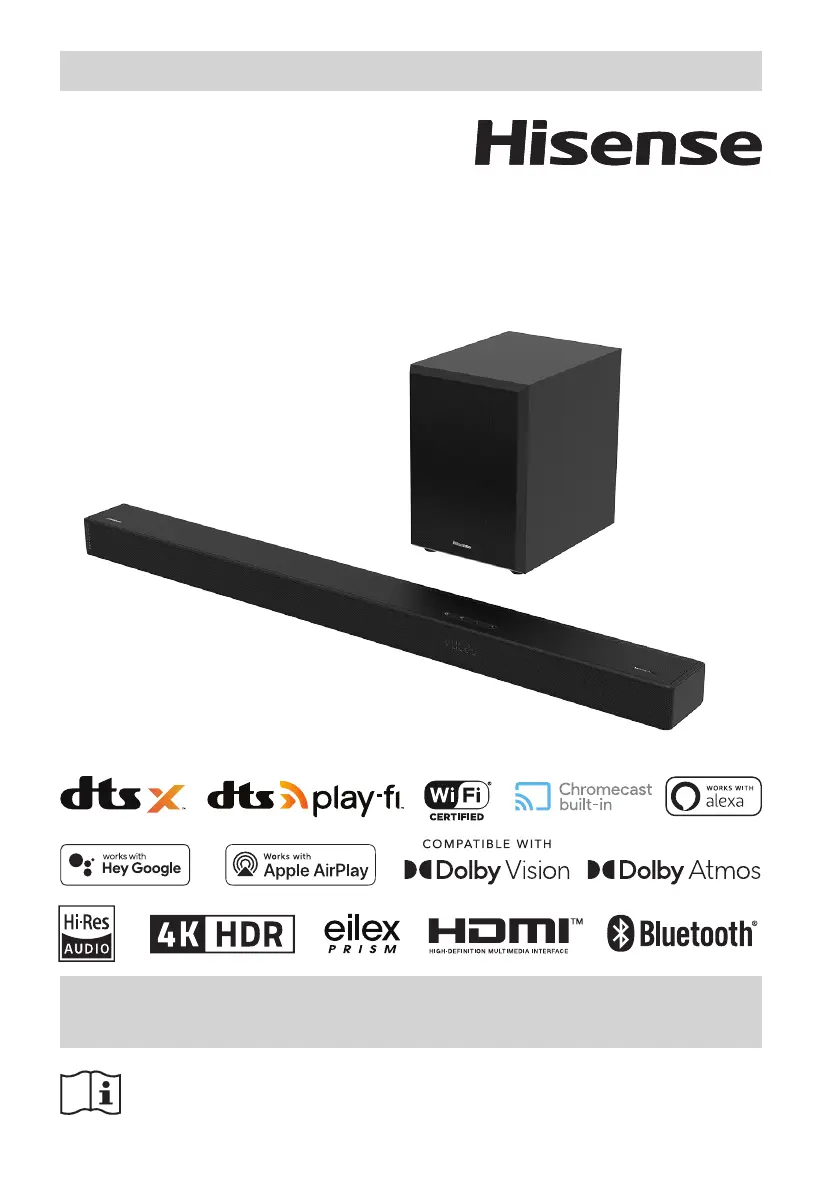
USER MANUAL
5.1.2CH Soundbar with Wireless Subwoofer
Model: U5120GW

Table of Contents

Other manuals for Hisense U5120GW

Questions and Answers

  • S
    Sydney FritzAug 20, 2025
    What to do if the Hisense Speaker System subwoofer is idle?
    • T
      Thomas ValdezAug 20, 2025
      If the subwoofer of your Hisense Speaker System is idle or its indicator light is off, unplug the power cord from the mains socket and plug it back in after 4 minutes to reset the subwoofer.
  • J
    jasonchoiAug 22, 2025
    What to do if my Hisense Speaker System has no sound?
    • L
      Lydia PerryAug 22, 2025
      To address the issue of no sound from your Hisense Speaker System: * Ensure the unit isn't muted by pressing the Mute or VOL+/– button. * Try switching the soundbar to standby mode and then back on using the button on the unit or remote. * Unplug both the soundbar and subwoofer, then plug them back in and switch on the soundbar. * Verify that the audio setting of your input source (e.g., TV, game console) is set to PCM or Dolby Digital mode, especially when using digital connections like HDMI, OPTICAL, or COAXIAL. * If using a subwoofer, ensure it's within 5 meters of the soundbar. * If the soundbar has lost connection with the subwoofer, re-pair the units. * Note that the unit may not decode all digital audio formats, which can cause muting.
  • C
    Christina SchultzAug 26, 2025
    What to do if the Hisense U5120GW remote control does not work?
    • M
      Monica ReedAug 26, 2025
      If the remote control for your Hisense Speaker System isn't working, first select the correct source before pressing any playback control buttons. Try reducing the distance between the remote and the unit and ensure you are aiming the remote directly at the sensor on the front of the unit. Also, make sure the battery is inserted with the correct polarities (+/-) as indicated. If not, replace the battery.
  • T
    Troy EllisAug 28, 2025
    How to troubleshoot a Hisense U5120GW that has no power?
    • K
      Kayla BuchananAug 28, 2025
      If your Hisense Speaker System has no power, first ensure that the AC cord is properly connected. Then, check that there is power at the AC outlet. Finally, press the standby button to turn the unit on.
  • J
    Jason PierceAug 30, 2025
    How to fix a Hisense U5120GW Speaker System when Wi-Fi connection cannot be established?
    • O
      Olivia WatsonAug 30, 2025
      If you cannot establish a Wi-Fi connection with your Hisense Speaker System, check the availability of the WLAN network on the router. Place the Wi-Fi router closer to the unit and ensure the password is correct. You may also want to check the WLAN function or reboot the modem and Wi-Fi router.
  • F
    frossSep 1, 2025
    What to do if I can’t find the Bluetooth name of my Hisense U5120GW on my Bluetooth device?
    • J
      jesse53Sep 1, 2025
      If you can’t find the Bluetooth name of your Hisense Speaker System on your Bluetooth device, ensure that the Bluetooth function is activated on your device and that you have paired the unit with your Bluetooth device.
  • R
    Richard ThompsonSep 3, 2025
    Why can't I play Play-Fi music on my Hisense U5120GW?
    • B
      Beth DavisSep 3, 2025
      There are several reasons why you might not be able to play Play-Fi music on your Hisense Speaker System: * The service provider may have terminated its service. * If the first-time setup was unsuccessful, close and restart the DTS Play-Fi app. * If the speaker is set as Stereo Pairs or Surround Sound, disconnect it in the app before using it separately.
  • G
    Gerald JacksonSep 5, 2025
    Why does my Hisense Soundbar keep turning off?
    • D
      Dakota ThompsonSep 5, 2025
      If your Hisense Soundbar turns off, it may be due to a low external input signal level. Increase the volume level of your external device.
  • J
    Jennifer RaySep 7, 2025
    What to do if Hisense U5120GW Speaker System cannot discover the Play-Fi supported devices from the app?
    • E
      Elizabeth BrownSep 7, 2025
      If you cannot discover the Play-Fi supported devices from the app, make sure that the device is connected to the Wi-Fi.
  • P
    Patricia BauerSep 9, 2025
    How to fix a Hisense U5120GW Speaker System remote control that is not working?
    • T
      Tara BarkerSep 9, 2025
      If your Hisense Speaker System remote control isn't working, try these steps: * First, select the correct source before pressing any playback control button. * Reduce the distance between the remote and the unit. * Ensure the battery is inserted with the correct polarities (+/-). * Try replacing the battery. * Aim the remote directly at the sensor on the front of the unit.

Summary

Important Safety Instructions

Safety Precautions

Read and follow all safety and operating instructions to prevent hazards.

Warning Information

Information regarding potential hazards, radiation, battery use, and compliance markings.

Identifying the Parts

Main Unit Overview

Identify and understand the functions of the main soundbar unit's buttons and indicators.

Wireless Subwoofer

Description of the wireless subwoofer's components, including AC socket, pair button, and indicator.

Remote Control

Overview of the remote control's buttons and their functions for operating the soundbar.

Connections

HDMI Connections

Connect the soundbar to your TV and external devices using HDMI for audio and video.

Connect to Wi-Fi

Set up the Wi-Fi connection using WPS or AirPlay for network features.

Subwoofer Pairing

Details on automatic and manual pairing procedures for the wireless subwoofer.

Basic Operation

Powering On and Standby

How to turn the soundbar on, put it in standby mode, and manage auto-standby features.

Selecting Input Modes

Choose the audio source mode (ARC, HDMI, Optical, Coaxial, Bluetooth, USB) for playback.

Audio Delay (AV SYNC)

Guide to setting audio delay to synchronize audio with video for a better viewing experience.

Troubleshooting

Specifications

Hisense U5120GW Specifications

General IconGeneral
BrandHisense
ModelU5120GW
TypeSoundbar
Sound output mode5.1.2 Channel
Wireless SubwooferYes
Dolby AtmosYes
HDMI eARCYes
Total speaker power510W
Frequency Response40Hz - 20kHz
Bluetooth Version5.0
Bluetooth Range10 meters
Input Voltage100-240V
Dimensions240 x 420 x 240 mm (Subwoofer)

Related product manuals