1156mm
1
3
2
4
SS
SS
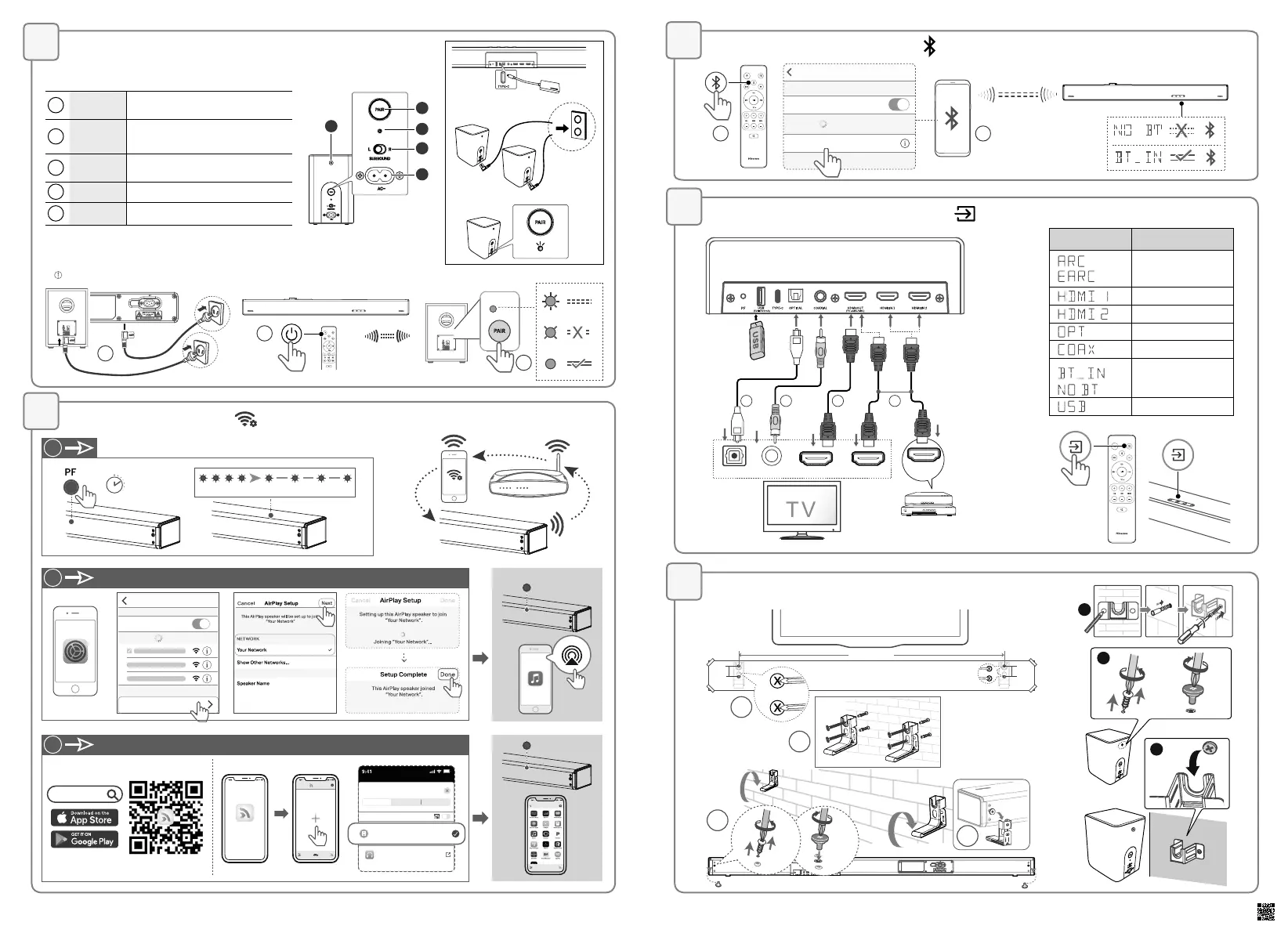
Select the play function ( )
Wall Mounting
HDMI eARC HDMI IN
OPTICAL COAXIAL
43 1 2
Blu-ray Player / DVD Player /
Recorder / Set-top Box...
HDMI OUT
Pair up with the Rear Speakers & Subwoofer
Connect to Wi-Fi ( )
Fast blink Slow pulse
Settings
AirPlay (iOS)
Settings Wi-Fi
Wi-Fi
Networks
SET UP NEW AIRPLAY SPEAKER…
Play-Fi Device XXXXXX
Play-Fi Device XXXXXX
Play-Fi
Play -Fi
New Recent Scenes
Start
SPEAKERS
HEADPHONES
Play-Fi Device (2DFXXX)
Headphones App
Play-Fi Device XXXXXX
Sources
Connecting...
Music App
Solid
Solid
1
2
2
Play-Fi
>8 sec
◎
Pair up with the subwoofer
The subwoofer and the soundbar will be paired automatically when both are powered on.
If no audio from the wireless subwoofer can be heard, manually pair up the subwoofer.
1
2
!
<6m
3
Bluetooth Operation
( )
1 2
< 8m
Settings Bluetooth
Bluetooth
DEVICES
Hisense U5120GW
Now Discoverable
Connected
5
4
Hisense_U5120GW+_QSG_EN_V1 _220322
Display Mode
ARC
HDMI IN 1
HDMI IN 2
OPTICAL
COAXIAL
Bluetooth
Connected
Connection
USB
1
2
3
6
7
Wireless Rear Speaker
1
PAIR
Press activate the pairing function
between the main unit and the surround.
2
Indicator
• Fast blink: Rear Speaker in pairing mode
• Constant on: Connected / Paired successful
• Slow blink: Connection / Pairing Failed
3
Surround
L/R
Set to Left or Right Surround Speaker
4
AC ~
Connect to power supply.
5
Screws
Remove the screws then install the wall
screws into the back of the Rear Speaker
Hisense U5120GW+


 To Previous Page