10
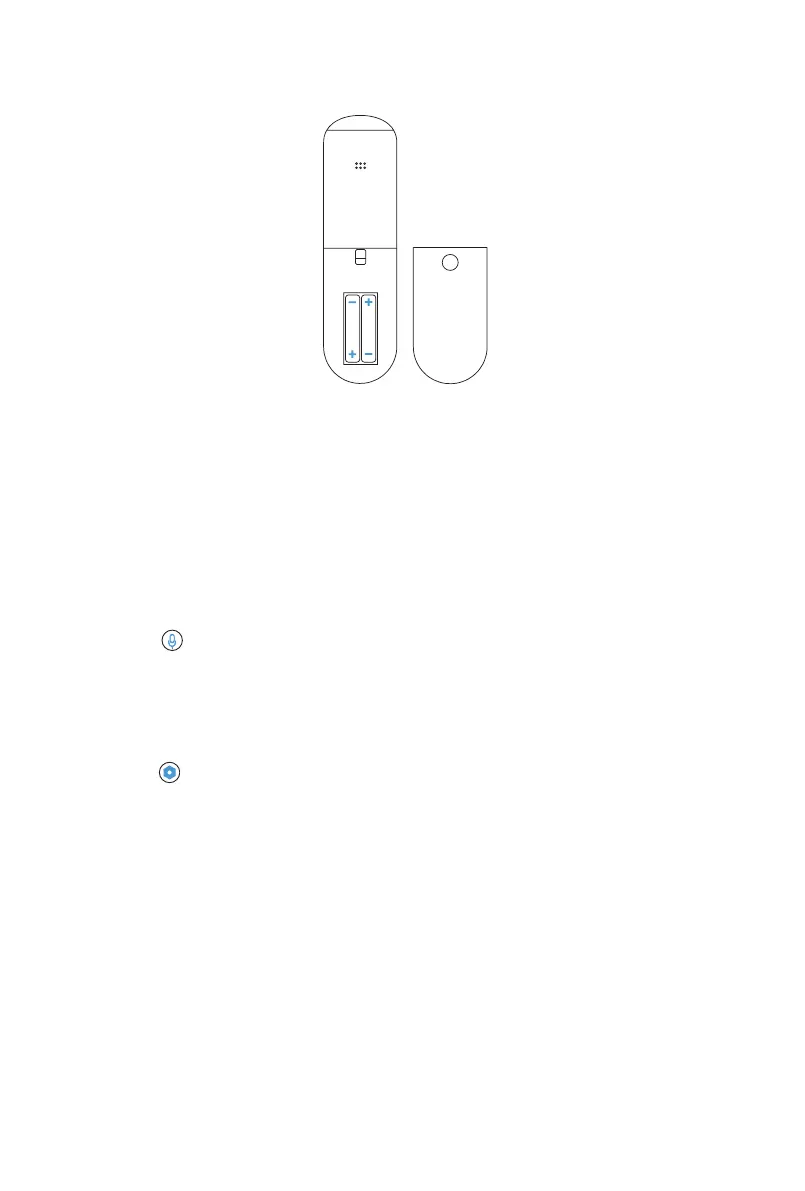
Set up your remote in just a few easy steps
1. Push the battery cover down and slide it off the remote
2. Insert the included batteries
3. Replace the battery cover
Pairing your remote to a new TV
If you set up your remote within 15 minutes of plugging in your TV for the rst time, your
remote will automatically pair. Your remote should pair automatically, but if you experience any
issues, please follow instructions under “Pairing your remote to an existing TV”.
Pairing your remote to an existing TV
1. Press the button
2. Follow the on-screen instructions
3. If you’re having trouble, try pressing and holding the 1 and 3 buttons simultaneously
for 3 seconds
Pairing your remote to a sound system
1. Press the button
2. Select Remote > Pair your remote and sound system
3. Follow the on-screen instructions
CAUTION
• Properly dispose of old batteries in a designated area. Do not throw old batteries into a re
• Remove old batteries immediately to prevent them from leaking
• Remove the batteries from your remote if you don’t intent to use it for a while
• If the batteries leak, be sure to clean the battery compartment. Wash your skin immediately
if you come into contact with battery chemicals
• Do not mix old and new batteries
• Do not mix alkaline, standard (carbon-zinc), or rechargeable (for example NiCd or NiMH)
batteries
• If your remote gets warm or hot during use, stop using it and contact customer support
immediately at www.hisense-usa.com/support



 To Next Page