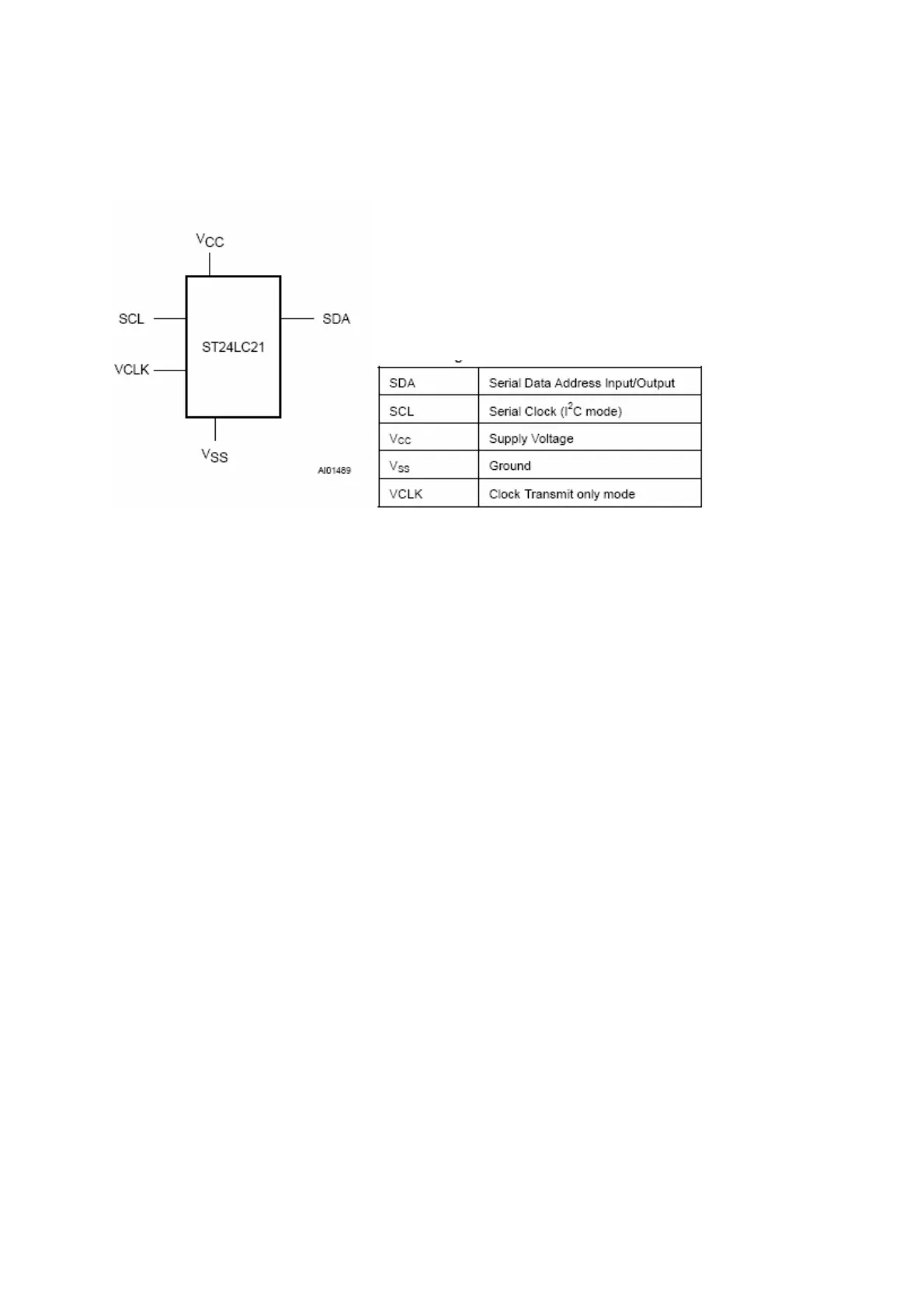
10.10.4 Pinning
11.SERVICE MENU SETTINGS
In order to reach service menu,
x First Press “MENU”
x Then press the remote control code, which is “4725”
11.1. Video Setup
x Picture Mute <.....>
If “Yes” selected, “Picture mute” feature is active.
x Blue Screen <.....>
If “Yes” selected, “Blue Background” item is seen in “Feature”
menu.
x YC Delay <...........>
Tuner PAL <.....> Value between -8 to+7
Ext PAL <.....> Value between -8 to+7
SECAM <.....> Value between -8 to+7
NTSC <.....> Value between -8 to+7
x AGC (dB) <.....> Value between 0 to+8
11.2. AudioSetup
x Equaliser <.....>
If “Yes” selected, “Equaliser” item is seen in “Sound” menu.



 To Next Page