EasyManua.ls Logo

Hitachi 3700 - Page 5

Hitachi 3700
16 pages
Print Icon
To Next Page IconTo Next Page
To Previous Page IconTo Previous Page
Loading...
3 Make
sure
the
CD
controller
board
is
set
at
the
appropriate
I/0
ad-
dress.
The
TCD-IFIS
controller
board
comes
factory-preset
with
a
hardware
I/0
address
of
300-30F.
The
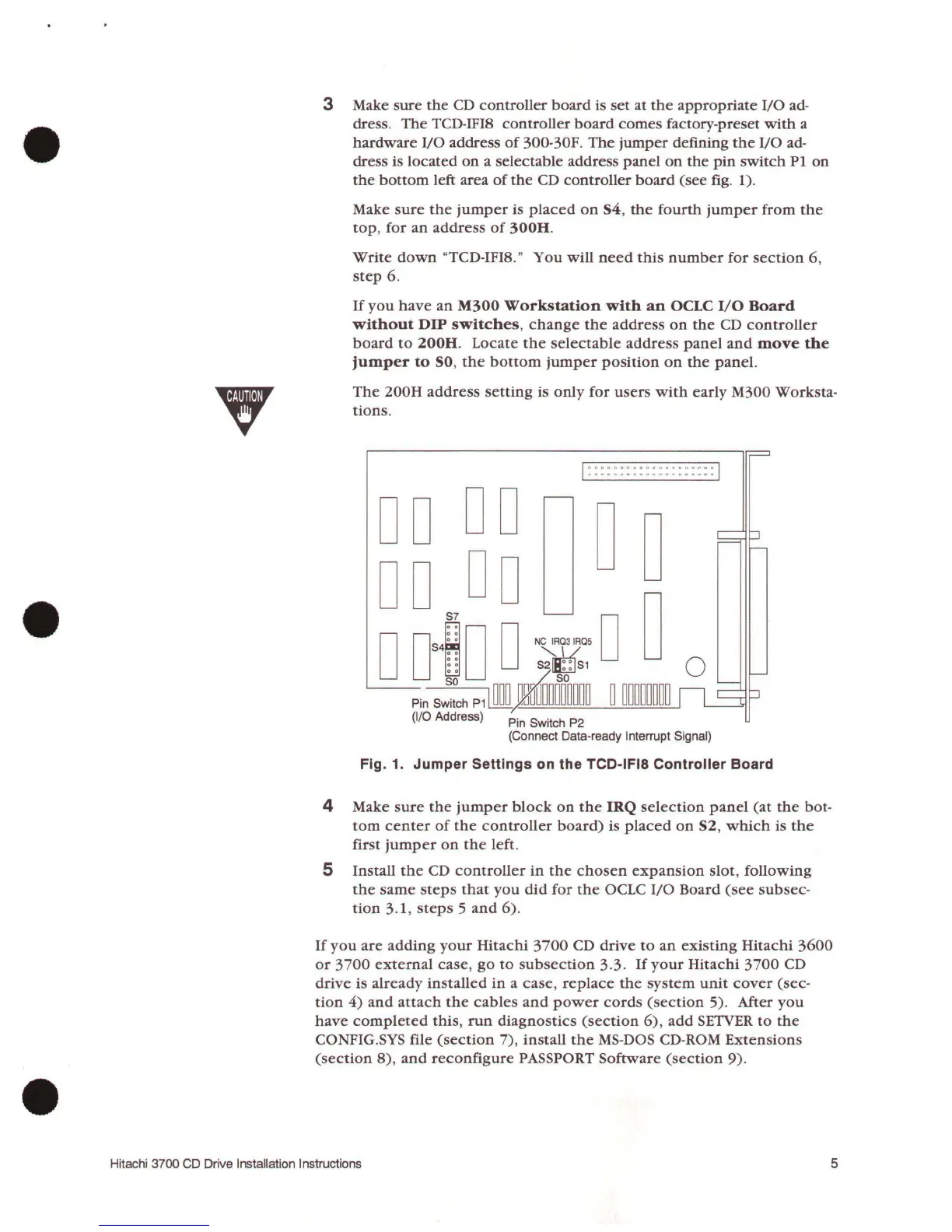
jumper
defining
the
I/0
ad-
dress is
located
on
a
selectable
address
panel
on
the
pin
switch
P1
on
the
bottom
left
area
of
the
CD
controller
board
(see
fig.
1).
Make
sure
the
jumper
is
placed
on
S4,
the
fourth
jumper
from
the
top,
for
an
address
of
300H.
Write
down
"TCD-IFIS."
You
will
need
this
number
for
section
6,
step
6.
If
you
have
an
M300
Workstation
with
an
OCLC
I/0
Board
without
DIP
switches,
change
the
address
on
the
CD
controller
board
to
200H.
Locate
the
selectable
address
panel
and
move
the
jumper
to
SO,
the
bottom
jumper
position
on
the
panel.
The
200H
address
setting
is
only
for
users
with
early
M300 Worksta-
tions.
D D D D
D D D D
I
00000000000000000000
I
uoooouoouo.,.,o<><ooouoo
n u
o n
D
D~D
D
~~
L___Pin
S;~ch
P11
~m
y~W=~~~=o
~m::....___.::__c~
~
=m~=~m=---.J~
(1/0
Address)
Pin
Switch
P2
(Connect Data-ready Interrupt Signal)
Fig. 1. Jumper Settings on the TCD-IFIB Controller Board
4 Make
sure
the
jumper
block
on
the
IRQ
selection
panel
(at
the
bot-
tom
center
of
the
controller
board)
is
placed
on
S2,
which
is
the
first
jumper
on
the
left.
5
Install
the
CD
controller
in
the
chosen
expansion
slot,
following
the
same
steps
that
you
did
for
the
OCLC
I/0
Board
(see
subsec-
tion
3.1,
steps
5
and
6)
.
If
you
are
adding
your
Hitachi
3700
CD
drive
to
an
existing
Hitachi
3600
or
3
700
external
case,
go
to
subsection
3. 3.
If
your
Hitachi
3
700
CD
drive
is
already
installed
in
a
case,
replace
the
system
unit
cover
(sec-
tion
4)
and
attach
the
cables
and
power
cords
(section
5). After
you
have
completed
this,
run
diagnostics
(section
6),
add
SETVER
to
the
CONFIG.
SYS
file
(section
7),
install
the
MS-DOS CD-ROM
Extensions
(section
8),
and
reconfigure
PASSPORT
Software
(section
9)
.
Hitachi 3700 CD Drive Installation Instructions
5

Related product manuals