EasyManua.ls Logo

Hitachi 3700 - 6. Run Diagnostics

Hitachi 3700
16 pages
Print Icon
To Next Page IconTo Next Page
To Previous Page IconTo Previous Page
Loading...
6. Run
Diagnostics
Use
the
OCLC
Check
CD
Program
3.00
to
test
your
Hitachi
CD drives.
This
program
tests
all
Hitachi
CD
drives
chained
to
the
CD
controller
board.
Drives
are
tested
in
sequential
order
for
Select,
Reset,
Seek,
and
Read
functions
.
However
,
since
screen
messages
scroll
rapidly
off
the
display
during
execution,
you
may
want
to
print
the
screen
displays
on
a
parallel
printer
so
that
you
will
have
time
to
analyze
the
test
results
.
1
Reboot
your
workstation
with
MS-DOS 3.1
or
later.
2
Insert
a
compact
disc
that
contains
data
in
the
Hitachi
CD
drive
that
you
are
testing
.
3
Insert
the
Check
CD
Program
3.
00
diskette
in
drive
A
of
your
work-
station;
and
, from
the
DOS
prompt,
typeA:CKCD
and
press
<Enter>.
The
introductory
screen
appears
and
confirms
that
you
are
using
Check
CD
Program
3.00
(CKCD.
EXE
VER.
3.00).
If
the
VER
number
is
not
3.
00
,
contact
OCLC
User
&
Network
Support,
and
request
Check
CD
Program
3.00.
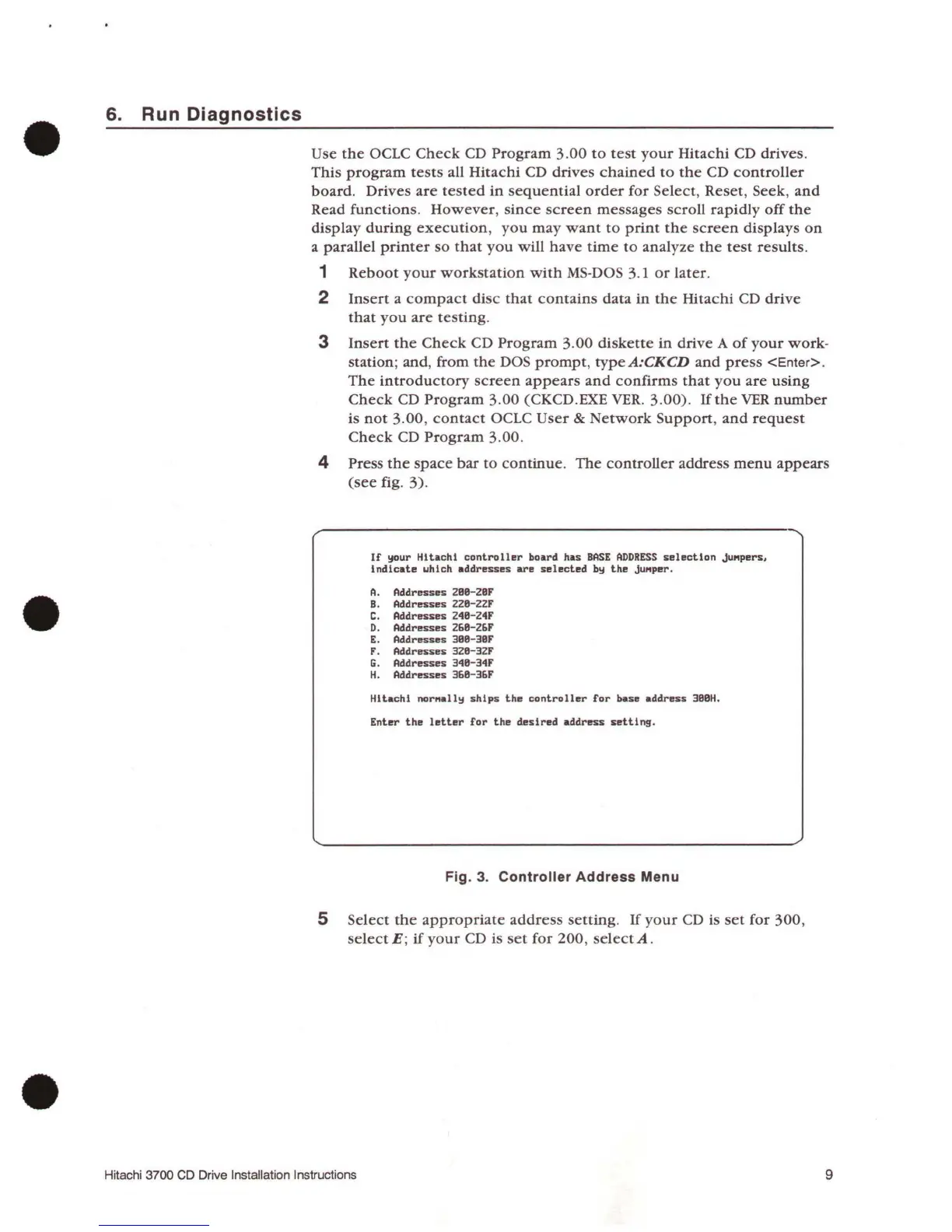
4 Press
the
space
bar
to
continue.
The
controller
address
menu
appears
(see
fig.
3)
.
If
your
Hitachi
controller
board
has
BASE
ADDRESS
selection
juMpers,
indicate
uhich
addresses
are
selected
by
the
juMper.
A.
Addresses
2BB-2BF
B.
Addresses 22B-22F
C.
Addresses 248-24F
D. Addresses
268-26F
E.
Addresses 388-38F
F. Addresses 328-32F
G.
Addresses 348-34F
H.
Addresses 368-36F
Hitachi
norMally
ships
the
controller
for
base
address
388H.
Enter
the
letter
for
the
desired
address
setting.
Fig.
3.
Controller Address Menu
5
Select
the
appropriate
address
setting.
If
your
CD is
set
for
300,
selectE;
if
your
CD is
set
for
200,
selectA
.
Hitachi 3700
CD
Drive Installation Instructions
9

Related product manuals