30
Adjustment Procedure
(1) Receive NTSC RF or video signal.
(2) With Power off, PRESS and HOLD the SERVICE
ONLY button on CONVER/FOCUS PWB, then press
the Power On/Off, when picture appeares release
SERVICE ONLY button. (Internal crosshatch is
displayed without conv. correction data.)
Adjustment Procedure
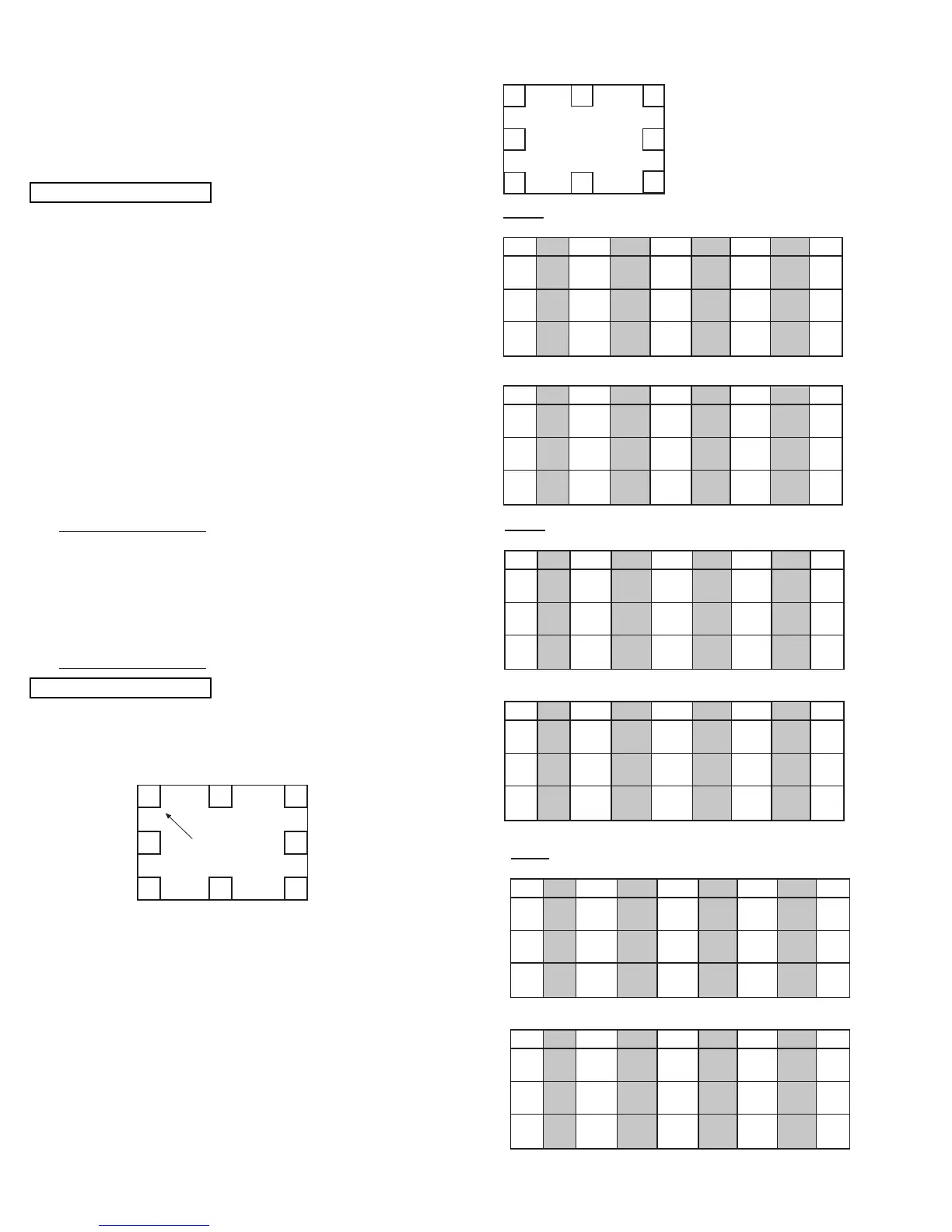
(1) Press FREEZE key on R/C. (One addtional line
appears near the top and near the bottom.)
(2) Press HELP key, then MAGIC FOCUS PATTERN
mode is displayed as follows:
(3) Use [6] key on remote control to rotate the arrow.
Arrow indicates each sensor position. (Upper left
corner, middle top, upper right corner, right middle, in
this order).
(4) Use the keys to switch color of pattern.
STATUS : Green pattern
0 : Red pattern
ANT : Blue pattern
(5) Press or key to change the data value to the
horizontal direction. Press or key to change the
data value to the vertical direction.
(6) Set the data as shown below:
1
3
5
7
01234567
RH 06 02 F6 FA F8 02 08 02
RV FF FE 04 00 FC 01 00 00
GH 04 00 FC 00 FC 00 06 02
GV 00 FE 01 00 FE 02 FE 00
BH 06 FE FC 00 FC FE 06 02
BV 03 FE 01 00 00 02 FE 00
01234567
RH 06 02 F6 F8 F6 02 04 04
RV FE FF 04 01 FC 03 02 01
GH 06 00 FC FC FC 00 06 04
GV 01 FE 00 01 FF 03 00 01
BH 06 FE FC FC FC FE 06 06
BV 04 FE FE 01 00 02 FF 01
Pattern Position
Normal Mode:
V. Squeeze Mode (1080i Through Mode):
6
8 2
4
01234567
RH 04 02 FC 00 FC 02 06 02
RV 02 FF 06 00 F9 00 FD 00
GH 04 00 FC 00 FE 00 04 02
GV 04 00 04 00 FB 00 FB 00
BH 06 FE FC 00 FE FE 06 04
BV 06 FF 03 00 FD 00 F9 00
01234567
RH 06 02 FC 00 FC 02 08 02
RV 02 FF 08 00 F7 01 FD 00
GH 06 00 FC 00 FE 00 06 02
GV 05 FF 06 00 FA 01 FA 00
BH 08 FE FC 00 FE FE 08 04
BV 09 FE 03 00 FD 01 F7 00
Normal Mode:
V. Squeeze Mode (1080i Through Mode):
01234567
RH 06 02 FC FC FA 02 06 02
RV 02 FF 04 00 FB 00 FD 00
GH 06 00 FA FE FC 00 06 02
GV 03 FF 03 00 FD 00 FD 00
BH 06 FE FA FE FA FE 06 04
BV 04 FF 01 00 FE 00 FC 00
01234567
RH 04 02 FC FE FC 02 06 02
RV FF FF 05 00 FA 01 FF 00
GH 06 00 FC 00 FE 00 06 02
GV 02 FE 03 00 FC 01 FC 00
BH 08 FE FC 00 FE FE 08 04
BV 06 FE 02 00 FF 01 F9 00
Normal Mode:
V. Squeeze Mode (1080i Through Mode):
DP15H
1080i THROUGH MODE
NORMAL MODE
2.12.2 MAGIC FOCUS Pattern Set-Up
NOTE: (1) This instruction should be applied when a new
DCU is being replaced.
(2) This instruction shows how to set up the pattern
position for MAGIC FOCUS.
(5) Press PIP MODE key 2 times to write the changed
data into EEPROM. (First press, ADJ. PARAMETER
/ ROM WRITE ? is displayed. 2nd press writes data
into EEPROM. Green dots appear after completion
of operation.)
(6) Press MUTE key 3 times to exit from ADJ.
PARAMETER mode.
(6) press EXIT button 5 times to return to VIDEO mode.
(7) Select INPUT with 1080i input.
(8) Access menu and select ASPECT 5 (Through
Mode).
(9) press SERVICE SW. only to enter DCU crosshatch
signal.
(10)Repeat steps 1 through 6.
NOTE: 4:3 aspect model has 2 DCU memories. One is
for NTSC input, the other is for 1080i through
mode. All DCU data must be done in both
modes.



 To Next Page