38
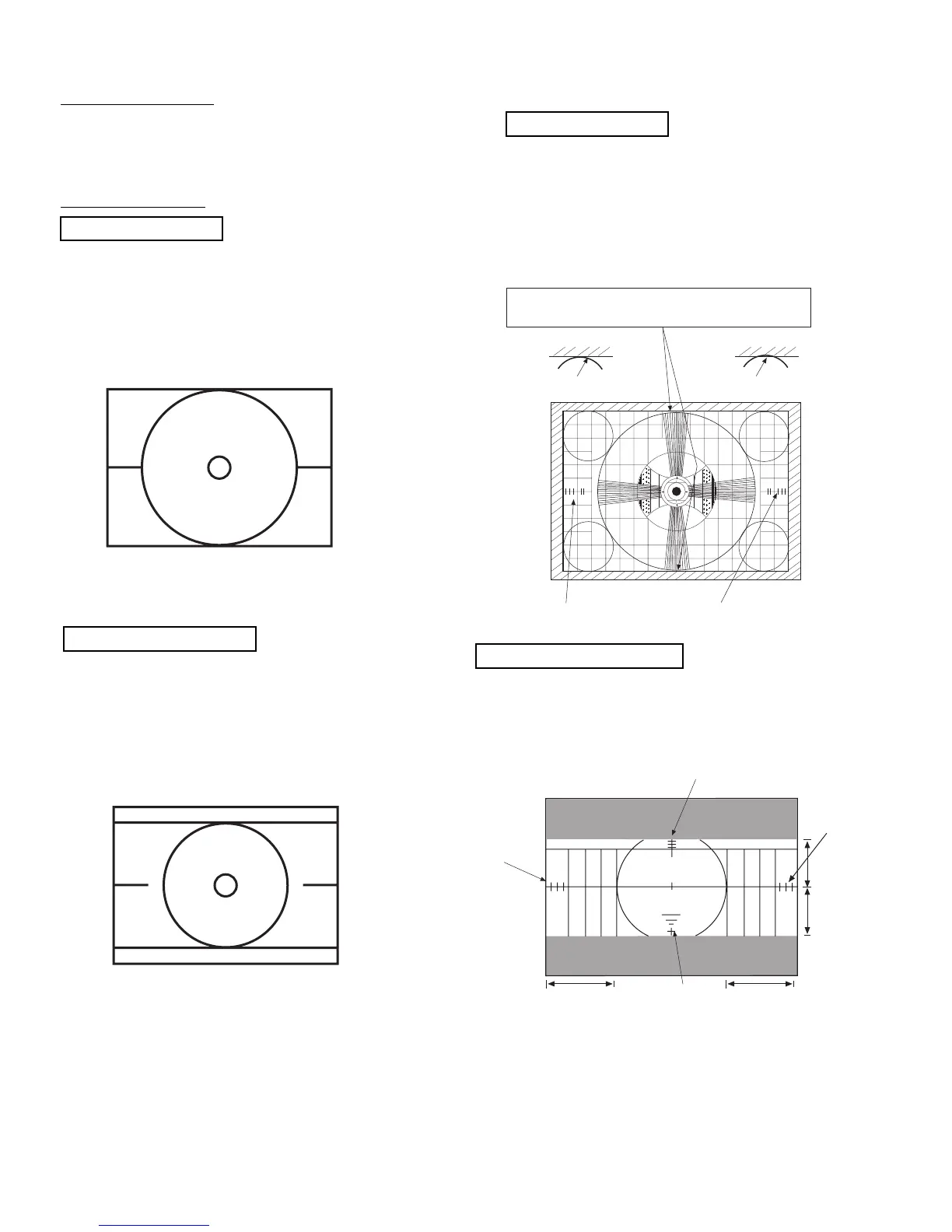
(1) Input 1080i (fH=33.75kHz) component circle
pattern signal to COMPONENT 3 or 4.
(2) Go to I
2
C Adjustment mode by pressing INPUT
and POWER button on control panel at the
same time.
(3) Choose H. POSI item by using CURSOR ,.
(4) Adjust HOR. POSITION as following by using
CURSOR ,.
1080i THROUGH MODE
Spec: Balance Left/Right side display position
for H. position.
Balance Top/Bottom side display position
for V. position (check only).
(1) Receive 1080i circle pattern No.59 of LT1611*,
LT1608* of LEADER signal generator.
SET UP: ASPECT 5/PICTURE FORMAT/SET
UP MENU
• LT1611 : Programmable Video Generator
• LT1608 : Video Encoder
NORMAL MODE
3 5
5 3
Top and bottom of the circle is between
outer edge and inner edge.
Outer edge of the circle Inner edge of the circle
H size marker
0.7~1.5
H size marker
0.7~1.5
3~4 scales
3~4 scales
1~2 scales
6 grids
6 grids
3~4 scales
4 grids
4 grids
2.18 Scanning area check
Checking condition
(1) Digital convergence adjustment should have
been completed.
(2) Receive the circle pattern signal.
(3) Brightness/Contrast - standard condition
Contrast:max
Other controls:center position
(4) Check that the scanning area matches with the
following drawing.
1080i THROUGH MODE
2.17 Horizontal position adjustment
Adjustment preparation
(1) Set video conditions to factory preset.
(2) DIGITAL CONVERGENCE adjustment should
be finished. (Normal mode and 1080i through
mode).
Adjustment procedure
(1) Receive circle pattern signal.
(2) Go to I
2
C Adjustment mode by pressing INPUT
and POWER button on control panel at the
same time.
(3) Choose H. POSI item by using CURSOR ,.
(4) Adjust HOR. POSITION as following by using
CURSOR ,.
NORMAL MODE
Spec: Balance Left/Right side display position
for H. position. H. size marker 0.7~1.5.



 To Next Page