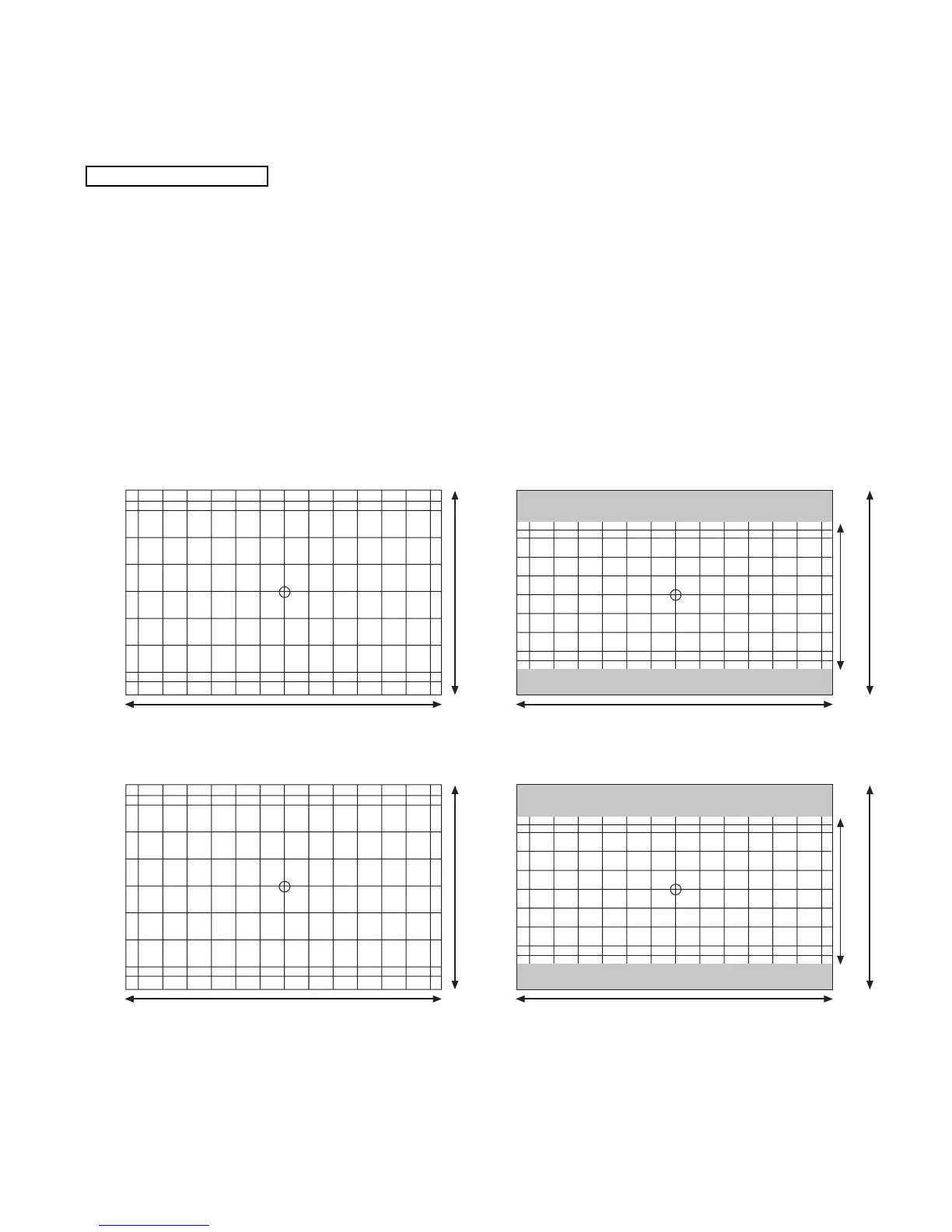
11 71 71 71 71 71 71 71 71 71 71 71 71 11
34
42
34
42
84
84
84
84
84
84
874
656
20 69.5 20
82
82
19.9
64.6
874
656492
69.5 69.5 69.5 69.5 69.5 69.5 69.5 69.5 69.5 69.5 69.5
32.3
64.6
64.6
64.6
64.6
64.6
19.9
32.3
43” Full (4:3) 43” V. Squeeze (16:9)
13.4 87.6 87.6 87.6 87.6 87.6 87.6 87.6 87.6 87.6 87.6 87.6 87.6 13.4
43.5
51.5
103
103
1078
808
24.2 85.8 24.2
101
101
24.7
79.5
1078
808606
85.8 85.8 85.8 85.8 85.8 85.8 85.8 85.8 85.8 85.8 85.8
39.8
79.5
79.5
79.5
79.5
79.5
24.7
39.8
53” Full (4:3) 53” V. Squeeze (16:9)
103
103
103
103
51.5
43.5
UNIT: MM
UNIT: MM
2.12.3 Convergence Jig Screen Specifications
(7) Press PIP MODE key 2 times to write the changed
data in EEPROM. (First press, ADJ. PATTERN/ROM
WRITE ? 2nd press, writes data into EEPROM.
Green dots appear after completion of operation.)
(8) Press MUTE key 3 times to exit from PATTERN
mode.
(9) Press EXIT button 5 times to return to VIDEO
MODE.
(10)Select 1080i input signal.
(11) Access MENU and select ASPECT 5 (Through
Mode).
(12)Press SERVICE SWITCH only to enter DCU
crosshatch signal.
(13)Repeat steps 1-8.
NOTE: 4:3 Aspect model has 2 DCU memories. One is for
NTSC input, the other is for 1080i through mode
(Aspect 5). All DCU data must be done in both
modes.
1080i THROUGH MODE



 To Next Page