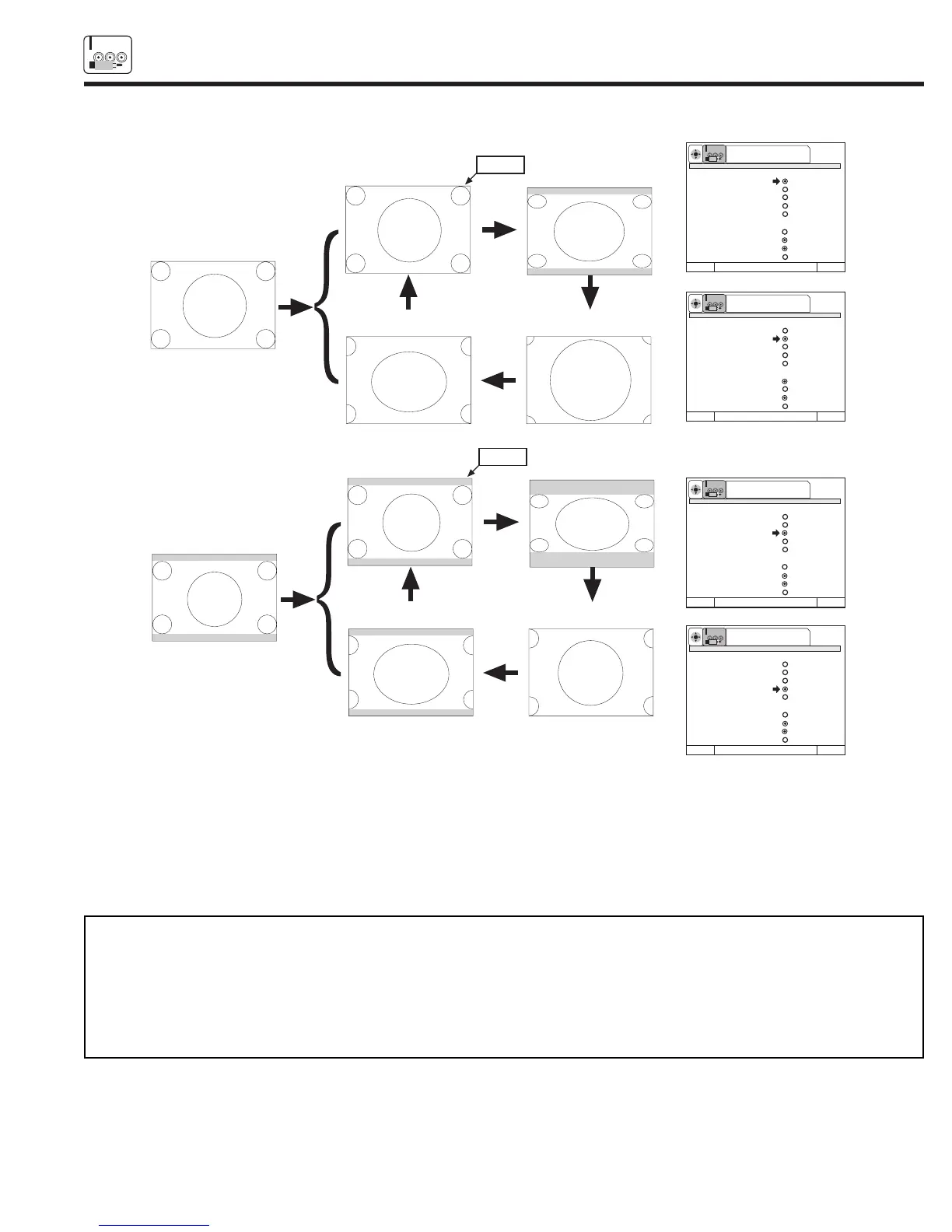
4x3
480p
Aspect 1
540p/1080i
Aspect
key
Aspect
key
Input
Aspect 1
(4x3 mode)
Aspect 2
(16x9 mode)
Aspect
key
Aspect
key
Aspect 4
(Zoom 2 mode)
Aspect 3
(Zoom 1 Mode)
Aspect 3
540p/1080i
Aspect 4
540p/1080i
Normal
Aspect
key
Aspect
key
Aspect 2
405p/810i
Letter
16x9
480p
Input
Aspect
key
Aspect
key
Aspect 1
(4x3 mode)
Aspect 2
(16x9 mode)
Aspect
key
Aspect
key
Aspect 4
(Zoom 2 mode)
Aspect 3
(Zoom 1 Mode)
Aspect 3
540p/1080i
Aspect 4
540p/1080i
Normal
Aspect
key
Aspect
key
Aspect 2
405p/810i
Aspect 1
540p/1080i
Press Select To Set
SETUP
SEL
Picture Formats Y-PBPR: 4
Aspect Style Aspect 1
Aspect 2
Aspect 3
Aspect 4
Aspect 5
V. Position +5
Comp Color Type HDTV
SDTV/DVD
Video Display 1080i
540P
Menu To Menu Bar To Quit Exit
Press Select To Set
SETUP
SEL
Picture Formats Y-PBPR: 4
Aspect Style
Aspect 1
Aspect 2
Aspect 3
Aspect 4
Aspect 5
V. Position +5
Comp Color Type HDTV
SDTV/DVD
Video Display 1080i
540P
Menu To Menu Bar To Quit Exit
Press Select To Set
SETUP
SEL
Picture Formats Y-PBPR: 4
Aspect Style
Aspect 1
Aspect 2
Aspect 3
Aspect 4
Aspect 5
V. Position +5
Comp Color Type HDTV
SDTV/DVD
Video Display 1080i
540P
Menu To Menu Bar To Quit Exit
Press Select To Set
SETUP
SEL
Picture Formats Y-PBPR: 4
Aspect Style
Aspect 1
Aspect 2
Aspect 3
Aspect 4
Aspect 5
V. Position +5
Comp Color Type HDTV
SDTV/DVD
Video Display 1080i
540P
Menu To Menu Bar To Quit Exit
Comp Color Type
The Comp Color Type function allows you to automatically change tint and color coordinate for DTV Programs.
HDTV - High Definition Television - Use for High Vision Signal Y-P
B
P
R
from HDTV Set-Top Box.
SDTV /DVD - Standard Definition Television or Digital Video Disc Y-C
B
C
R
such as DVD (Digital Video Disc Player).
Video Display
The video display feature allows you to select between 1080i or 540P signal display.
NOTE: 1. If Comp Color Type is set improperly (does not match actual input signal), the color and tint of the main picture will be
abnormal.
2. You must be tuned to VIDEO: 4 or 5 input and have a component hooked up to the Y-P
B
P
R
input jacks to
access all Picture Formats menu.
3. All settings will affect only the component input you are currently viewing. If you are using both sets of component
input jacks, be sure to set the Picture Formats feature for both inputs (set VIDEO:4 AND
VIDEO:5).
(3) 480p Input - Input 4/5 (Component) - 4x3 Format



 To Next Page